How to filter a NumPy array with a boolean mask
Data-cleaning rules often begin as comparisons against thresholds, quality scores, or category flags. NumPy turns each comparison into a Boolean array that can select matching data without a Python loop.
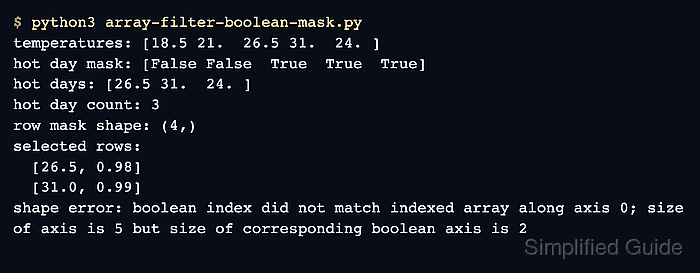
A mask built from a one-dimensional array has one True or False value for every source value. Indexing the source with that mask returns only the values at True positions, while a mask with a different length raises an indexing error.
For a two-dimensional array, a one-dimensional mask selects complete rows along the first axis. Combine row conditions with parenthesized comparisons and & so every selected row satisfies each condition element by element.
Related: Filter NaN values
Related: Replace values conditionally
Related: Index and slice arrays
Steps to filter a NumPy array with a boolean mask:
- Create the source arrays in array-filter-boolean-mask.py.
- array-filter-boolean-mask.py
import numpy as np

temperatures = np.array([18.5, 21.0, 26.5, 31.0, 24.0])
samples = np.array(
    [
        [18.5, 0.91],
        [26.5, 0.98],
        [31.0, 0.99],
        [21.0, 0.87],
    ]
)
The first array supports value selection. Each row in samples stores a temperature followed by its quality score.
- Append the one-dimensional value mask below the source arrays.
hot_day_mask = temperatures >= 24
hot_days = temperatures[hot_day_mask]
hot_day_mask has the same shape as temperatures, so temperatures[hot_day_mask] keeps the values at its True positions.
- Add the two-condition row mask below the value filter.
valid_hot_row_mask = (samples[:, 0] >= 24) & (samples[:, 1] >= 0.95)
selected_rows = samples[valid_hot_row_mask]
valid_hot_row_mask has one Boolean value per row. The mask keeps complete rows whose temperature is at least 24 and whose quality score is at least 0.95.
- Insert exact-result assertions below both selections.
np.testing.assert_array_equal(hot_days, np.array([26.5, 31.0, 24.0]))
np.testing.assert_array_equal(
    selected_rows,
    np.array([[26.5, 0.98], [31.0, 0.99]]),
)
Either assertion raises an error if a mask selects different values or rows.
- Append result reporting below the assertions.
print("hot day mask:", hot_day_mask)
print("hot days:", hot_days)
print("valid hot row mask:", valid_hot_row_mask)
print("selected rows:")
print(selected_rows)
- Consolidate the constructed sections into the completed array-filter-boolean-mask.py file.
- array-filter-boolean-mask.py
import numpy as np

temperatures = np.array([18.5, 21.0, 26.5, 31.0, 24.0])
samples = np.array(
    [
        [18.5, 0.91],
        [26.5, 0.98],
        [31.0, 0.99],
        [21.0, 0.87],
    ]
)

hot_day_mask = temperatures >= 24
hot_days = temperatures[hot_day_mask]

valid_hot_row_mask = (samples[:, 0] >= 24) & (samples[:, 1] >= 0.95)
selected_rows = samples[valid_hot_row_mask]

np.testing.assert_array_equal(hot_days, np.array([26.5, 31.0, 24.0]))
np.testing.assert_array_equal(
    selected_rows,
    np.array([[26.5, 0.98], [31.0, 0.99]]),
)

print("hot day mask:", hot_day_mask)
print("hot days:", hot_days)
print("valid hot row mask:", valid_hot_row_mask)
print("selected rows:")
print(selected_rows)
- Run the completed script to confirm both masks and filtered arrays.
$ python3 array-filter-boolean-mask.py
hot day mask: [False False  True  True  True]
hot days: [26.5 31.  24. ]
valid hot row mask: [False  True  True False]
selected rows:
[[26.5   0.98]
 [31.    0.99]]
The command prints both expected selections only after the assertions accept the filtered values and rows.