How to exclude targets from an Nmap scan
Range scans are easier to review when the target expression and the exception list are kept separate. Nmap can scan a broad approved range while skipping hosts that are sensitive, out of scope, or owned by another team.
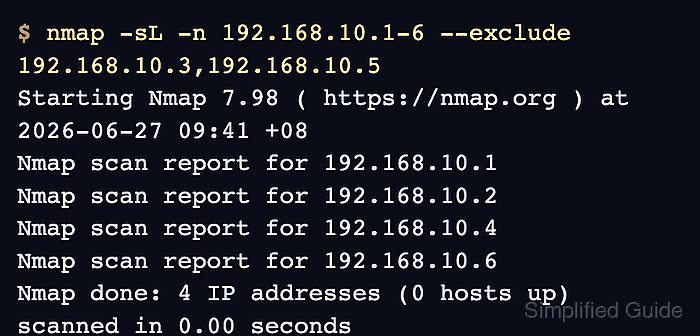
The --exclude option removes a comma-separated list of hosts, hostnames, ranges, or netblocks from the final scan set. The --excludefile option reads the same kind of entries from a file, which is better for larger denylists and for target expressions that already use commas.
Preview the final target list with -sL -n before sending discovery or port probes. The list scan prints the addresses Nmap would scan, so excluded entries should be absent before the real scan begins.
Related: How to discover live hosts with Nmap
Related: How to scan an authorized host with Nmap
Related: How to scan a port range with Nmap
Related: How to save Nmap scan output
Steps to exclude targets from an Nmap scan:
- Confirm the approved target range and the hosts that must be excluded.
Do not rely on exclusions to broaden authorization. The main target expression and every remaining address still need written approval.
- Preview the scan set with inline exclusions.
$ nmap -sL -n 192.168.10.1-6 --exclude 192.168.10.3,192.168.10.5
Starting Nmap 7.98 ( https://nmap.org ) at 2026-06-27 09:41 +08
Nmap scan report for 192.168.10.1
Nmap scan report for 192.168.10.2
Nmap scan report for 192.168.10.4
Nmap scan report for 192.168.10.6
Nmap done: 4 IP addresses (0 hosts up) scanned in 0.00 seconds
-sL lists targets without sending discovery or port probes. -n keeps the preview focused on addresses instead of reverse DNS names.
- Create an exclusion file when the denylist is longer or easier to review as a file.
$ cat > nmap-exclude.txt <<'EOF'
192.168.10.3
192.168.10.5
EOF
Use one entry per line for reviewability. Nmap also accepts space- or tab-separated entries, and comment lines can start with #.
- Preview the same scan set with the exclusion file.
$ nmap -sL -n 192.168.10.1-6 --excludefile nmap-exclude.txt
Starting Nmap 7.98 ( https://nmap.org ) at 2026-06-27 09:41 +08
Nmap scan report for 192.168.10.1
Nmap scan report for 192.168.10.2
Nmap scan report for 192.168.10.4
Nmap scan report for 192.168.10.6
Nmap done: 4 IP addresses (0 hosts up) scanned in 0.00 seconds
Use --excludefile when the target expression contains comma-based octet ranges, because --exclude also uses commas to separate excluded targets.
- Run the approved scan with the reviewed exclusion file.
$ nmap -n -p 8080 -oN nmap-excluded-range.nmap 192.168.10.1-6 --excludefile nmap-exclude.txt
Starting Nmap 7.98 ( https://nmap.org ) at 2026-06-27 09:41 +08
Nmap scan report for 192.168.10.1
Host is up (0.000014s latency).

PORT     STATE SERVICE
8080/tcp open  http-proxy

Nmap scan report for 192.168.10.2
Host is up (0.000058s latency).

PORT     STATE  SERVICE
8080/tcp closed http-proxy

Nmap scan report for 192.168.10.4
Host is up (0.0000040s latency).

PORT     STATE  SERVICE
8080/tcp closed http-proxy

Nmap scan report for 192.168.10.6
Host is up (0.0000050s latency).

PORT     STATE  SERVICE
8080/tcp closed http-proxy

Nmap done: 4 IP addresses (4 hosts up) scanned in 0.08 seconds
The report headers should cover 192.168.10.1, 192.168.10.2, 192.168.10.4, and 192.168.10.6 only. Use the approved port expression for the real scan.
Related: How to scan a port range with Nmap
Related: How to save Nmap scan output - Review the saved normal output before sharing it.
$ cat nmap-excluded-range.nmap
# Nmap 7.98 scan initiated Sat Jun 27 09:41:01 2026 as: nmap -n -p 8080 -oN nmap-excluded-range.nmap --excludefile nmap-exclude.txt 192.168.10.1-6
Nmap scan report for 192.168.10.1
Host is up (0.000014s latency).

PORT     STATE SERVICE
8080/tcp open  http-proxy

Nmap scan report for 192.168.10.2
Host is up (0.000058s latency).

PORT     STATE  SERVICE
8080/tcp closed http-proxy

Nmap scan report for 192.168.10.4
Host is up (0.0000040s latency).

PORT     STATE  SERVICE
8080/tcp closed http-proxy

Nmap scan report for 192.168.10.6
Host is up (0.0000050s latency).

PORT     STATE  SERVICE
8080/tcp closed http-proxy

# Nmap done at Sat Jun 27 09:41:01 2026 -- 4 IP addresses (4 hosts up) scanned in 0.08 seconds
The saved report should omit 192.168.10.3 and 192.168.10.5 just like the terminal output.
- Remove the one-time exclusion file if it is not part of the review record.
$ rm nmap-exclude.txt