How to scan an authorized host with Nmap
A single-host Nmap scan checks which common TCP ports answer on one system that is explicitly in scope. Security and systems operators use it after a change window, firewall update, or asset review to compare exposed services with the approved baseline.
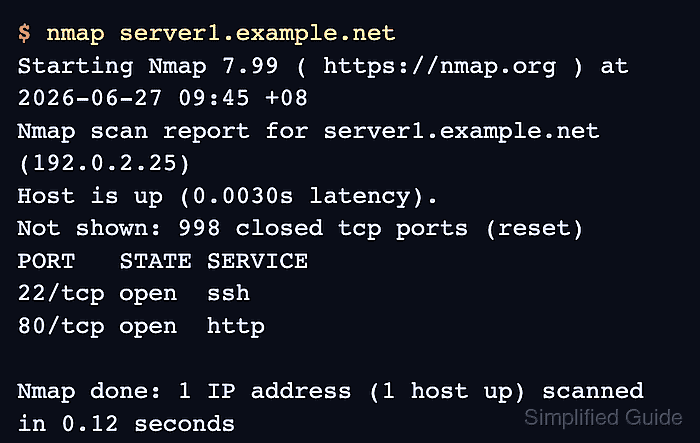
The default scan against one hostname or IP address performs host discovery and scans Nmap's common TCP port set. Its port table shows port/protocol, state, and service name; version detection, OS detection, NSE scripts, and UDP scans are separate deeper checks.
Keep the target expression as narrow as the authorization allows. A hostname or single IP address fits this page; subnets, exclusions, saved reports, and deeper service checks belong to follow-up scans only when the written scope permits them.
Related: How to install Nmap on Ubuntu or Debian
Related: How to discover live hosts with Nmap
Related: How to scan a port range with Nmap
Related: How to save Nmap scan output
Steps to scan an authorized host with Nmap:
- Confirm the target hostname or IP address is inside the written scan scope.
Do not scan Internet hosts, customer systems, neighboring subnets, or shared infrastructure unless the written scope explicitly includes them.
- Run the default scan against the approved host.
$ nmap server1.example.net
Starting Nmap 7.99 ( https://nmap.org ) at 2026-06-27 09:45 +08
Nmap scan report for server1.example.net (192.0.2.25)
Host is up (0.0030s latency).
Not shown: 998 closed tcp ports (reset)
PORT   STATE SERVICE
22/tcp open  ssh
80/tcp open  http

Nmap done: 1 IP address (1 host up) scanned in 0.12 seconds
Replace server1.example.net with the approved hostname or IP address. The default scan summarizes closed ports and prints a table for ports that need review.
- Read the host state and port table from the result.
Host is up means Nmap received a response from the target. open means a service answered on that port, closed means the host responded but no service listened there, and filtered means a firewall or filter blocked a clear answer.
- Limit the scan to approved service ports when the scope names exact ports.
$ nmap -p 22,80,443 server1.example.net
Starting Nmap 7.99 ( https://nmap.org ) at 2026-06-27 09:48 +08
Nmap scan report for server1.example.net (192.0.2.25)
Host is up (0.0031s latency).

PORT    STATE  SERVICE
22/tcp  open   ssh
80/tcp  open   http
443/tcp closed https

Nmap done: 1 IP address (1 host up) scanned in 0.11 seconds
The -p list keeps the check on the ports named in the scope. Use a range only when the approval covers that range.
Related: How to scan a port range with Nmap
Tool: Port List Checker - Verify the scan stayed on one host and each reported open port belongs to the expected exposure.
The final summary should report 1 IP address and 1 host up. Investigate unexpected open or filtered ports before expanding the scan or saving the result for handoff.
Related: How to save Nmap scan output