How to enable open file cache in Nginx
Busy static paths can make Nginx repeat the same file opens, metadata checks, directory checks, and missing-file lookups for assets that clients request over and over. Enabling open_file_cache keeps those filesystem results available inside each worker process so repeated requests for CSS, JavaScript, images, or downloads do less disk lookup work.
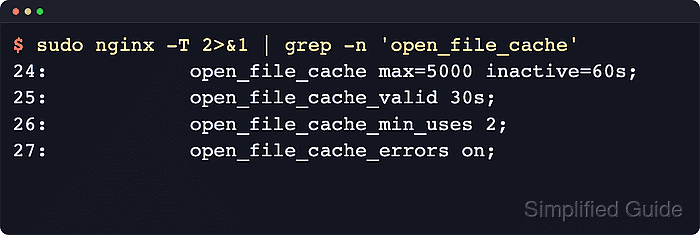
The cache can store open file descriptors, file size and modification time, directory existence information, and file lookup errors when that error caching is enabled. The companion directives decide the maximum entries per worker, how long unused entries stay eligible, how often cached entries are revalidated, and how many times a file must be requested before it remains in the cache.
Use open_file_cache only on paths where Nginx reads files from local storage, such as a static asset location or a try_files path. The max limit is per worker, open_file_cache_valid defaults to 60s when unset, and open_file_cache_errors on; can keep a newly deployed file invisible until the next validation window if the earlier request cached a missing-file result.
Steps to enable open file cache in Nginx:
- Inspect the loaded configuration so you know which file and server or location block serves the static content you want to optimize.
$ sudo nginx -T
nginx: the configuration file /etc/nginx/nginx.conf syntax is ok
nginx: configuration file /etc/nginx/nginx.conf test is successful
# configuration file /etc/nginx/nginx.conf:
user www-data;
worker_processes auto;
include /etc/nginx/conf.d/*.conf;
include /etc/nginx/sites-enabled/*;
##### snipped #####
On Debian and Ubuntu, site files are commonly loaded from /etc/nginx/sites-available/ through /etc/nginx/sites-enabled/. On RHEL-family systems, server blocks are commonly stored under /etc/nginx/conf.d/.
- Open the target site file in a text editor.
$ sudoedit /etc/nginx/conf.d/example.conf
Use the file shown by sudo nginx -T for the real site. The example path below matches packaged Nginx layouts that load /etc/nginx/conf.d/*.conf.
- Add the cache directives to the server or location block that serves files from disk.
server { listen 80; server_name example.com; root /var/www/example.com/public; location /static/ { open_file_cache max=5000 inactive=60s; open_file_cache_valid 30s; open_file_cache_min_uses 2; open_file_cache_errors on; } }open_file_cache, open_file_cache_valid, open_file_cache_min_uses, and open_file_cache_errors can be set in the http, server, or location context. The closest definition wins.
Keep the existing root or alias settings for the static path and add the cache directives in the same block that serves the files you want to optimize.
open_file_cache_errors on; caches negative lookups such as missing files. That reduces repeated disk checks, but a newly deployed file may still return a cached miss until the open_file_cache_valid interval expires.
- Test the configuration syntax before reloading Nginx.
$ sudo nginx -t
nginx: the configuration file /etc/nginx/nginx.conf syntax is ok
nginx: configuration file /etc/nginx/nginx.conf test is successful
Related: How to test Nginx configuration
- Reload the service so the new directives are used by the running workers.
$ sudo systemctl reload nginx
When systemd is not managing the service, use sudo nginx -s reload to ask the master process to reload the configuration in place.
- Confirm the effective configuration now contains the cache directives.
$ sudo nginx -T
nginx: the configuration file /etc/nginx/nginx.conf syntax is ok
nginx: configuration file /etc/nginx/nginx.conf test is successful
# configuration file /etc/nginx/nginx.conf:
user www-data;
worker_processes auto;
pid /run/nginx.pid;
##### snipped #####
# configuration file /etc/nginx/conf.d/open-file-cache.conf:
server {
    listen 80;
    server_name example.com;
    root /var/www/example.com/public;

    location /static/ {
        open_file_cache max=5000 inactive=60s;
        open_file_cache_valid 30s;
        open_file_cache_min_uses 2;
        open_file_cache_errors on;
    }
}
The -T switch performs the same syntax test as -t and also dumps the loaded configuration to standard output, which is useful when the active site file is assembled through multiple include directives. Review the output locally before sharing it because loaded configuration can contain internal hostnames or inline secrets.
- Request a representative static file and confirm Nginx still serves it after the reload.
$ curl -I -sS http://127.0.0.1/static/test.txt
HTTP/1.1 200 OK
Server: nginx/1.28.3 (Ubuntu)
Date: Sat, 06 Jun 2026 11:49:50 GMT
Content-Type: text/plain
Content-Length: 11
Last-Modified: Sat, 06 Jun 2026 11:49:50 GMT
Connection: keep-alive
ETag: "6a24095e-b"
Accept-Ranges: bytes
This confirms that the static path still works after the configuration change. Replace the sample URL with a real CSS, JavaScript, image, or download path served by the location you updated.
Related: How to improve Nginx performance