How to configure fixed NFSv3 ports for firewall rules
Legacy NFS clients can force a file server to expose more than the main TCP 2049 listener. NFSv3 still depends on RPC helper services for export discovery, status recovery, and file locking, and those helpers are difficult to protect with host firewall rules when they register random ports.
On current Linux NFS servers, /etc/nfs.conf is the central place for mountd, rpc.statd, and lockd port settings. rpcbind still uses port 111 and the kernel NFS server still uses 2049, while mountd, status, and nlockmgr need explicit values before UFW or firewalld can allow only known ports.
Change these values during a maintenance window if NFSv3 clients are active, because restarting NFS helper services can interrupt old mounts and locks. Keep the allowed source network narrow, then prove the server by checking rpcinfo -p and an NFSv3 mount from a client that matches the firewall and export policy.
Related: Allow NFS server traffic through UFW
Related: Allow NFS server traffic through firewalld
Related: Configure an NFSv4-only server
Related: Check NFS server status
Steps to configure fixed NFSv3 ports for firewall rules:
- Open a shell on the NFS server with an account that can use sudo.
- Confirm the running server still exposes NFSv3.
$ cat /proc/fs/nfsd/versions
+3 +4 -4.0 +4.1 +4.2
A plus sign before 3 means the server accepts NFSv3 clients. If the server shows -3 and all clients use NFSv4, keep the simpler NFSv4 firewall path instead.
- Choose fixed ports for the NFSv3 helper services.
Service RPC program Example port Firewall role rpcbind portmapper 111 Discovery for older RPC clients. NFS nfs 2049 Main file service listener. mountd mountd 20048 Export discovery and NFSv3 mount negotiation. rpc.statd status 32765 Network status recovery for NFSv3 locks. lockd nlockmgr 32766 Network Lock Manager traffic for NFSv3 file locks. Use ports approved by the local firewall policy. The examples keep mountd on the common 20048 value and place statd and lockd below the usual ephemeral range.
- Back up the main NFS configuration file.
$ sudo cp -a /etc/nfs.conf /etc/nfs.conf.bak
- Open /etc/nfs.conf in a text editor.
$ sudoedit /etc/nfs.conf
- Add or update the fixed helper port settings.
[mountd]
port=20048

[statd]
port=32765
outgoing-port=32764

[lockd]
port=32766
udp-port=32766
statd port is the server-side status listener. statd outgoing-port controls the source port used for status notifications, which matters on hosts with restrictive outbound or stateful firewall policy.
lockd port sets the TCP nlockmgr port. Keep udp-port only when legacy UDP NFSv3 clients must remain supported.
- Confirm nfsconf reads the saved settings.
$ sudo nfsconf --dump
[lockd]
 port = 32766
 udp-port = 32766

[mountd]
 port = 20048

[statd]
 outgoing-port = 32764
 port = 32765
- Restart the NFSv3 helper path and the NFS server.
$ sudo systemctl restart rpc-statd nfs-server
Restart during a maintenance window when old NFSv3 clients are mounted. If nlockmgr remains registered on an old port after the restart, drain NFSv3 clients and reboot so the kernel lock service starts with the fixed port.
- Confirm the restarted services are active.
$ sudo systemctl is-active rpc-statd nfs-server
active
active
On current Ubuntu packages, nfs-kernel-server.service is an alias for nfs-server.service.
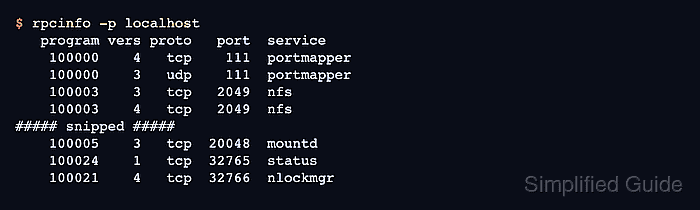
- Verify the local RPC registrations use the fixed ports.
$ rpcinfo -p localhost
   program vers proto   port  service
    100000    4   tcp    111  portmapper
    100000    3   udp    111  portmapper
    100003    3   tcp   2049  nfs
    100003    4   tcp   2049  nfs
##### snipped #####
    100005    3   tcp  20048  mountd
    100024    1   tcp  32765  status
    100021    4   tcp  32766  nlockmgr
If mountd, status, or nlockmgr still shows a different port, do not add firewall rules yet. Recheck /etc/nfs.conf, restart the affected service, and clear any old lockd state before exposing the server.
- Update the firewall rule set with the fixed NFSv3 port list.
Allow only the client host or subnet that should mount the export, such as 192.0.2.0/24. Open TCP 111, TCP 2049, TCP 20048, TCP 32765, and TCP 32766 for normal TCP-based NFSv3 clients; add matching UDP rules only when the server intentionally supports UDP legacy clients.
- Create a temporary mount point on an allowed client.
$ sudo mkdir --parents /mnt/projects
The client must match both the export selector and the firewall source rule. The shared campaign examples use files.example.net, /srv/nfs/projects, and /mnt/projects.
- Mount the export from the allowed client with NFSv3 over TCP.
$ sudo mount -t nfs -o vers=3,proto=tcp files.example.net:/srv/nfs/projects /mnt/projects
A timeout usually means the firewall, server listener, or network path still blocks one of the NFSv3 ports. An access denied error points first to the export selector or filesystem permissions.
- Verify the client mount uses NFSv3.
$ findmnt -o TARGET,FSTYPE,OPTIONS /mnt/projects
TARGET        FSTYPE OPTIONS
/mnt/projects nfs    rw,relatime,vers=3,proto=tcp,mountport=20048,addr=192.0.2.10
The vers=3 and proto=tcp options prove the smoke test used the legacy path whose helper ports were fixed.
- Unmount the temporary client test mount.
$ sudo umount /mnt/projects
- Remove the temporary mount point when it is not a permanent client path.
$ sudo rmdir /mnt/projects