How to enable two-factor authentication in Nextcloud
Two-factor authentication adds a second check after the account password, so a stolen password alone is not enough to open the Nextcloud account. Time-based one-time password apps are the common choice because they work without a hardware key and can be verified immediately during setup.
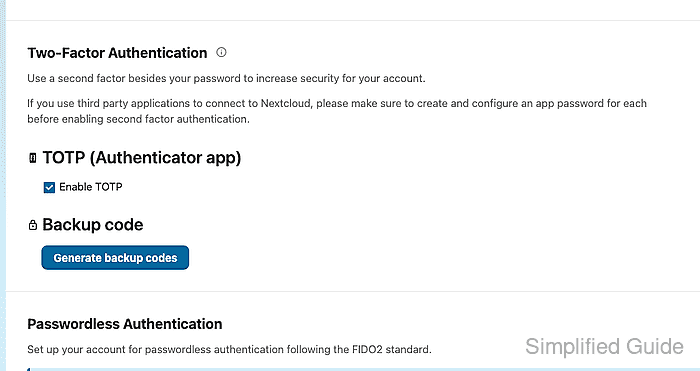
The Security settings page controls personal two-factor providers. Enabling TOTP creates a secret for the authenticator app, asks for a test code, and then requires the code on the next sign-in.
Set up app passwords before enabling two-factor authentication for accounts that use desktop sync, mobile sync, WebDAV mounts, or other third-party clients. Those clients cannot complete an interactive second-factor prompt and should use a dedicated app password instead.
Steps to enable two-factor authentication in Nextcloud:
- Sign in to Nextcloud with the account that should use two-factor authentication.
- Open the account menu in the upper-right corner.
- Choose Personal settings.
- Open Security from the settings navigation.
- Review existing desktop, mobile, or WebDAV clients before changing the account.
Create app passwords for clients that need continued access after two-factor authentication is enabled.
Related: How to create a Nextcloud app password - In Two-Factor Authentication, enable TOTP (Authenticator app).
- Scan the displayed QR code with the authenticator app, or manually enter the shown secret into the app.
Do not save the TOTP secret in screenshots, tickets, or shared notes. Store recovery material only in an approved password manager or secure recovery location.
- Enter the current authentication code from the app.
- Click Verify.
- Confirm that Enable TOTP remains checked under TOTP (Authenticator app).
- Generate and store backup codes if the server offers them and the account policy requires recovery codes.
- Sign out of Nextcloud.
- Sign in again with the username and password.
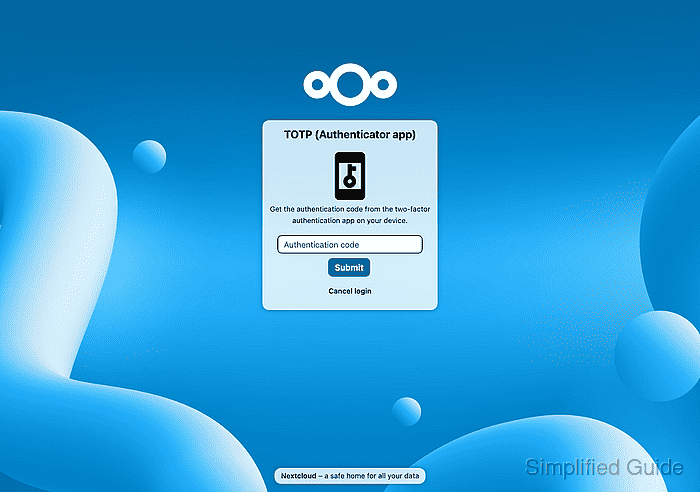
- Confirm that the login stops at the TOTP (Authenticator app) challenge.
- Enter the current authentication code from the app and submit the challenge.
- Confirm the account opens normally after the second factor is accepted.
An administrator can also verify the provider state from the server shell.
$ sudo -E -u www-data php occ twofactorauth:state ada
Two-factor authentication is enabled for user ada

Enabled providers:
- totp