How to check suspicious DNS queries during network triage
Suspicious DNS traffic is often the first network clue in security triage because a host can ask for command-and-control, tracking, typo-squatted, or newly generated names before it opens a visible connection. Checking the query at the resolver or packet layer shows whether the alert reflects a live lookup, a cached result, or stale log context.
A useful DNS triage record needs more than the domain name. Capture the source host, resolver, record type, response code, answer data, and timestamp so the result can be compared with endpoint activity, firewall logs, and web or TLS attempts.
Use owned networks, approved packet-capture points, and documentation-safe names in shared evidence. DNS over HTTPS and DNS over TLS hide query names from normal port 53 captures, so confirm endpoint resolver settings or application logs when the suspected client uses encrypted DNS.
Related: How to capture DNS queries with tcpdump
Related: How to check DNS resolution in Linux
Steps to check suspicious DNS queries during network triage:
- Record the alert scope before capturing traffic.
Suspicious name: beacon-01.example.net
Record type: A
Query source: 192.0.2.40
Resolver: 192.0.2.53
Time window: 2026-06-27 09:10-09:20 UTC
Use the exact name, source address, resolver address, and time zone from the alert or resolver log. Keep real malware domains, customer names, and internal hostnames out of shared notes unless the incident owner has approved those values for publication.
- Identify the interface that reaches the resolver from the affected Linux host.
$ ip route get 192.0.2.53
192.0.2.53 dev eth0 src 192.0.2.40 uid 1000
    cache
Run the capture on the resolver-facing interface, or run it on the resolver interface that receives client DNS traffic when the affected host cannot be inspected directly.
- Capture the suspected UDP DNS exchange.
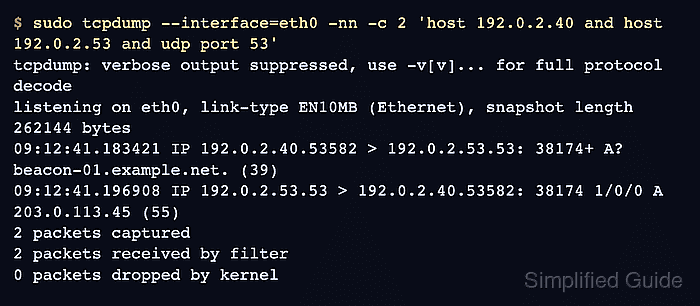
$ sudo tcpdump --interface=eth0 -nn -c 2 'host 192.0.2.40 and host 192.0.2.53 and udp port 53'
tcpdump: verbose output suppressed, use -v[v]... for full protocol decode
listening on eth0, link-type EN10MB (Ethernet), snapshot length 262144 bytes
09:12:41.183421 IP 192.0.2.40.53582 > 192.0.2.53.53: 38174+ A? beacon-01.example.net. (39)
09:12:41.196908 IP 192.0.2.53.53 > 192.0.2.40.53582: 38174 1/0/0 A 203.0.113.45 (55)
2 packets captured
2 packets received by filter
0 packets dropped by kernel
The shared transaction ID, here 38174, ties the answer to the query. If only the query line appears, check resolver reachability, firewall policy, and resolver logs for drops or refused queries.
- Query the same resolver for the same name and record type.
$ dig @192.0.2.53 beacon-01.example.net A +noall +comments +answer
;; Got answer:
;; ->>HEADER<<- opcode: QUERY, status: NOERROR, id: 49261
;; flags: qr rd ra; QUERY: 1, ANSWER: 1, AUTHORITY: 0, ADDITIONAL: 1

;; ANSWER SECTION:
beacon-01.example.net. 60 IN A 203.0.113.45
NOERROR with an answer means the resolver can still return address data. NXDOMAIN means the name does not exist from that resolver view; SERVFAIL points to resolver, validation, or upstream authority trouble.
Tool: DNS Record Lookup - Save a short pcap when the query is still active or needs escalation.
$ sudo tcpdump --interface=eth0 -nn -s 0 -c 20 -w dns-suspicious.pcap 'host 192.0.2.40 and host 192.0.2.53 and port 53'
tcpdump: listening on eth0, link-type EN10MB (Ethernet), snapshot length 262144 bytes
20 packets captured
20 packets received by filter
0 packets dropped by kernel
Packet captures can contain internal hostnames, resolver addresses, and adjacent client traffic. Store the pcap in the incident evidence location, and share only sanitized excerpts outside the response team.
- Extract query and answer fields from the pcap.
$ tshark -r dns-suspicious.pcap -Y 'dns.qry.name == "beacon-01.example.net"' -T fields -E header=y -E separator=, -e frame.time_relative -e ip.src -e ip.dst -e dns.flags.response -e dns.flags.rcode -e dns.qry.name -e dns.a
frame.time_relative,ip.src,ip.dst,dns.flags.response,dns.flags.rcode,dns.qry.name,dns.a
0.000000000,192.0.2.40,192.0.2.53,0,0,beacon-01.example.net,
0.013487000,192.0.2.53,192.0.2.40,1,0,beacon-01.example.net,203.0.113.45
dns.flags.response separates queries (0) from responses (1), and dns.flags.rcode records the DNS response code. A response line without dns.a can still matter for CNAME, TXT, AAAA, NXDOMAIN, or NODATA triage.
- Record the DNS triage summary for escalation.
DNS query status: active during packet capture
Query source: 192.0.2.40
Resolver path: 192.0.2.53 over UDP/53
Name and type: beacon-01.example.net A
Resolver response: NOERROR, A 203.0.113.45
Evidence files: dns-suspicious.pcap, resolver-log-export.csv
Open endpoint process, proxy, EDR, or firewall evidence after the DNS summary identifies the current source and returned destination.