How to validate network segmentation access
Network segmentation separates systems by trust level, application tier, or business role, but the rule set can drift after firewall, routing, cloud security group, or Kubernetes policy changes. A scoped access test from the approved source host shows which destination ports accept connections and which ones fail at the boundary.
The source host matters because segmentation rules often depend on VLAN, subnet, cloud identity, namespace label, or firewall zone. A written matrix keeps the test narrow by naming the source host, destination host, port, protocol, expected result, and evidence location before any probe touches the network.
Denied flows do not always fail with the same signal. A firewall drop commonly appears as filtered in Nmap and as a timeout in nc or curl, while a host-level reject can appear as closed or connection refused. Match the observed signal to the enforcement layer and stop if a denied flow succeeds or an allowed flow fails.
Related: How to scan an authorized host with Nmap
Related: How to scan a port range with Nmap
Related: How to exclude targets from an Nmap scan
Steps to validate network segmentation access:
- Confirm the written test scope before sending probes.
- segmentation-matrix.csv
source_host,destination,port,expected,result
jump01.ops.example,app01.segmentation.example,8080,allow,pending
jump01.ops.example,app01.segmentation.example,8443,deny,pending
Test only hosts, ports, and protocols covered by written approval. A segmentation check can still be treated as unauthorized scanning when it reaches outside the agreed matrix.
- Log in to the source host named in the matrix.
$ hostname -f
jump01.ops.example
The source host should sit in the same VLAN, subnet, cloud security group, namespace, or policy identity that the segmentation rule targets.
- Test the allowed application port from the approved source.
$ curl --connect-timeout 3 -sS -I http://app01.segmentation.example:8080/
HTTP/1.0 200 OK
Server: SimpleHTTP/0.6 Python/3.12.3
Content-type: text/html; charset=utf-8
Content-Length: 962
Use the real application URL or protocol when the policy allows a specific service. --connect-timeout keeps a failed path from hanging the test session.
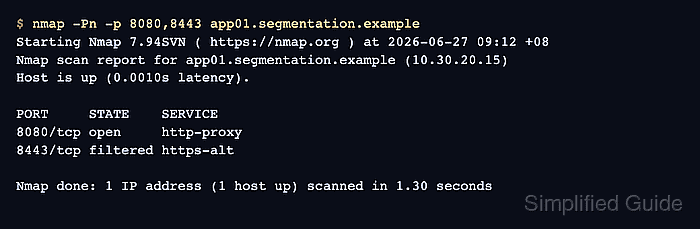
- Scan only the approved destination ports from the matrix.
$ nmap -Pn -p 8080,8443 app01.segmentation.example
Starting Nmap 7.94SVN ( https://nmap.org ) at 2026-06-27 09:12 +08
Nmap scan report for app01.segmentation.example (10.30.20.15)
Host is up (0.0010s latency).

PORT     STATE    SERVICE
8080/tcp open     http-proxy
8443/tcp filtered https-alt

Nmap done: 1 IP address (1 host up) scanned in 1.30 seconds
-Pn skips host discovery so Nmap checks the listed ports even when ping probes are filtered. -p limits the scan to the approved ports.
Related: How to scan a port range with Nmap - Probe the denied port with a direct TCP connection test.
$ nc -vz -w 3 app01.segmentation.example 8443
nc: connect to app01.segmentation.example port 8443 (tcp) timed out: Operation now in progress
A timeout matches a drop-style deny. A connection refused result can still be expected when the policy or host firewall rejects the flow instead of silently dropping it.
- Check the enforcement logs for the same source, destination, port, and time window.
time=2026-06-27T09:12:04+08:00 action=deny src=10.20.10.25 dst=10.30.20.15 dst_port=8443 protocol=tcp policy=deny-ops-to-app-admin
Use the log source that owns the boundary, such as a firewall, flow log, security group log, Kubernetes policy log, or service mesh telemetry. The recorded action should match the matrix expectation and the connection test result.
- Update the matrix with the observed result and evidence location.
- segmentation-matrix.csv
source_host,destination,port,expected,result
jump01.ops.example,app01.segmentation.example,8080,allow,pass:http_200
jump01.ops.example,app01.segmentation.example,8443,deny,pass:nmap_filtered;nc_timeout;policy_log=deny-ops-to-app-admin
If an allowed flow fails or a denied flow succeeds, keep the failed row unchanged, attach the raw command output, and send the row back to the policy owner instead of expanding the test scope.