How to view Nagios Core host groups and service groups
Hostgroups and servicegroups in the Nagios Core web interface turn many individual monitoring objects into reviewable groups. Hostgroups show host state by role, site, customer, or environment, while servicegroups show related services that are OK or non-OK across one or more hosts.
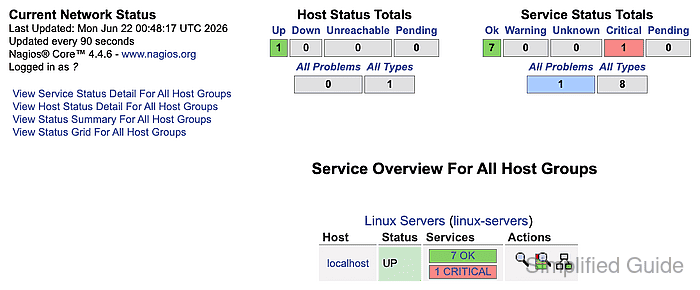
The grouped status screens are rendered by status.cgi. Overview gives a compact group row with totals, Summary emphasizes aggregate counts, and Detail expands the group into individual host or service rows.
Use grouped views to decide where to drill in, not as a replacement for object detail pages. A group row can identify the affected area, but host and service detail pages still carry the plugin output, command links, check timing, and action history for the selected object.
Steps to view hostgroups and servicegroups in Nagios Core web interface:
- Open the Nagios Core web interface as a user allowed to view the target groups.
http://monitor.example.net/nagios4/
Debian and Ubuntu packages commonly publish the web UI under /nagios4/. Source installs often use /nagios/.
- Open Hostgroups from the Status navigation.
- Load the hostgroup Overview view when the group totals are enough to choose a drill-down path.
http://monitor.example.net/nagios4/cgi-bin/status.cgi?hostgroup=all&style=overview
- Review the hostgroup name, member host state, service totals, and action icons.
Open the affected hostgroup when it matches the role, site, customer, or environment already being investigated.
- Open the hostgroup Detail view when the member services need individual rows.
http://monitor.example.net/nagios4/cgi-bin/status.cgi?hostgroup=linux-servers&style=detail
- Review the hostgroup service rows for Status, Last Check, Duration, Attempt, and Status Information.
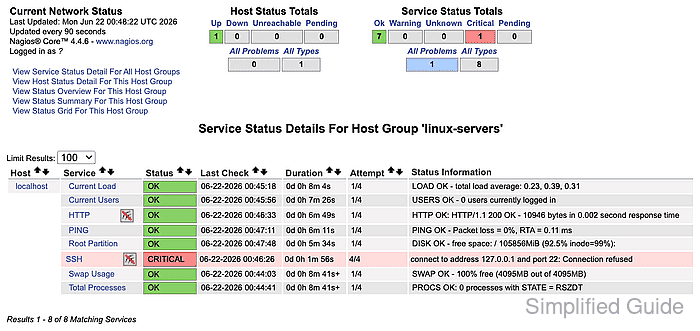
Status Information is the plugin output from the latest check. Use it to choose the service that needs object-level review.
- Open Servicegroups from the Status navigation.
- Load the servicegroup Overview view when related checks need to be compared across hosts.
http://monitor.example.net/nagios4/cgi-bin/status.cgi?servicegroup=all&style=overview
- Review the servicegroup name, member host state, service totals, and action icons.
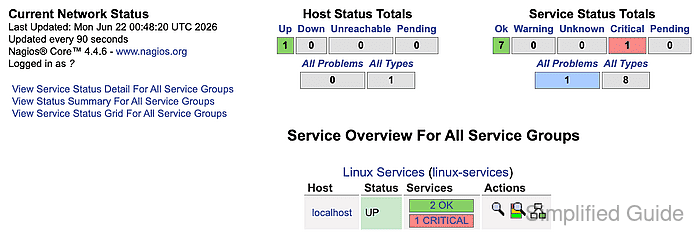
Servicegroups fit checks that repeat across hosts, such as disk, load, HTTP, database, queue, or endpoint checks.
- Click the affected host or service name before submitting acknowledgements, downtime, rechecks, disabled checks, or notification changes.
- Finish the grouped review after the hostgroup or servicegroup identifies the exact host or service that needs investigation or operator action.