How to list users in MySQL or MariaDB
Listing accounts in MySQL or MariaDB is one of the quickest ways to confirm who can sign in, which hosts those logins are allowed from, and which entries still exist after application, server, or staff changes. It is also a practical first check when you are investigating failed authentication attempts or auditing overly broad access.
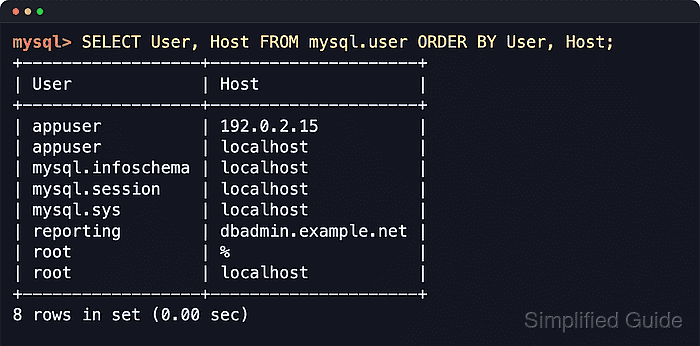
Both products identify an account by the full User and Host pair rather than by username alone, so 'appuser'@'localhost' and 'appuser'@'192.0.2.15' are different accounts with different access. In current MariaDB releases, mysql.user is a compatibility view over mysql.global_priv, but querying mysql.user for User and Host remains the familiar cross-version way to list accounts.
Reading mysql.user usually requires an administrative account or another account that can read the mysql system schema, and managed services can restrict that direct access. In MySQL 8.4, '%' and '_' host wildcards are deprecated, so treat them as legacy patterns when they appear in older account entries and prefer explicit hosts or supported netmask syntax for new accounts.
Steps to list users in MySQL or MariaDB:
- Connect to the server with the mysql or mariadb client using an account that can read mysql.user.
$ mysql --user=root --password
Enter password:
mysql>
MariaDB packages may provide the client as
$ mariadb --user=root --password
instead. On socket-authenticated installations,
$ sudo mysql
or
$ sudo mariadb
can replace a password prompt for local administrative access.
- List each account as a User and Host pair.
mysql> SELECT USER, Host FROM mysql.user ORDER BY USER, Host;
+------------------+---------------------+
| USER             | Host                |
+------------------+---------------------+
| appuser          | 192.0.2.15          |
| appuser          | localhost           |
| mysql.infoschema | localhost           |
| mysql.session    | localhost           |
| mysql.sys        | localhost           |
| reporting        | dbadmin.example.net |
| root             | %                   |
| root             | localhost           |
+------------------+---------------------+
8 ROWS IN SET (0.00 sec)
An account is the full User@Host identity, so repeated usernames represent separate accounts. One-shot shell form:
$ mysql --user=root --password --table --execute="SELECT User, Host FROM mysql.user ORDER BY User, Host;"
In MariaDB 10.4 and later, mysql.user is a compatibility view over mysql.global_priv, so the same query still returns the account list.
- Filter the list when you need to inspect one username across multiple hosts.
mysql> SELECT USER, Host FROM mysql.user WHERE USER = 'appuser' ORDER BY Host;
+---------+------------+
| USER    | Host       |
+---------+------------+
| appuser | 192.0.2.15 |
| appuser | localhost  |
+---------+------------+
2 ROWS IN SET (0.00 sec)
If this query returns more than one row, keep the exact Host value with the username for every follow-up command.
- Generate copy-ready account identifiers for privilege and cleanup commands.
mysql> SELECT CONCAT(QUOTE(USER), '@', QUOTE(Host)) AS account
    -> FROM mysql.user
    -> WHERE USER = 'appuser'
    -> ORDER BY Host;
+------------------------+
| account                |
+------------------------+
| 'appuser'@'192.0.2.15' |
| 'appuser'@'localhost'  |
+------------------------+
2 ROWS IN SET (0.00 sec)
These quoted values paste directly into SHOW GRANTS, ALTER USER, and DROP USER commands after you choose the exact host entry.
Avoid selecting authentication_string, Password, or other credential fields during routine audits, especially on shared terminals or in saved logs.
- Exit the client when you are finished auditing accounts.
mysql> exit
Bye
If SELECT User, Host FROM mysql.user returns an access error, reconnect with a more privileged account or use your provider's account-management interface when direct reads from the mysql system schema are restricted.