How to delete a user in MySQL or MariaDB
Deleting unused MySQL or MariaDB accounts closes login paths that applications, administrators, or former team members no longer need. Cleaning up old accounts also reduces the blast radius of leaked credentials and keeps privilege reviews focused on identities that should still exist.
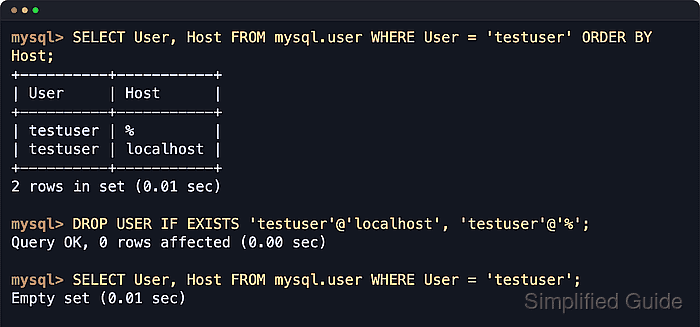
Accounts are defined by a username plus a host matcher, such as 'app'@'localhost' or 'app'@'%', and each user@host pair is a separate login. DROP USER removes the account record and its privilege rows, so the safest workflow is to list the exact matching entries first, review their grants, check for dependent definer objects, and then delete only the host variants you intend to remove.
Deleting the wrong account can break the next connection attempt for that login, so confirm the exact User and Host pair before running the change. Existing sessions need a separate cutoff decision because MySQL can postpone final removal while a dropped account still has an open session, and MariaDB leaves active sessions usable until they disconnect or are killed. Replicated environments should apply account changes on the primary so they propagate normally, and MySQL 8.0.22 or later can reject DROP USER when the account is still named as a DEFINER for stored objects.
Steps to delete a user in MySQL or MariaDB:
- Open an administrative client session.
$ mysql --user=root --password
Enter password:
Welcome to the MySQL monitor.  Commands end with ; or \g.
Your MySQL connection id is 13
Server version: 8.4.8 MySQL Community Server - GPL

mysql>
Use the mysql or mariadb client command your installation provides. If root uses socket authentication, connect with
$ sudo mysql
or
$ sudo mariadb
instead.
- List the exact account entries that match the username you want to remove.
mysql> SELECT USER, Host FROM mysql.user WHERE USER = 'testuser' ORDER BY Host;
+----------+-----------+
| USER     | Host      |
+----------+-----------+
| testuser | %         |
| testuser | localhost |
+----------+-----------+
2 ROWS IN SET (0.01 sec)
On MariaDB 10.4 and newer, mysql.user is a compatibility view over mysql.global_priv, so this query still returns the correct account pairs.
'testuser'@'localhost' and 'testuser'@'%' are different accounts. Each host variant must be reviewed and dropped explicitly.
- Review the grants for every 'user'@'host' entry you plan to delete.
mysql> SHOW GRANTS FOR 'testuser'@'%';
+-----------------------------------------------------+
| Grants FOR testuser@%                               |
+-----------------------------------------------------+
| GRANT USAGE ON *.* TO `testuser`@`%`                |
| GRANT SELECT, INSERT ON `appdb`.* TO `testuser`@`%` |
+-----------------------------------------------------+
2 ROWS IN SET (0.00 sec)
Run SHOW GRANTS for each distinct host entry before deletion, and avoid pasting the raw output into shared tickets or chat logs because MariaDB can include authentication details in the grant text.
- Check whether views, routines, events, or triggers still name the account as their DEFINER.
mysql> SELECT 'VIEW' AS object_type, TABLE_SCHEMA AS schema_name, TABLE_NAME AS object_name
    -> FROM information_schema.VIEWS
    -> WHERE DEFINER = 'testuser@%'
    -> UNION ALL
    -> SELECT ROUTINE_TYPE, ROUTINE_SCHEMA, ROUTINE_NAME
    -> FROM information_schema.ROUTINES
    -> WHERE DEFINER = 'testuser@%'
    -> UNION ALL
    -> SELECT 'EVENT', EVENT_SCHEMA, EVENT_NAME
    -> FROM information_schema.EVENTS
    -> WHERE DEFINER = 'testuser@%'
    -> UNION ALL
    -> SELECT 'TRIGGER', TRIGGER_SCHEMA, TRIGGER_NAME
    -> FROM information_schema.TRIGGERS
    -> WHERE DEFINER = 'testuser@%';
Empty SET (0.02 sec)
If this query returns rows, change the object owner, drop the object, or keep the account until the dependency is resolved. Dropping a definer account can fail on current MySQL releases or leave objects that fail later when they run under definer security.
- Delete the exact account entries with DROP USER IF EXISTS.
mysql> DROP USER IF EXISTS 'testuser'@'localhost', 'testuser'@'%';
Query OK, 0 ROWS affected (0.00 sec)
IF EXISTS turns a missing account into a warning instead of an error, which is useful when you are cleaning up stale or partly removed logins.
Do not use DROP USER as the only active-session cutoff. After the account is fully removed, fresh authentication fails, but active sessions may persist or delay final removal depending on the product and version.
- Confirm that the account no longer appears in the account list.
mysql> SELECT USER, Host FROM mysql.user WHERE USER = 'testuser';
Empty SET (0.01 sec)
DROP USER updates the grant tables directly, so FLUSH PRIVILEGES is unnecessary unless someone edited privilege tables manually.
- Exit the administrative session.
mysql> EXIT; Bye - Try a fresh login as the deleted account and expect the server to reject it.
$ mysql --user=testuser --password --execute="SELECT 1"
Enter password:
ERROR 1045 (28000): Access denied for user 'testuser'@'localhost' (using password: YES)