How to clear a table in MySQL or MariaDB
Clearing a table removes every row while keeping the table definition, indexes, grants, and dependent application code in place. Use it before rerunning imports, integration tests, staging refreshes, or maintenance jobs where rebuilding the table would add unnecessary schema risk.
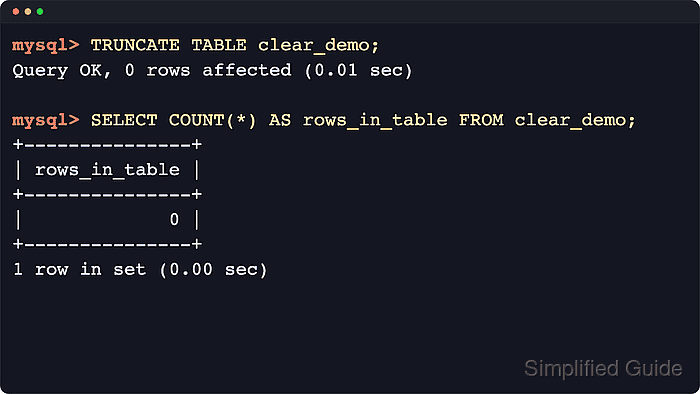
In MySQL and MariaDB, TRUNCATE TABLE is the normal full-table reset because it empties the table quickly and restarts AUTO_INCREMENT. It is a DDL-style operation, so it requires the DROP privilege, causes an implicit commit, and commonly returns 0 rows affected because it does not report a deleted-row count.
Use DELETE FROM only when row-by-row delete behavior matters more than speed, such as tables protected by foreign keys, tables with ON DELETE triggers, or changes that need an explicit InnoDB transaction. Both choices remove data from the target table, so take a logical backup first when the rows might be needed for rollback, audit, or comparison.
Steps to clear a table in MySQL or MariaDB:
- Create a logical backup of the table if the data might need to be restored later.
$ mysqldump --host=db.example.net --port=3306 --user=dbadmin --password --single-transaction --quick table_demo clear_demo > clear_demo-before-clear.sql
Enter password:
Use mariadb-dump instead of mysqldump on current MariaDB hosts that no longer provide the MySQL compatibility dump name.
- Open the SQL client against the target database with an account that can empty the table.
$ mysql --host=db.example.net --port=3306 --user=dbadmin --password table_demo
Enter password:
Welcome to the MySQL monitor.  Commands end with ; or \g.
mysql>
Current MariaDB installs often provide mariadb as the client binary name. The SQL statements below are the same once you are connected.
- Confirm the current database and the exact table name before removing rows.
mysql> SELECT DATABASE() AS current_database;
+------------------+
| current_database |
+------------------+
| table_demo       |
+------------------+
1 ROW IN SET (0.00 sec)

mysql> SHOW TABLES LIKE 'clear_demo';
+-----------------------------------+
| Tables_in_table_demo (clear_demo) |
+-----------------------------------+
| clear_demo                        |
+-----------------------------------+
1 ROW IN SET (0.00 sec)
Stop if the database or table name is not exactly the table you intend to clear. Use a fully qualified name such as table_demo.clear_demo when the current database should not matter.
- Count the rows that are about to be removed.
mysql> SELECT COUNT(*) AS rows_in_table FROM clear_demo;
+---------------+
| rows_in_table |
+---------------+
|             3 |
+---------------+
1 ROW IN SET (0.00 sec)
- Clear the table with TRUNCATE TABLE when no dependent foreign key, DELETE trigger, or transaction rollback requirement applies.
mysql> TRUNCATE TABLE clear_demo;
Query OK, 0 ROWS affected (0.01 sec)
TRUNCATE requires the DROP privilege, performs an implicit commit, resets AUTO_INCREMENT to its start value, and commonly reports 0 rows affected because it does not return a meaningful deleted-row count.
Current MySQL and MariaDB releases return ERROR 1701 (42000): Cannot truncate a table referenced in a foreign key constraint when another table points at the target, and TRUNCATE does not fire DELETE triggers.
- Use DELETE FROM instead when the table must be cleared through row-by-row delete behavior.
mysql> DELETE FROM clear_demo;
Query OK, 3 ROWS affected (0.00 sec)
Run exactly one clearing statement for the production table. DELETE needs the DELETE privilege, fires DELETE triggers, and can be rolled back on InnoDB before COMMIT when it runs inside an explicit transaction.
- Reset the AUTO_INCREMENT counter only if you used DELETE FROM and want the next generated value to restart from the beginning.
mysql> ALTER TABLE clear_demo AUTO_INCREMENT = 1;
Query OK, 0 ROWS affected (0.01 sec)
Records: 0  Duplicates: 0  Warnings: 0
Run this only after confirming the table is empty. If rows remain, the next generated value still advances past the highest existing identifier.
- Verify that the table is empty and that the next AUTO_INCREMENT value matches the path you chose.
mysql> SELECT COUNT(*) AS rows_in_table FROM clear_demo;
+---------------+
| rows_in_table |
+---------------+
|             0 |
+---------------+
1 ROW IN SET (0.00 sec)

mysql> SHOW TABLE STATUS LIKE 'clear_demo'\G
*************************** 1. ROW ***************************
           Name: clear_demo
         Engine: InnoDB
           ROWS: 0
 AUTO_INCREMENT: 1
##### snipped #####
1 ROW IN SET (0.01 sec)
Auto_increment is the next value that will be assigned. After DELETE FROM without the optional reset step, InnoDB usually keeps the next value above the previous high-water mark.
- Exit the client session.
mysql> EXIT;
Bye