How to configure slow query log in MySQL or MariaDB
Slow query logging records the SQL statements that actually consume time under live traffic, giving operators query-level evidence behind CPU spikes, lock waits, or exhausted connection pools in MySQL or MariaDB.
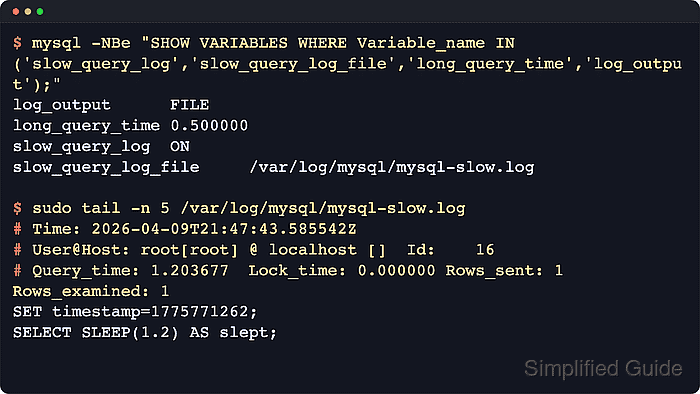
When enabled, the server writes an entry after a statement finishes and the measured execution time exceeds long_query_time. With log_output=FILE, the entry is written to the file named by slow_query_log_file. When no absolute path is set, current MySQL and MariaDB releases default to a hostname-slow.log file in the data directory.
Slow logs can contain full SQL text and literal values, so the destination path should be writable by mysqld and protected like any other application log. MariaDB 10.11 and later also expose newer aliases such as log_slow_query, log_slow_query_file, log_slow_query_time, and log_slow_min_examined_row_limit, but the legacy slow_query_log, slow_query_log_file, long_query_time, and min_examined_row_limit settings remain the safest shared option-file syntax when one workflow must cover both servers.
Common Linux service units are mysql, mariadb, or mysqld.
Common option-file locations are /etc/mysql/my.cnf/ with /etc/mysql/conf.d/ or /etc/mysql/mysql.conf.d/ on Debian or Ubuntu, and /etc/my.cnf/ with /etc/my.cnf.d/ on RHEL-family systems.
Steps to configure slow query log in MySQL or MariaDB:
- Display the current slow-query variables before changing anything.
$ mysql -NBe "SHOW VARIABLES WHERE Variable_name IN ('slow_query_log','slow_query_log_file','long_query_time','log_output','log_queries_not_using_indexes','min_examined_row_limit');"
log_output	FILE
log_queries_not_using_indexes	OFF
long_query_time	10.000000
min_examined_row_limit	0
slow_query_log	OFF
slow_query_log_file	/var/lib/mysql/db01-slow.log
Use
sudo mysql
when socket authentication is enabled locally, or
mysql -u root -p
when password authentication is required.
MariaDB 10.11 and later also expose alias variables such as log_slow_query, log_slow_query_file, log_slow_query_time, and log_slow_min_examined_row_limit, but the classic names above still work on both servers.
- Create the log directory when using /var/log/mysql/ as the destination.
$ sudo install -d -o mysql -g mysql -m 0750 /var/log/mysql
Changing the log path outside the package defaults can require AppArmor or SELinux policy updates. A blocked path or wrong ownership can stop mysqld from opening the file.
- Create the slow-query log file with restrictive ownership and permissions.
$ sudo install -o mysql -g mysql -m 0640 /dev/null /var/log/mysql/mysql-slow.log
$ sudo ls -l /var/log/mysql/mysql-slow.log
-rw-r----- 1 mysql mysql 0 Apr 10 10:32 /var/log/mysql/mysql-slow.log
If the packaged default file in the data directory is acceptable, keep that path and skip the custom /var/log/mysql/ file.
- Persist the slow-query settings in a mysqld drop-in file.
[mysqld]
log_output = FILE
slow_query_log = 1
slow_query_log_file = /var/log/mysql/mysql-slow.log
long_query_time = 1
log_queries_not_using_indexes = 0
min_examined_row_limit = 0
Use the same block in /etc/my.cnf.d/slow-query-log.cnf/ or another included file on hosts that do not load /etc/mysql/conf.d/. Keeping the shared block under [mysqld] works on both MySQL and MariaDB.
A long_query_time of 1 is useful for short capture windows. Raise it later when the log volume is too high for normal production collection.
- Restart the database service and confirm the unit is back in an active (running) state.
$ sudo systemctl restart mysql
$ sudo systemctl status --no-pager mysql
mysql.service - MySQL Community Server
     Loaded: loaded (/usr/lib/systemd/system/mysql.service; enabled; preset: enabled)
     Active: active (running) since Fri 2026-04-10 10:35:52 +08; 2s ago
Replace mysql with mariadb or mysqld when the host uses a different service unit name.
- Re-check the active variables to confirm the server is logging to the intended file with the intended threshold.
$ mysql -NBe "SHOW VARIABLES WHERE Variable_name IN ('slow_query_log','slow_query_log_file','long_query_time','log_output');" log_output FILE long_query_time 1.000000 slow_query_log ON slow_query_log_file /var/log/mysql/mysql-slow.log - Execute a deliberately slow statement to force a slow-log entry.
$ mysql -e "SELECT SLEEP(1.2) AS slept;"
+-------+
| slept |
+-------+
|     0 |
+-------+
The test query must run longer than long_query_time or the server will skip it. Lower the threshold temporarily when faster statements also need to be captured.
- Read the slow-log file and confirm the test query was recorded.
$ sudo cat /var/log/mysql/mysql-slow.log
##### snipped #####
# Time: 2026-04-09T21:47:43.585542Z
# User@Host: root[root] @ localhost []  Id:    16
# Query_time: 1.203677  Lock_time: 0.000000 Rows_sent: 1  Rows_examined: 1
SET timestamp=1775771262;
SELECT SLEEP(1.2) AS slept;
MariaDB adds fields such as Thread_id, Rows_affected, and Bytes_sent, but the same Query_time and SQL text still confirm that slow logging is active.
Run
mysql -e "FLUSH SLOW LOGS;"
after a manual rotation or path change when the server needs to reopen the file handle.
- Verify that log rotation covers the custom slow-log path before leaving the setting in production.
$ sudo grep -R "/var/log/mysql/mysql-slow.log" /etc/logrotate.d
/etc/logrotate.d/mysql-server:/var/log/mysql/mysql-slow.log
If this returns nothing, add the path to the package-managed logrotate policy file for MySQL or MariaDB so the slow log does not grow without bounds.