How to install MySQL server on Windows
Running a local MySQL server on Windows 11 keeps schema changes, database imports, and application testing off shared environments while still providing a real database engine for development and troubleshooting.
Recent MySQL Community Server releases for Windows are installed from a 64-bit .msi package. That package installs the server files and MySQL Configurator, and MySQL Configurator then writes my.ini, creates the initial accounts, defines the data directory under C:\ProgramData\MySQL, and can register MySQL as a Windows service.
The server is not ready until configuration finishes, and Oracle's current Windows documentation still requires the Microsoft Visual C++ runtime on the host. Port selection, firewall exposure, existing MySQL installations on the same machine, and the service account choice all change how the instance behaves after setup. The older MySQL Installer workflow remains tied to the 8.0 product line, so MySQL 8.1 and later installs should use the server MSI plus MySQL Configurator path instead.
Steps to install MySQL server on Windows:
- Open the MySQL Community Server downloads page.
https://dev.mysql.com/downloads/mysql/
- Select the required MySQL release, choose Microsoft Windows, and download the Windows (x86, 64-bit), MSI Installer package.
MySQL Installer at dev.mysql.com/downloads/installer/ is the older integrated installer line for MySQL 8.0. MySQL 8.1 and later Windows server installs use the product-specific server MSI from the MySQL Community Server downloads page.
- Download the current supported Microsoft Visual C++ Redistributable for x64.
https://learn.microsoft.com/en-us/cpp/windows/latest-supported-vc-redist?view=msvc-170
Oracle's Windows documentation still calls for the Visual C++ 2019 Redistributable. Microsoft delivers that runtime family through the current supported v14 redistributable packages.
- Run vc_redist.x64.exe, then run the downloaded MySQL server MSI as an administrator.
- Finish the file installation and start MySQL Configurator from the last installer screen or from the Start menu under MySQL.
The server does not start until MySQL Configurator completes the configuration workflow.
- If MySQL Configurator detects an existing server instance, confirm whether the host needs an in-place upgrade or a separate side-by-side installation before proceeding.
The configurator can present upgrade actions when an older MySQL instance is already installed. Stop here if the machine is meant to keep only one development or production instance.
- Choose the Server Configuration Type that matches the host: Development, Server, Dedicated, or Manual.
Development uses the least memory, Server assigns a medium amount, Dedicated favors MySQL over other workloads, and Manual leaves memory-related settings at their default configuration-file values.
- Keep TCP/IP enabled unless the server must accept local connections only. Review the classic MySQL port and X Protocol Port values before continuing.
The default classic MySQL port is 3306 and the default X Protocol Port is 33060.
If a port is already in use, MySQL Configurator blocks the next step until a free port is entered.
- Clear Open Windows Firewall port for network access for a local-only database, or leave it selected only when remote clients must connect.
Leaving the firewall rule open exposes the MySQL listener to other systems that can reach the Windows host.
- Enable Show Advanced and Logging Options only when custom log locations, a replication server ID, or initial table-name case handling must be set during setup.
The advanced path also exposes logging options and the initial Table Names Case setting.
- Set a strong password for the root account, then add any day-to-day administrative account that the host requires.
Set the account host to localhost for local-only administration, or use <All Hosts (%)> only when remote logins are actually required.
- Configure the Windows service settings.
Configure MySQL server as a Windows service and Start the MySQL Server at System Startup are selected by default. The default service name follows the installed release, such as MySQL97 or MySQL84, and the standard service account runs as Network Service.
- Keep the default Server File Permissions choice unless a custom access model is required.
Skipping Configurator-managed file permissions leaves the data directory and related files to be secured manually after setup.
- Click Execute and wait for every configuration task to report success.
Check the Log tab if service registration, port binding, or file-permission steps fail.
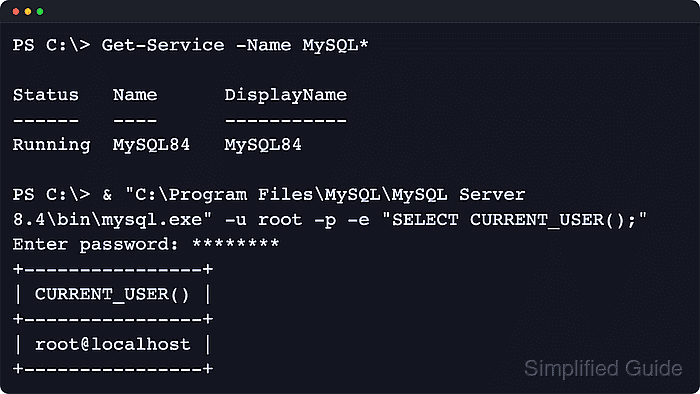
- Confirm that the MySQL Windows service is running.
PS> Get-Service -Name MySQL*

Status   Name      DisplayName
------   ----      -----------
Running  MySQL97   MySQL97
The returned service name matches the selected version or the custom service name chosen during configuration.
- Verify that the server accepts a local login.
PS> & "C:\Program Files\MySQL\MySQL Server 9.7\bin\mysql.exe" -u root -p -e "SELECT CURRENT_USER()"
Enter password: ********
+----------------+
| CURRENT_USER() |
+----------------+
| root@localhost |
+----------------+
If mysql.exe is on PATH, the same check can be run as mysql -u root -p -e "SELECT CURRENT_USER()".