How to enable remote access to MySQL or MariaDB server
Remote database access lets application servers, automation jobs, and administrators connect to one central MySQL or MariaDB instance from another host instead of maintaining separate local copies of the same data. That keeps writes, backups, and operational checks pointed at one server and makes replica or failover planning easier.
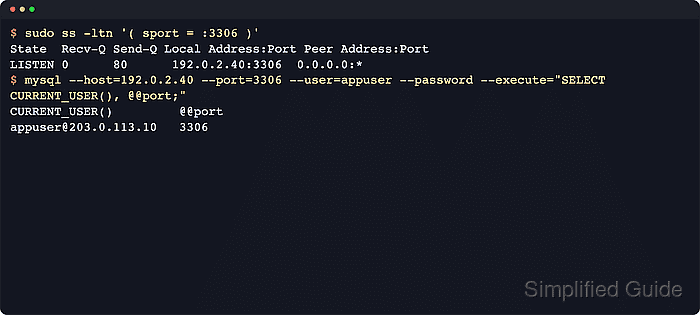
A remote connection works only when the server listens on a reachable address, the network path allows TCP port 3306, and the database account matches the client host as well as the supplied password and privileges. Changing only the listener or only the grants leaves the access path incomplete.
Examples below use a Debian or Ubuntu style Linux server with systemd, a private server IP, and a host firewall that allowlists only the client system. Exact config file paths vary by distro and package, and any active skip-networking setting must be removed or commented out because it disables TCP connections entirely.
Steps to enable remote access to MySQL or MariaDB server:
- Open a terminal on the database host with an account that can use sudo.
- Identify the server IP address that remote clients should use.
$ ip -brief address show scope global
ens18            UP             192.0.2.40/24
Use a private or otherwise restricted service address when possible instead of a public interface.
- Check whether the server already listens on TCP port 3306.
$ sudo ss -ltn '( sport = :3306 )'
State  Recv-Q Send-Q Local Address:Port Peer Address:Port
LISTEN 0      80      127.0.0.1:3306  0.0.0.0:*
A loopback-only listener such as 127.0.0.1:3306 or [::1]:3306 rejects remote clients. No output usually means the service is stopped, the port was changed, or skip-networking is active.
- Locate the active network directives in the server configuration.
$ sudo grep --recursive --line-number --extended-regexp 'bind-address|skip-networking' /etc/mysql 2>/dev/null
/etc/mysql/mysql.conf.d/mysqld.cnf:27:bind-address = 127.0.0.1
On MariaDB packages for Debian and Ubuntu, the active server file is often /etc/mysql/mariadb.conf.d/50-server.cnf. On RHEL-family systems, start with /etc/my.cnf and /etc/my.cnf.d/.
- Back up the active server file before changing the listener.
$ sudo cp /etc/mysql/mysql.conf.d/mysqld.cnf /etc/mysql/mysql.conf.d/mysqld.cnf.bak
Use the file path returned by the previous search. The backup gives you a quick rollback if the restart exposes a typo or an unintended override.
- Edit the active server file so mysqld listens on the chosen server IP, and comment out any active skip-networking line.
$ sudoedit /etc/mysql/mysql.conf.d/mysqld.cnf
[mysqld]
bind-address = 192.0.2.40
# skip-networking
Setting bind-address to 0.0.0.0 listens on every IPv4 interface. Use that only when firewall rules and upstream network policy already restrict which systems can reach port 3306.
- Restart the database service so the listener change takes effect.
$ sudo systemctl restart mysql
Use mariadb instead of mysql on hosts where the installed package provides the mariadb unit.
- Confirm that the database service is active after the restart.
$ sudo systemctl is-active mysql
active
Check the same unit name you restarted in the previous step.
- Recheck the TCP listener and confirm that port 3306 is now bound to the intended address.
$ sudo ss -ltn '( sport = :3306 )'
State  Recv-Q Send-Q Local Address:Port Peer Address:Port
LISTEN 0      80      192.0.2.40:3306  0.0.0.0:*
If the listener still shows 127.0.0.1 or no longer appears at all, another config file can still be overriding bind-address, or skip-networking is still active in a loaded file.
- Create a remote account that is limited to the client host or client public egress address instead of opening access to every source address.
$ sudo mysql --execute="CREATE USER 'appuser'@'203.0.113.10' IDENTIFIED BY 'RemotePass123!'; GRANT SELECT, INSERT, UPDATE, DELETE ON appdb.* TO 'appuser'@'203.0.113.10';"
Keep the host part as specific as possible. Avoid '%' unless the workflow truly requires access from many unknown origins.
Replace appdb.* and the privilege list with only the schema and operations that the remote workload actually needs.
- Review the grants for the new account before testing the connection.
$ sudo mysql --execute="SHOW GRANTS FOR 'appuser'@'203.0.113.10';"
Grants for appuser@203.0.113.10
GRANT USAGE ON *.* TO `appuser`@`203.0.113.10`
GRANT SELECT, INSERT, UPDATE, DELETE ON `appdb`.* TO `appuser`@`203.0.113.10`
CREATE USER and GRANT take effect immediately in normal use, so FLUSH PRIVILEGES is not needed unless the grant tables were edited directly.
If the server uses skip_name_resolve, define the account with the client IP instead of a hostname. When name resolution is enabled, use the same IP or DNS form that the server resolves for that client.
When encrypted transport is available, require it for the remote account: ALTER USER 'appuser'@'203.0.113.10' REQUIRE SSL;
- Allow inbound TCP port 3306 from the client address in the host firewall.
$ sudo ufw allow from 203.0.113.10 to any port 3306 proto tcp
Rule added
Cloud firewalls, security groups, or upstream ACLs must allow the same source address and port. On RHEL-family systems, apply the equivalent rule with firewall-cmd or the site's standard firewall tool.
- Test the remote login from the client host.
$ mysql --host=192.0.2.40 --port=3306 --user=appuser --password --database=appdb --execute="SELECT CURRENT_USER, @@hostname, @@port"
CURRENT_USER           @@hostname   @@port
appuser@203.0.113.10   db01         3306
On MariaDB-only client installs, use mariadb if the mysql client alias is not present.
ERROR 2003 usually points to routing, firewall, or listener issues. ERROR 1130 or Access denied usually means the 'user'@'host' definition, password, authentication plugin, or TLS requirement does not match the client connection.