How to monitor replication in MySQL or MariaDB
Monitor replication on the replica before read routing, backups, or failover decisions because a replica can stay online while it stops receiving or applying changes. A quick status check shows whether the receiver and applier threads are running, whether binary-log positions are moving, and whether stale data could reach reports or applications.
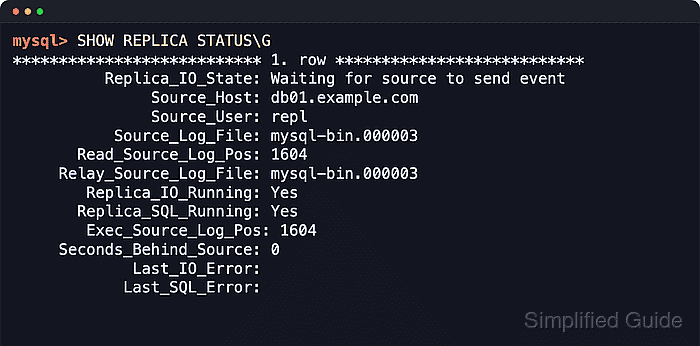
Replication health comes from the receiver thread, the applier thread, and the source positions they report. The receiver thread pulls binary log events from the source into relay logs, and the applier thread replays those events locally. A caught-up idle replica commonly shows Waiting for source to send event or Waiting for master to send event with both threads running and the read and executed positions aligned.
Current MySQL uses SHOW REPLICA STATUS and returns Replica_* and Source_* fields such as Replica_IO_Running and Seconds_Behind_Source. Current MariaDB also accepts SHOW REPLICA STATUS, but many returned columns still use Slave_* and Master_* names such as Slave_SQL_Running and Seconds_Behind_Master. A MySQL monitoring account needs REPLICATION CLIENT, a MariaDB monitoring account needs REPLICA MONITOR, and older servers can still require SHOW SLAVE STATUS.
Steps to monitor MySQL or MariaDB replication:
- Connect to the replica with a monitoring account and run the current status statement in vertical output mode.
$ mysql --user=monitor --password --execute "SHOW REPLICA STATUS\G"
Use a dedicated monitoring account rather than root. Current MySQL needs REPLICATION CLIENT for this statement, and current MariaDB needs REPLICA MONITOR.
- Retry with the legacy statement only when the server rejects the current command.
$ mysql --user=monitor --password --execute "SHOW SLAVE STATUS\G"
MySQL 8.0.22 and later deprecate SHOW SLAVE STATUS in favor of SHOW REPLICA STATUS, but older servers and old automation may still expose the legacy form.
- Confirm the command returns the replica channel intended for the check.
Empty set or 0 rows usually means replication is not configured on that server, the wrong channel was queried, or the command was run on a primary instead of a replica.
- On current MySQL, read the main health fields from the Replica_* and Source_* output.
*************************** 1. ROW ***************************
          Replica_IO_State: Waiting FOR SOURCE TO send event
               Source_Host: db-PRIMARY.example.net
               Source_User: repl
           Source_Log_File: mysql-bin.000003
       Read_Source_Log_Pos: 1447
     Relay_Source_Log_File: mysql-bin.000003
        Replica_IO_Running: Yes
       Replica_SQL_Running: Yes
        Exec_Source_Log_Pos: 1447
     Seconds_Behind_Source: 0
             Last_IO_Error:
            Last_SQL_Error:
Replica_SQL_Running_State: Replica has READ ALL relay log; waiting FOR more updates
##### snipped #####
MySQL 8.0.22 and later prefer these Replica_* and Source_* field names. Older MySQL releases use SHOW SLAVE STATUS with the legacy Slave_* and Master_* equivalents.
- On current MariaDB, read the same health checks from the legacy Slave_* and Master_* columns that still back SHOW REPLICA STATUS.
*************************** 1. ROW ***************************
             Slave_IO_State: Waiting FOR master TO send event
                Master_Host: db-PRIMARY.example.net
                Master_User: repl
            Master_Log_File: mariadb-bin.000002
        Read_Master_Log_Pos: 1341
      Relay_Master_Log_File: mariadb-bin.000002
           Slave_IO_Running: Yes
          Slave_SQL_Running: Yes
        Exec_Master_Log_Pos: 1341
      Seconds_Behind_Master: 0
              Last_IO_Error:
             Last_SQL_Error:
##### snipped #####
Current MariaDB documentation still describes these Slave_* and Master_* columns under SHOW REPLICA STATUS, so the command name is newer than many of the returned field names.
- Treat the receiver and applier thread states as the first alarm condition.
Replica_IO_Running or Slave_IO_Running set to No means the replica is not receiving fresh events. Replica_SQL_Running or Slave_SQL_Running set to No means the replica stopped applying events and Last_SQL_Error usually explains why.
- Compare the read position with the executed position to separate transport lag from apply lag.
On MySQL, compare Read_Source_Log_Pos with Exec_Source_Log_Pos. On MariaDB, compare Read_Master_Log_Pos with Exec_Master_Log_Pos. If the read position advances while the executed position stays flat, the applier is falling behind. If neither moves while writes continue on the source, the receiver side is the likely problem.
- Treat the lag field as an estimate rather than a proof of health.
Seconds_Behind_Source or Seconds_Behind_Master at 0 usually means the replica is caught up at that moment. NULL is common when replication threads are stopped or the lag cannot be calculated. On slow networks, MySQL can show 0 when the applier is caught up with the receiver even though the receiver itself is behind the source.
- Inspect Last_IO_Error and Last_SQL_Error for non-empty messages.
Last_IO_Error usually points at connectivity, DNS, authentication, TLS, or source-availability problems. Last_SQL_Error usually points at apply failures such as missing rows, duplicate keys, or schema drift.
- Re-run the status query after a short interval or after a known write on the source.
$ mysql --user=monitor --password --execute "SHOW REPLICA STATUS\G"
*************************** 1. ROW ***************************
           Source_Log_File: mysql-bin.000003
       Read_Source_Log_Pos: 1893
     Relay_Source_Log_File: mysql-bin.000003
        Replica_IO_Running: Yes
       Replica_SQL_Running: Yes
        Exec_Source_Log_Pos: 1893
     Seconds_Behind_Source: 0
             Last_IO_Error:
             Last_SQL_Error:
##### snipped #####
Unchanged positions together with continuing source writes indicate a stall even when the lag field still looks harmless.
- Save a point-in-time status snapshot for incident notes or handoff.
$ mysql --user=monitor --password --execute "SHOW REPLICA STATUS\G" > replication-status.txt
Avoid putting the password value directly on the command line because it can leak through shell history or process listings.
- Check each named channel separately on multi-source replicas.
$ mysql --user=monitor --password --execute "SHOW REPLICA STATUS FOR CHANNEL \"analytics\"\G"
Current MariaDB also supports FOR CHANNEL for MySQL compatibility and can list every connection with SHOW ALL REPLICAS STATUS.
- Poll the full status statement from the monitoring host and let the collector parse fields by name.
$ mysql --user=monitor --password --execute "SHOW REPLICA STATUS\G"
Alert on thread state, lag, and non-empty error text. Field-name parsing handles MySQL Replica_* output and MariaDB Slave_* output better than fixed column offsets or a command that only works for one product family.