How to revoke privileges from MySQL or MariaDB users
Revoking database privileges is the fastest way to reduce what an application account, contractor login, or forgotten credential can do after requirements change. Removing unneeded access limits accidental writes, blocks unwanted reads, and narrows the blast radius of exposed credentials.
In MySQL and MariaDB, an account is the full 'user'@'host' identity, so 'app'@'localhost' and 'app'@'%' are different targets with different grants. Access can come from direct grants on *.*, db.*, or specific objects, and it can also come from assigned roles, so the current grant list is the correct starting point before removing anything.
Privilege changes from REVOKE apply immediately, and broad revocations can break running workloads as soon as the next statement reaches the server. Current MySQL releases still leave granted roles in place after REVOKE ALL PRIVILEGES, GRANT OPTION, while current MariaDB releases can remove the role grant but still leave a SET DEFAULT ROLE entry, so always re-check SHOW GRANTS after the revoke. FLUSH PRIVILEGES is only needed after direct edits to the system grant tables.
Steps to revoke privileges from MySQL or MariaDB users:
- Connect to the server with an administrative account.
$ mysql -u root -p
Enter password:
mysql>
Some installations use socket authentication for the local administrative account, so sudo mysql may be the expected entry point.
- List the matching account rows so the revoke targets the correct 'user'@'host' identity.
mysql> SELECT User, Host FROM mysql.user WHERE User = 'revokeuser' ORDER BY Host;
+------------+-----------+
| User       | Host      |
+------------+-----------+
| revokeuser | %         |
| revokeuser | localhost |
+------------+-----------+
2 rows in set (0.00 sec)
Revokes apply only to the exact account row, and a more specific host match such as 'localhost' takes precedence over '%'.
- Review the current grants for the exact account before removing access.
mysql> SHOW GRANTS FOR 'revokeuser'@'%';
+---------------------------------------------------------------+
| Grants for revokeuser@%                                       |
+---------------------------------------------------------------+
| GRANT USAGE ON *.* TO `revokeuser`@`%`                        |
| GRANT SELECT, INSERT, UPDATE ON `appdb`.* TO `revokeuser`@`%` |
| GRANT `reporting_role`@`%` TO `revokeuser`@`%`                |
+---------------------------------------------------------------+
3 rows in set (0.00 sec)
MariaDB can display role lines differently, and it may also show SET DEFAULT ROLE for the account. Any role-related line means access is still coming from more than direct privilege grants.
- Revoke selected privileges from one schema when only part of the access needs to be removed.
mysql> REVOKE SELECT, INSERT ON `appdb`.* FROM 'revokeuser'@'%';
Query OK, 0 rows affected (0.00 sec)
- Revoke all direct privileges from one schema when the account should keep access elsewhere.
mysql> REVOKE ALL PRIVILEGES ON `appdb`.* FROM 'revokeuser'@'%';
Query OK, 0 rows affected (0.00 sec)
Applications using this schema can start failing immediately after this command succeeds.
- Revoke all direct privileges plus GRANT OPTION from every scope assigned directly to the account.
mysql> REVOKE ALL PRIVILEGES, GRANT OPTION FROM 'revokeuser'@'%';
Query OK, 0 rows affected (0.00 sec)
In current MySQL releases, this removes direct global, database, table, column, and routine privileges but leaves granted roles in place. In current MariaDB releases, the role grant can disappear here, but SET DEFAULT ROLE can still remain in SHOW GRANTS until it is cleared explicitly.
- Re-run SHOW GRANTS and revoke any remaining role assignment only when the role line is still present.
mysql> REVOKE reporting_role FROM 'revokeuser'@'%';
Query OK, 0 rows affected (0.00 sec)
Use this step only when SHOW GRANTS still lists a role assignment after the direct revoke. Current MariaDB releases can already remove the role grant during REVOKE ALL PRIVILEGES, GRANT OPTION, in which case running another role revoke returns an error because no role grant remains.
- Clear a leftover default-role entry on MariaDB when SHOW GRANTS still shows SET DEFAULT ROLE for the account.
mysql> SET DEFAULT ROLE NONE FOR 'revokeuser'@'%';
Query OK, 0 rows affected (0.00 sec)
This MariaDB-specific cleanup removes stale default-role metadata after the role grant itself is already gone.
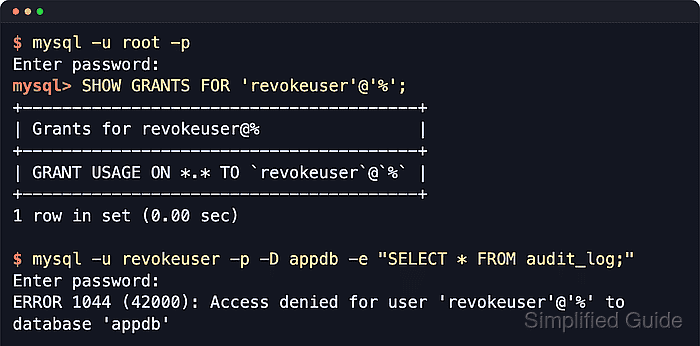
- Verify the remaining grants for the account.
mysql> SHOW GRANTS FOR 'revokeuser'@'%';
+----------------------------------------+
| Grants for revokeuser@%                |
+----------------------------------------+
| GRANT USAGE ON *.* TO `revokeuser`@`%` |
+----------------------------------------+
1 row in set (0.00 sec)
If SHOW GRANTS still lists a role line or a MariaDB SET DEFAULT ROLE line, the account can still inherit access or still carries default-role metadata. MariaDB may also include IDENTIFIED BY PASSWORD on the remaining USAGE line; that is account metadata, not an object privilege grant.
- Confirm the revoked access from the affected account when a runtime proof is needed.
$ mysql -u revokeuser -p -D appdb -e "SELECT * FROM audit_log;"
Enter password:
ERROR 1044 (42000): Access denied for user 'revokeuser'@'%' to database 'appdb'
- Exit the mysql client when the work is complete.
mysql> exit
Bye