Table of Contents
How to benchmark MariaDB and MySQL performance
Benchmarking MariaDB or MySQL before a hardware change, parameter tune, or version upgrade shows whether throughput improved, latency regressed, or the bottleneck simply moved to storage, CPU, or connection handling.
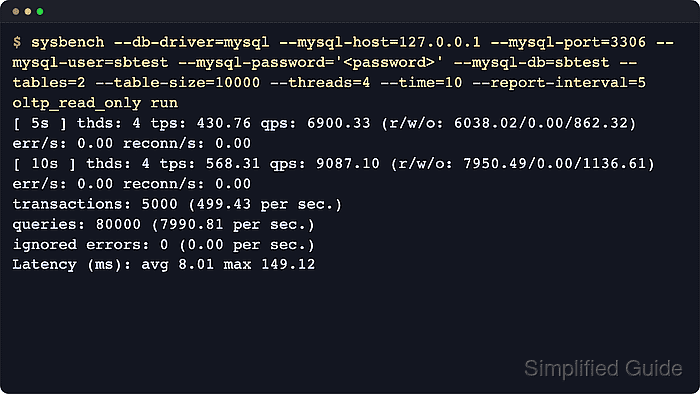
Sysbench uses bundled oltp_*.lua workloads to create a repeatable schema, run a controlled query mix over the MySQL protocol, and report transactions per second, query rate, reconnects, and latency. The same dataset, thread count, and runtime let one server version, storage layout, or parameter set be compared against another without changing the workload generator.
Connection path and workload shape matter as much as raw speed. Local localhost logins on Unix-like systems often use a socket, while explicit TCP tests use 127.0.0.1 or another host plus a port, and some MySQL deployments with skip_name_resolve need an IP-based account for predictable authentication. Keep the connection method, table size, thread count, and runtime identical across every comparison, and remove the sbtest objects when measurements are complete.
Steps to benchmark MariaDB and MySQL performance:
- Run the benchmark on a staging clone or a dedicated test instance.
An OLTP benchmark can saturate CPU, memory, and disk I/O, so do not run aggressive tests on a busy production primary without an approved window and rollback plan.
- Create a dedicated sbtest database and TCP benchmark user.
$ mysql --user=root --password --execute="CREATE DATABASE sbtest; CREATE USER 'sbtest'@'127.0.0.1' IDENTIFIED BY '<password>'; GRANT ALL PRIVILEGES ON sbtest.* TO 'sbtest'@'127.0.0.1';"
Enter password:
Many MariaDB packages authenticate local root over the Unix socket, so sudo mariadb or sudo mysql can be the correct administrative entry point.
These examples use explicit TCP to 127.0.0.1. If the benchmark should use a local Unix socket instead, create the matching 'sbtest'@'localhost' account and replace host or port options with --mysql-socket=/path/to/mysql.sock. On MySQL, a connection to 127.0.0.1 usually resolves to the localhost account unless skip_name_resolve is enabled, but an explicit IP-based account keeps the TCP path predictable across both engines.
- Prepare a repeatable read-only dataset sized for the comparison.
$ sysbench --db-driver=mysql --mysql-host=127.0.0.1 --mysql-port=3306 --mysql-user=sbtest --mysql-password='<password>' --mysql-db=sbtest --tables=2 --table-size=10000 oltp_read_only prepare
Creating table 'sbtest1'...
Inserting 10000 records into 'sbtest1'
Creating a secondary index on 'sbtest1'...
Creating table 'sbtest2'...
Inserting 10000 records into 'sbtest2'
Creating a secondary index on 'sbtest2'...
Increase --tables and --table-size until the working set and index size resemble the system being compared, otherwise the run mostly measures a tiny hot cache.
Large datasets consume disk quickly and can take much longer to build, especially on slower storage tiers.
- Run a fixed-duration baseline with explicit concurrency and interval reporting.
$ sysbench --db-driver=mysql --mysql-host=127.0.0.1 --mysql-port=3306 --mysql-user=sbtest --mysql-password='<password>' --mysql-db=sbtest --tables=2 --table-size=10000 --threads=4 --time=10 --report-interval=5 oltp_read_only run
sysbench 1.0.20 (using system LuaJIT 2.1.0-beta3)

Running the test with following options:
Number of threads: 4
Report intermediate results every 5 second(s)
Initializing random number generator from current time


Initializing worker threads...

Threads started!

[ 5s ] thds: 4 tps: 3127.53 qps: 50050.50 (r/w/o: 43794.64/0.00/6255.86) lat (ms,95%): 2.26 err/s: 0.00 reconn/s: 0.00
[ 10s ] thds: 4 tps: 3294.84 qps: 52715.01 (r/w/o: 46125.53/0.00/6589.48) lat (ms,95%): 2.07 err/s: 0.00 reconn/s: 0.00
SQL statistics:
    queries performed:
        read:                            449652
        write:                           0
        other:                           64236
        total:                           513888
    transactions:                        32118  (3210.60 per sec.)
    queries:                             513888 (51369.61 per sec.)
    ignored errors:                      0      (0.00 per sec.)
    reconnects:                          0      (0.00 per sec.)

General statistics:
    total time:                          10.0032s
    total number of events:              32118

Latency (ms):
         min:                                    0.52
         avg:                                    1.24
         max:                                   13.10
         95th percentile:                        2.18
         sum:                                39975.20

Threads fairness:
    events (avg/stddev):           8029.5000/122.80
    execution time (avg/stddev):   9.9938/0.00
Use transactions per second, queries per second, zero ignored errors, and zero reconnects as the first comparison points before tuning around latency.
- Save each raw result before changing server settings or rerunning the test.
$ sysbench --db-driver=mysql --mysql-host=127.0.0.1 --mysql-port=3306 --mysql-user=sbtest --mysql-password='<password>' --mysql-db=sbtest --tables=2 --table-size=10000 --threads=4 --time=10 --report-interval=5 oltp_read_only run > mariadb-read-only-4t-10s.txt
Keep the workload name, thread count, and runtime in the filename so later comparisons remain readable.
- Repeat the same scenario several times and compare medians rather than trusting one pass.
Warm-cache tests and cold-cache tests are both valid, but the numbers only stay comparable when every run starts from the same cache state, connection path, and server settings.
- Switch to a mixed read/write workload when the target system handles inserts, updates, or deletes under load.
$ sysbench --db-driver=mysql --mysql-host=127.0.0.1 --mysql-port=3306 --mysql-user=sbtest --mysql-password='<password>' --mysql-db=sbtest --tables=2 --table-size=10000 --threads=4 --time=10 --report-interval=5 oltp_read_write run
Small tables or unrealistically hot datasets can produce lock conflicts and ignored errors in oltp_read_write, so grow the dataset until the workload resembles the real working set before comparing one server against another.
- Remove the sysbench tables when the measurements are complete.
$ sysbench --db-driver=mysql --mysql-host=127.0.0.1 --mysql-port=3306 --mysql-user=sbtest --mysql-password='<password>' --mysql-db=sbtest --tables=2 oltp_read_only cleanup
Dropping table 'sbtest1'...
Dropping table 'sbtest2'...
- Drop the benchmark database and account after cleanup.
$ mysql --user=root --password --execute="DROP DATABASE sbtest; DROP USER 'sbtest'@'127.0.0.1';"
Enter password:
Drop the actual host-scoped account used for the run, such as 'sbtest'@'localhost' for socket tests or another client IP for a remote benchmark host.
- Confirm that the benchmark database is gone.
$ mysql -vvv --user=root --password --execute="SHOW DATABASES LIKE 'sbtest';"
Enter password:
--------------
SHOW DATABASES LIKE 'sbtest'
--------------

Empty set (0.00 sec)

Bye
Tips for benchmarking MariaDB and MySQL performance:
- Run the benchmark client from a separate host when the goal is end-to-end server capacity rather than single-host loopback performance.
- Record the server version, storage class, CPU count, buffer pool size, and any changed variables next to each result file.
- Change one variable at a time so a faster or slower run can be explained afterward.
- Keep backup jobs, replica catch-up bursts, schema migrations, and other noisy background work out of the benchmark window when possible.
- Use the same sysbench script and the same data size on MySQL and MariaDB so the comparison reflects the server rather than the workload generator.