How to set up MySQL read/write load balancing with HAProxy and replication
Splitting write traffic from read traffic keeps the primary MySQL server focused on transactions that must land in one place, while replica nodes absorb reporting, search, and other read-heavy workloads. That reduces contention on the primary and gives applications a stable pair of database endpoints instead of hard-coding individual hosts.
This layout combines file-and-position replication with HAProxy TCP frontends. The source server writes binary log events, replicas replay those events to stay current, and HAProxy exposes one port for writes and a separate port for read-only sessions because it routes whole TCP connections rather than inspecting SQL statements.
Replication is asynchronous, so the read endpoint can return slightly stale data during bursts, long transactions, or link problems. The procedure uses current MySQL 8.4 syntax such as SHOW BINARY LOG STATUS, --source-data, CHANGE REPLICATION SOURCE TO, START REPLICA, and SHOW REPLICA STATUS; if the topology already uses GTID, keep the GTID method instead of switching to manual log coordinates.
Common MySQL config paths include /etc/mysql/mysql.conf.d/mysqld.cnf on Debian or Ubuntu and /etc/my.cnf.d/mysql-server.cnf on RHEL, Rocky Linux, AlmaLinux, or SUSE. HAProxy commonly uses /etc/haproxy/haproxy.cfg.
Steps to set up MySQL read/write load balancing with HAProxy and replication:
- Edit the source server replication config file.
$ sudoedit /etc/mysql/mysql.conf.d/replication.cnf
- Add a unique source server-id and enable the binary log on the source server.
[mysqld]
server-id = 1
log-bin = mysql-bin
binlog-format = ROW
Every server in the topology needs its own server-id value. If the source only listens on 127.0.0.1, remote replicas will not be able to connect.
- Restart the source MySQL service so the replication settings load.
$ sudo systemctl restart mysql
Use the installed unit name such as mysql or mysqld.
Related: How to manage MySQL or MariaDB service with systemctl in Linux - Confirm that the source is writing a binary log and record the current file name.
$ mysql --user=root --password --execute "SHOW BINARY LOG STATUS\G"
*************************** 1. row ***************************
             File: mysql-bin.000003
         Position: 2557
     Binlog_Do_DB:
 Binlog_Ignore_DB:
Executed_Gtid_Set:
- Create a replication account that is limited to the replica hosts.
$ mysql --user=root --password
mysql> CREATE USER 'repl'@'db-replica-1.example.net' IDENTIFIED BY 'strong_repl_password';
mysql> CREATE USER 'repl'@'db-replica-2.example.net' IDENTIFIED BY 'strong_repl_password';
mysql> GRANT REPLICATION SLAVE ON *.* TO 'repl'@'db-replica-1.example.net';
mysql> GRANT REPLICATION SLAVE ON *.* TO 'repl'@'db-replica-2.example.net';
mysql> FLUSH PRIVILEGES;
Use replica-specific hostnames or IP addresses instead of '%' for the replication account.
- Create a consistent seed dump for the application database on the source server.
$ mysqldump --user=root --password --databases appdb --single-transaction --routines --triggers --events --source-data=2 > /var/tmp/mysql-ha-seed.sql
Replace appdb with the database set that the application uses. Use --all-databases only when the replicas should be seeded with every application database on the source.
--single-transaction keeps InnoDB tables consistent, but it does not protect non-transactional tables such as MyISAM.
- Copy the seed dump to each replica server.
$ scp /var/tmp/mysql-ha-seed.sql root@db-replica-1.example.net:/var/tmp/
$ scp /var/tmp/mysql-ha-seed.sql root@db-replica-2.example.net:/var/tmp/
- Edit the replica config file on each replica server.
$ sudoedit /etc/mysql/mysql.conf.d/replica.cnf
- Give each replica its own server-id and relay log name.
[mysqld]
server-id = 2
relay-log = replica1-relay-bin
Change both server-id and relay-log on every replica so they stay unique. Enable read_only and super_read_only after the seed import and replica startup so the restore is not blocked.
- Restart the MySQL service on each replica so the replica settings load.
$ sudo systemctl restart mysql
Use the installed unit name such as mysql or mysqld.
Related: How to manage MySQL or MariaDB service with systemctl in Linux - Import the seed dump on each replica before starting replication.
$ mysql --user=root --password < /var/tmp/mysql-ha-seed.sql
Import into an empty or disposable dataset only, because restoring a seed dump over unrelated existing data can create conflicts or silent drift.
- Read the commented replication coordinate line near the top of the seed dump on each replica.
-- CHANGE REPLICATION SOURCE TO SOURCE_LOG_FILE='mysql-bin.000003', SOURCE_LOG_POS=2557;
The dump header is the safest source for file and position values because --source-data records the coordinates that match the snapshot.
- Point each replica at the source server with the coordinates from the seed dump.
$ mysql --user=root --password
mysql> CHANGE REPLICATION SOURCE TO
    -> SOURCE_HOST='db-primary.example.net',
    -> SOURCE_PORT=3306,
    -> SOURCE_USER='repl',
    -> SOURCE_PASSWORD='strong_repl_password',
    -> SOURCE_LOG_FILE='mysql-bin.000003',
    -> SOURCE_LOG_POS=2557,
    -> GET_SOURCE_PUBLIC_KEY=1;
GET_SOURCE_PUBLIC_KEY=1 is needed when the replication account uses the default caching_sha2_password plugin and the channel is not already protected with TLS or a configured public key file.
- Start the replica threads on each replica server.
$ mysql --user=root --password --execute "START REPLICA;"
- Confirm that both replica threads are running and that lag is near zero.
$ mysql --user=root --password --execute "SHOW REPLICA STATUS\G"
*************************** 1. row ***************************
        Replica_IO_State: Waiting for source to send event
             Source_Host: db-primary.example.net
             Source_User: repl
             Source_Port: 3306
         Source_Log_File: mysql-bin.000003
     Replica_IO_Running: Yes
    Replica_SQL_Running: Yes
 Seconds_Behind_Source: 0
         Last_IO_Error:
        Last_SQL_Error:
##### snipped #####
If either thread reports No, fix the replication error before putting HAProxy in front of the replicas.
- Persist the replica read-only guardrails after the replication channel is running.
$ mysql --user=root --password --execute "SET PERSIST read_only=ON; SET PERSIST super_read_only=ON;"
Applying the guardrails after the restore keeps the seed import writable while still making later replica restarts come back in read-only mode.
- Edit the HAProxy config file on the load balancer host.
$ sudoedit /etc/haproxy/haproxy.cfg
- Add separate HAProxy frontends and backends for writes and reads.
defaults
    mode tcp
    timeout connect 5s
    timeout client 1m
    timeout server 1m

frontend mysql_write
    bind *:3306
    default_backend mysql_primary

backend mysql_primary
    option tcp-check
    server mysql-primary db-primary.example.net:3306 check

frontend mysql_read
    bind *:3307
    default_backend mysql_replicas

backend mysql_replicas
    balance roundrobin
    option tcp-check
    server mysql-replica-1 db-replica-1.example.net:3306 check
    server mysql-replica-2 db-replica-2.example.net:3306 check
Run HAProxy on a separate load balancer host, or choose ports that do not collide with a local mysqld listener. Current MySQL 8.4 keeps caching_sha2_password as the default account plugin and disables mysql_native_password by default, so a plain TCP health check is the safest default. HAProxy can use option mysql-check user <name> only when the backend check account is deliberately configured with an auth method that the probe supports.
Tool: HAProxy Backend Config Generator - Validate the HAProxy configuration before reloading the service.
$ sudo haproxy -c -V -f /etc/haproxy/haproxy.cfg
Configuration file is valid
- Restart the HAProxy service so the new frontends and backends go live.
$ sudo systemctl restart haproxy
A single HAProxy node is still a single point of failure, so add a redundant pair or upstream failover mechanism if the database endpoint must survive load balancer host loss.
- Confirm that HAProxy is listening on both the write and read ports.
$ sudo ss -lntp 'sport = :3306 or sport = :3307'
State  Recv-Q Send-Q Local Address:Port Peer Address:Port Process
LISTEN 0      2048         0.0.0.0:3306      0.0.0.0:*     users:(("haproxy",pid=1528,fd=7))
LISTEN 0      2048         0.0.0.0:3307      0.0.0.0:*     users:(("haproxy",pid=1528,fd=8))
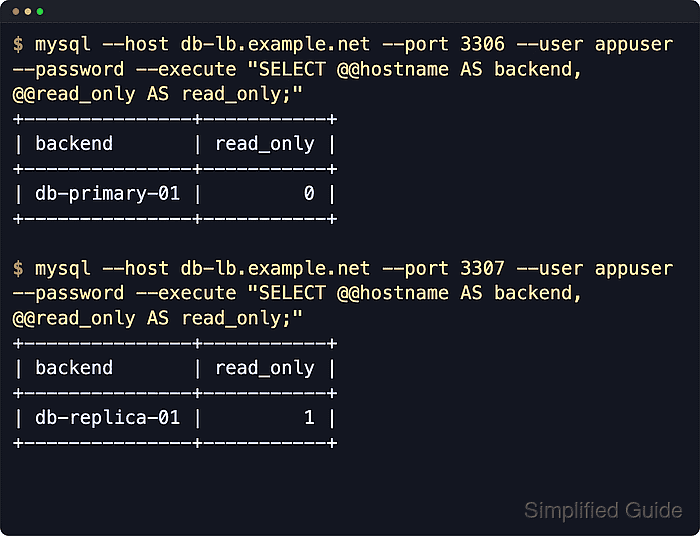
- Test the write endpoint through HAProxy with a normal application account.
$ mysql --host db-lb.example.net --port 3306 --user appuser --password --execute "SELECT @@hostname AS backend, @@read_only AS read_only;"
+---------------+-----------+
| backend       | read_only |
+---------------+-----------+
| db-primary-01 |         0 |
+---------------+-----------+
- Test the read endpoint through HAProxy and confirm it lands on a replica.
$ mysql --host db-lb.example.net --port 3307 --user appuser --password --execute "SELECT @@hostname AS backend, @@read_only AS read_only;"
+---------------+-----------+
| backend       | read_only |
+---------------+-----------+
| db-replica-01 |         1 |
+---------------+-----------+
Repeated connections to the read endpoint can rotate across different replicas because balancing happens per TCP session.
- Point application write traffic at the HAProxy write port.
Use db-lb.example.net:3306 for statements that must reach the primary node.
- Point read-only application traffic at the HAProxy read port.
Use db-lb.example.net:3307 for reads, and keep replication lag in mind when strict read-after-write consistency is required.