How to create an index in MySQL or MariaDB
Creating the right secondary index keeps repeated lookups from turning into full table scans as row counts rise. For query patterns that filter or join on the same columns repeatedly, adding an index can cut the number of rows the server must read and help keep latency predictable under growing load.
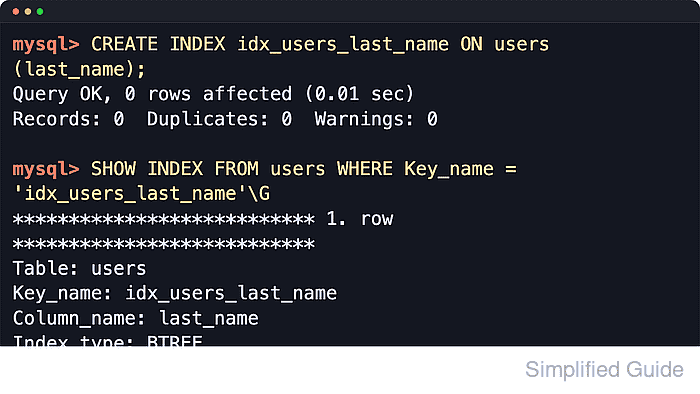
On existing tables, CREATE INDEX adds a secondary index definition without changing the query itself. For current InnoDB defaults in both MySQL and MariaDB, ordinary indexes use a BTREE structure, and the result can be checked through SHOW INDEX metadata plus EXPLAIN plan output before and after the change.
Each extra index adds write overhead and storage cost, and building one on a large busy table can wait on metadata locks or reduce concurrency depending on engine support and the chosen DDL path. The plain CREATE INDEX index_name ON table_name (column_list); form stays portable across current MySQL and MariaDB releases; MariaDB also supports IF NOT EXISTS and OR REPLACE, but MySQL 8.4 still treats those clauses as syntax errors for CREATE INDEX.
Steps to create an index in MySQL or MariaDB:
- Capture the exact statement that needs a better access path before adding anything.
mysql> SELECT id, first_name, last_name
    -> FROM users
    -> WHERE last_name = 'Case';
Indexing starts from real predicates, joins, and sort order. Avoid adding columns just because they look important in the schema.
- Run EXPLAIN first to record the baseline plan.
mysql> EXPLAIN SELECT id, first_name, last_name
    -> FROM users
    -> WHERE last_name = 'Case'\G
*************************** 1. ROW ***************************
           id: 1
  select_type: SIMPLE
        TABLE: users
   partitions: NULL
         TYPE: ALL
possible_keys: NULL
          KEY: NULL
     key_len: NULL
          REF: NULL
         ROWS: 10
     filtered: 10.00
        Extra: USING WHERE
1 ROW IN SET, 1 warning (0.00 sec)
MySQL and MariaDB label some EXPLAIN columns differently. Current MySQL tabular output usually includes partitions and filtered, while MariaDB's default tabular output is shorter for the same statement.
- Check the existing indexes on the target table so the new index does not duplicate something already present.
mysql> SHOW INDEX FROM users;
+-------+------------+----------+--------------+-------------+-----------+-------------+----------+--------+------+------------+---------+---------------+---------+------------+
| TABLE | Non_unique | Key_name | Seq_in_index | Column_name | Collation | Cardinality | Sub_part | Packed | NULL | Index_type | Comment | Index_comment | Visible | Expression |
+-------+------------+----------+--------------+-------------+-----------+-------------+----------+--------+------+------------+---------+---------------+---------+------------+
| users |          0 | PRIMARY  |            1 | id          | A         |          10 |     NULL |   NULL |      | BTREE      |         |               | YES     | NULL       |
+-------+------------+----------+--------------+-------------+-----------+-------------+----------+--------+------+------------+---------+---------------+---------+------------+
1 ROW IN SET (0.00 sec)
Current MySQL output shows Visible and Expression columns. Current MariaDB output shows an Ignored column instead.
- Choose index columns in the order the optimizer can actually use.
For composite indexes, place the most selective equality columns first, then range or sort columns that follow the same query pattern. Example: CREATE INDEX idx_users_last_name_created ON users (last_name, created_at); follows the leftmost-prefix rule for lookups on last_name and for queries that also sort or filter on created_at.
- Create the index with the plain cross-server syntax.
mysql> CREATE INDEX idx_users_last_name ON users (last_name);
Query OK, 0 ROWS affected (0.01 sec)
Records: 0  Duplicates: 0  Warnings: 0
Use CREATE UNIQUE INDEX instead when duplicate values must fail. CREATE INDEX cannot add a primary key; use ALTER TABLE ... ADD PRIMARY KEY for that case.
On large tables, the statement can wait on a metadata lock and may still copy or rebuild table data depending on engine support, version, and any ALGORITHM or LOCK clauses in use.
- Confirm that the new index exists and that the column order matches the intended design.
mysql> SHOW INDEX FROM users WHERE Key_name = 'idx_users_last_name'\G
*************************** 1. ROW ***************************
        TABLE: users
   Non_unique: 1
     Key_name: idx_users_last_name
 Seq_in_index: 1
  Column_name: last_name
    Collation: A
  Cardinality: 5
     Sub_part: NULL
       Packed: NULL
         NULL:
   Index_type: BTREE
      Comment:
Index_comment:
      Visible: YES
   Expression: NULL
1 ROW IN SET (0.00 sec)
MariaDB also supports CREATE INDEX IF NOT EXISTS and returns a warning instead of failing when the name already exists. MySQL 8.4 does not support IF NOT EXISTS for CREATE INDEX, so the plain statement above is the safe common form.
- Refresh table statistics when the optimizer still shows the old access path.
mysql> ANALYZE TABLE users;
+-------------+---------+----------+----------+
| TABLE       | Op      | Msg_type | Msg_text |
+-------------+---------+----------+----------+
| appdb.users | analyze | STATUS   | OK       |
+-------------+---------+----------+----------+
1 ROW IN SET (0.00 sec)
On InnoDB, ANALYZE TABLE refreshes optimizer statistics after index creation when row estimates or chosen plans still reflect the old table state.
- Re-run EXPLAIN to confirm the optimizer now uses the new index.
mysql> EXPLAIN SELECT id, first_name, last_name
    -> FROM users
    -> WHERE last_name = 'Case'\G
*************************** 1. ROW ***************************
           id: 1
  select_type: SIMPLE
        TABLE: users
   partitions: NULL
         TYPE: REF
possible_keys: idx_users_last_name
          KEY: idx_users_last_name
      key_len: 202
          REF: const
         ROWS: 6
     filtered: 100.00
        Extra: NULL
1 ROW IN SET, 1 warning (0.00 sec)
If the plan still shows ALL, the table may be too small for an index to win, the predicate may not be selective enough, or the index order may not match the query's leading columns. Current MariaDB builds may also show Using index condition in Extra for the same lookup.
- Validate the change against the real workload before keeping the index in production.
EXPLAIN shows the optimizer's chosen path, not the application latency by itself. Confirm the improvement with representative queries, execution-time checks, or slow-log evidence, and keep only the indexes that prove their value.