How to restore MySQL or MariaDB database from backup
Restoring a recent database dump is the fastest way to recover from an accidental delete, a failed migration, or a bad application deploy. A clean restore point turns recovery into a repeatable operation instead of a manual attempt to rebuild tables and rows under pressure.
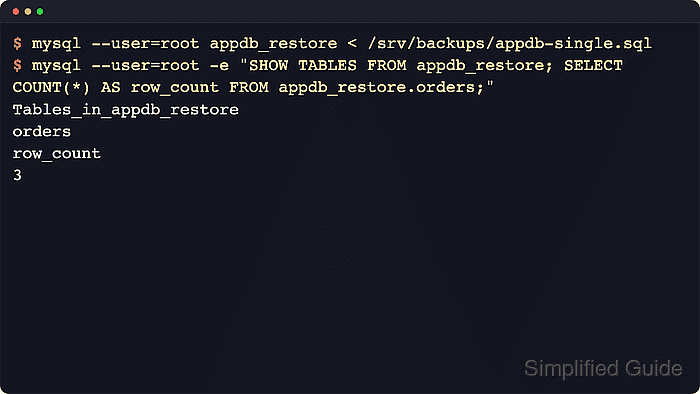
SQL-format backups created with mysqldump or mariadb-dump are replayed through the regular client, which executes the saved CREATE, INSERT, TRIGGER, and related statements in order. Single-database dumps often expect an already existing target database, while dumps created with --databases or --all-databases include CREATE DATABASE and USE statements that choose the destination during import.
Restore commands write to the selected server immediately, so use an empty target database or an isolated restore host before touching production data. The examples use the mariadb client because recent mariadb-dump files can include a sandbox-mode header that older mysql clients do not understand; MySQL dumps use the same input-redirection pattern with the mysql client. Large imports can still expose runtime limits such as max_allowed_packet, connection timeouts, or insufficient disk space, so retry only after fixing the condition that stopped the import.
Steps to restore MySQL or MariaDB database from backup:
- Confirm whether the dump expects a named target database or chooses the database inside the file.
Backups created with --databases or --all-databases include CREATE DATABASE and USE statements. A plain single-database dump normally does not, so the restore command must name the empty target database.
- Create an empty target database for a plain single-database dump.
$ mariadb --user=root -e "CREATE DATABASE appdb_restore CHARACTER SET utf8mb4 COLLATE utf8mb4_unicode_ci;"
Use the source database's character set and collation when the application depends on those defaults.
- Import the uncompressed .sql dump into the empty target database.
$ mariadb --user=root appdb_restore < /srv/backups/appdb-single.sql
The import starts writing immediately. Use the correct host, port, or socket, and point the command at an empty or intentionally disposable database.
If the account does not use socket authentication, an option file, or a MySQL login path, add --password so the client prompts instead of placing the secret in the command.
- Stream a compressed dump into an existing empty database when the backup is stored as .gz.
$ gzip --decompress --stdout /srv/backups/appdb-single.sql.gz | mariadb --user=root appdb_restore_gz
Streaming avoids writing a second full-size .sql file before the import starts. Create appdb_restore_gz first, using the same pattern as the empty target database step.
- Import a dump created with --databases or --all-databases without appending a database name to the client command.
$ mariadb --user=root < /srv/backups/appdb-with-database.sql
Those dumps already contain CREATE DATABASE and USE statements, so adding a database name on the command line can redirect or conflict with statements inside the file.
Current MySQL releases reject DROP DATABASE mysql during reload. If an all-databases dump was created with --add-drop-database and includes the mysql system schema, recreate the dump without that option or remove the offending statement before import.
- Verify that restored data exists in an expected table.
$ mariadb --user=root -e "SELECT COUNT(*) row_count FROM appdb_restore.orders;"
row_count
3
Use a table that should always exist in the application schema, then follow with a targeted sanity query such as SELECT COUNT(*) or SELECT MAX(id) to confirm the restored data is not empty.