How to clone a MySQL or MariaDB database
Cloning a MySQL or MariaDB database creates a separate schema for staging, dry-run migrations, data validation, or application testing without touching the source data set. A clean logical clone also creates a checkpoint before destructive DDL, bulk updates, or upgrade rehearsals.
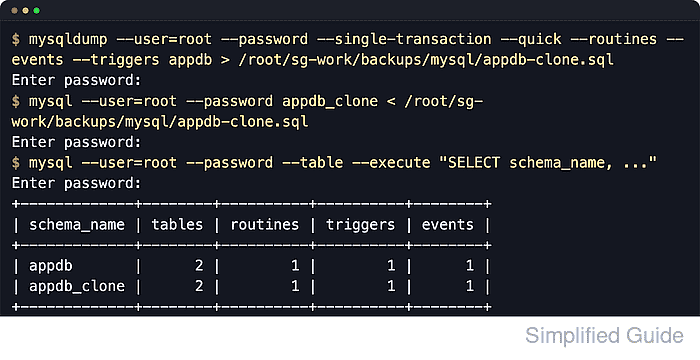
A logical clone is usually a dump-and-reload workflow. The source schema is exported to SQL, an empty destination schema is created with the same default character set and collation, and the SQL file is imported into the new database name. The same flow works on both products, but current MySQL hosts typically use mysqldump and mysql while current MariaDB hosts may expose mariadb-dump and mariadb instead.
The dump copies tables, routines, triggers, events, and row data, but it does not recreate users or schema-level grants automatically. --single-transaction only gives a consistent snapshot for transactional tables such as InnoDB, and current MariaDB dumps can start with a sandbox-mode header that should be restored with a matching current MariaDB client. Keep the destination database empty, keep the dump file private, and avoid schema-changing writes while the dump is running.
Steps to clone a MySQL or MariaDB database:
- Read the source database default character set and collation.
$ mysql --user=root --password --table --execute "SELECT DEFAULT_CHARACTER_SET_NAME, DEFAULT_COLLATION_NAME FROM information_schema.SCHEMATA WHERE SCHEMA_NAME='appdb';"
Enter password:
+----------------------------+------------------------+
| DEFAULT_CHARACTER_SET_NAME | DEFAULT_COLLATION_NAME |
+----------------------------+------------------------+
| utf8mb4                    | utf8mb4_unicode_ci     |
+----------------------------+------------------------+
Replace appdb with the source database name. If the installed SQL client is mariadb rather than mysql, run the same query with that client instead.
- Create a private working directory for the dump file.
$ install --directory --mode=0700 /root/sg-work/backups/mysql
- Set a restrictive file-creation mask for the current shell.
$ umask 077
umask 077 makes new dump files private to the current user in this shell session unless permissions are changed later.
- Create an empty destination database with the same defaults as the source.
$ mysql --user=root --password --execute "CREATE DATABASE appdb_clone CHARACTER SET utf8mb4 COLLATE utf8mb4_unicode_ci;"
Enter password:
No output indicates the database was created successfully.
Import into an empty destination database. If a previous attempt partially loaded objects, drop and recreate the destination database before retrying.
- Dump the source database to an SQL file, including routines, events, and triggers.
$ mysqldump --user=root --password --single-transaction --quick --routines --events --triggers appdb > /root/sg-work/backups/mysql/appdb-clone.sql
Enter password:
Do not add --databases when cloning into a different database name. Current MySQL documentation states that --databases writes CREATE DATABASE and USE statements into the dump, which can restore the data into the original schema name instead of appdb_clone.
--single-transaction gives a consistent snapshot only for InnoDB tables. MyISAM, MEMORY, and other non-transactional tables can still change while the dump is running.
On MariaDB hosts, use mariadb-dump when the mysqldump compatibility binary is not installed.
- Confirm the dump file exists and that the permissions stayed private.
$ ls -lh /root/sg-work/backups/mysql/appdb-clone.sql
-rw------- 1 root root 6.3K Jun  7 04:15 /root/sg-work/backups/mysql/appdb-clone.sql
SQL dumps often contain application data, email addresses, tokens, or other sensitive values. Keep the file private and remove it after the clone has been validated or archived securely.
- Import the dump into the destination database.
$ mysql --user=root --password appdb_clone < /root/sg-work/backups/mysql/appdb-clone.sql
Enter password:
Add --host and --port to the dump and import commands when the source or destination server is remote.
If the dump was created with mariadb-dump on a recent MariaDB release, import it with the matching mariadb client because the dump can begin with a sandbox-mode command that the MySQL mysql client does not understand.
- Compare the source and cloned database object counts.
$ mysql --user=root --password --table --execute "
SELECT
  schema_name,
  (SELECT COUNT(*) FROM information_schema.tables t WHERE t.table_schema = schema_name AND t.table_type = 'BASE TABLE') AS tables,
  (SELECT COUNT(*) FROM information_schema.routines r WHERE r.routine_schema = schema_name) AS routines,
  (SELECT COUNT(*) FROM information_schema.triggers tr WHERE tr.trigger_schema = schema_name) AS triggers,
  (SELECT COUNT(*) FROM information_schema.events e WHERE e.event_schema = schema_name) AS events
FROM (
  SELECT 'appdb' AS schema_name
  UNION ALL
  SELECT 'appdb_clone' AS schema_name
) AS dbs;"
Enter password:
+-------------+--------+----------+----------+--------+
| schema_name | tables | routines | triggers | events |
+-------------+--------+----------+----------+--------+
| appdb       |      2 |        1 |        1 |      1 |
| appdb_clone |      2 |        1 |        1 |      1 |
+-------------+--------+----------+----------+--------+
If the counts do not match, the dump may have missed object types, the import may have stopped on an error, or the source schema changed while the dump was running.
- Run a targeted row-count check against an application table that should exist in both databases.
$ mysql --user=root --password --table --execute "SELECT COUNT(*) AS orders FROM appdb.orders; SELECT COUNT(*) AS orders FROM appdb_clone.orders;"
Enter password:
+--------+
| orders |
+--------+
|      3 |
+--------+
+--------+
| orders |
+--------+
|      3 |
+--------+
Users, roles, and grants are not copied by a single-database dump. Recreate or verify those separately before pointing an application at the cloned database.
- Optionally create a structure-only clone without row data.
$ mysqldump --user=root --password --no-data --routines --events --triggers appdb > /root/sg-work/backups/mysql/appdb-schema.sql
Enter password:
Import the schema-only dump into an empty database when tables and programmable objects are needed without copying application rows.