A schema-only SQL dump captures database structure for review, migration rehearsal, or empty environment rebuilds without copying application rows. It keeps table, view, routine, event, and trigger definitions together while leaving customer data out of the handoff.
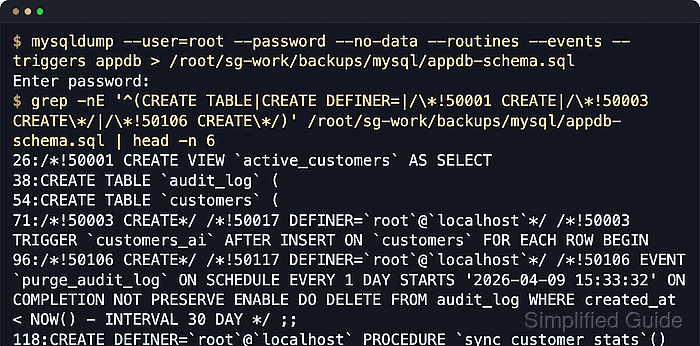
MySQL uses mysqldump for logical exports, while current MariaDB releases use mariadb-dump. The --no-data option suppresses table rows, --routines and --events add stored programs that are not included by default, and --triggers keeps trigger capture explicit even though triggers normally travel with dumped table definitions.
The dump can still expose object names, DEFINER clauses, SQL security context, character-set settings, and procedural logic. Keep the file private, load it into an empty validation database before relying on it, and use a current matching client when possible because current MariaDB dumps can include a sandbox-mode header that older MariaDB clients and MySQL mysql clients do not understand.
Steps to export MySQL or MariaDB database schema only:
- Create a private directory to hold the schema dump.
$ install --directory --mode=0700 /root/sg-work/backups/mysql
- Set a restrictive file-creation mask for the current shell.
$ umask 077
Files created after this command default to mode 600 in the current shell session unless permissions are changed later.
- Export the database structure to an SQL file.
$ mariadb-dump --user=root --password --no-data --routines --events --triggers appdb > /root/sg-work/backups/mysql/appdb-schema.sql
Enter password:
On MySQL hosts, use mysqldump with the same options. On MariaDB hosts, use mariadb-dump because current MariaDB releases no longer guarantee a mysqldump compatibility name.
Avoid --password=secret or -psecret so credentials do not leak into shell history or process listings.
- Confirm the dump file exists and stayed private.
$ ls -lh /root/sg-work/backups/mysql/appdb-schema.sql
-rw------- 1 root root 7.2K Jun  6 20:18 /root/sg-work/backups/mysql/appdb-schema.sql
- Create an empty database for a validation import.
$ mariadb --user=root --password --execute "CREATE DATABASE appdb_schema;"
Enter password:
If the source database uses a non-default character set or collation, create the target database with matching values before the import.
- Import the schema dump into the empty database.
$ mariadb --user=root --password appdb_schema < /root/sg-work/backups/mysql/appdb-schema.sql
Enter password:
Importing into the wrong database name can create or replace objects in an unintended schema, and dumps that contain DEFINER clauses can fail with ERROR 1449 (HY000) when the referenced account does not exist on the target server.
On MySQL hosts, import with mysql. If the file was created with current mariadb-dump, import it with a matching current mariadb client because the sandbox-mode header can fail in older MariaDB or MySQL clients.
- Verify a representative imported table has no rows.
$ mariadb --user=root --password --table -D appdb_schema --execute "SELECT COUNT(*) AS customers FROM customers"
Enter password:
+-----------+
| customers |
+-----------+
|         0 |
+-----------+
Replace customers with a base table from the source schema. A non-zero count means the validation database received row data, so the dump is not structure-only for that table.
- Verify tables and views exist in the imported schema.
$ mariadb --user=root --password --table -D appdb_schema --execute "SHOW FULL TABLES;"
Enter password:
+------------------------+------------+
| Tables_in_appdb_schema | Table_type |
+------------------------+------------+
| active_customers       | VIEW       |
| audit_log              | BASE TABLE |
| customers              | BASE TABLE |
+------------------------+------------+
- Verify stored routines exist when --routines was used.
$ mariadb --user=root --password --table --execute "
SELECT ROUTINE_NAME, ROUTINE_TYPE
FROM information_schema.ROUTINES
WHERE ROUTINE_SCHEMA='appdb_schema';"
Enter password:
+---------------------+--------------+
| ROUTINE_NAME        | ROUTINE_TYPE |
+---------------------+--------------+
| sync_customer_stats | PROCEDURE    |
+---------------------+--------------+
- Verify scheduled events exist when --events was used.
$ mariadb --user=root --password --table --execute "
SELECT EVENT_NAME, STATUS
FROM information_schema.EVENTS
WHERE EVENT_SCHEMA='appdb_schema';"
Enter password:
+-----------------+---------+
| EVENT_NAME      | STATUS  |
+-----------------+---------+
| purge_audit_log | ENABLED |
+-----------------+---------+
- Verify triggers were recreated with the table definitions.
$ mariadb --user=root --password -D appdb_schema --execute "SHOW TRIGGERS\\G"
Enter password:
*************************** 1. row ***************************
             Trigger: customers_ai
               Event: INSERT
               Table: customers
           Statement: BEGIN INSERT INTO audit_log(event_type, customer_id) VALUES ('insert', NEW.id); END
              Timing: AFTER
             Definer: root@localhost
##### snipped #####
mysqldump and mariadb-dump include triggers by default, but keeping --triggers in the export command makes the schema-only intent explicit.

Mohd Shakir Zakaria is a cloud architect with deep roots in software development and open-source advocacy. Certified in AWS, Red Hat, VMware, ITIL, and Linux, he specializes in designing and managing robust cloud and on-premises infrastructures.


