Table of Contents
How to locate and modify MySQL and MariaDB configuration files
Finding the exact MySQL or MariaDB option file before editing keeps routine tuning changes from turning into a startup failure, a silent no-op, or a setting that is overridden elsewhere. The safest workflow is to confirm the active file chain first, then place the change where the server actually reads it.
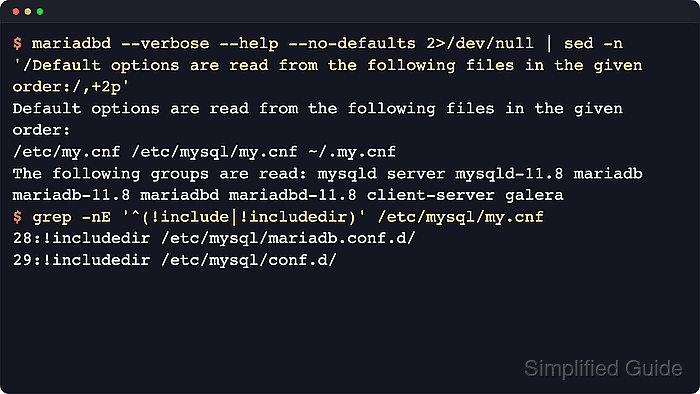
Both products load text option files such as my.cnf or my.ini, read only the option groups relevant to the current program, and let later settings override earlier ones. Linux packages often split server and client defaults across included directories, which makes small override files safer than editing vendor-managed files directly.
Examples below use Linux package installs and systemd units because that is where include chains and service restarts are easiest to verify. The exact paths still vary by platform and packaging, MySQL may also read a server-managed mysqld-auto.cnf file for SET PERSIST values, and a malformed option file can prevent startup, so each change should be followed by both an option-file check and a live server check.
Steps to locate and modify MySQL and MariaDB configuration files:
- Print the option-file search order used by the installed server binary.
$ mariadbd --verbose --help
mariadbd  Ver 11.8.2-MariaDB for debian-linux-gnu on x86_64 (Ubuntu 26.04)
##### snipped #####
Default options are read from the following files in the given order:
/etc/my.cnf /etc/mysql/my.cnf ~/.my.cnf
The following groups are read: mysqld server mysqld-11.8 mariadb mariadb-11.8 mariadbd mariadbd-11.8
client-server galera
##### snipped #####
The output on the local host is authoritative. Use mysqld --verbose --help on MySQL packages. Current MySQL builds often also report /usr/etc/my.cnf and read DATADIR/mysqld-auto.cnf for persisted settings, which should be left to the server rather than edited by hand.
- Inspect the base configuration file for explicit include directories before choosing where to edit.
$ sudo grep -nE '^(!include|!includedir)' /etc/my.cnf /etc/mysql/my.cnf /etc/mysql/mariadb.cnf 2>/dev/null
/etc/mysql/my.cnf:28:!includedir /etc/mysql/conf.d/
/etc/mysql/my.cnf:29:!includedir /etc/mysql/mariadb.conf.d/
/etc/mysql/mariadb.cnf:28:!includedir /etc/mysql/conf.d/
/etc/mysql/mariadb.cnf:29:!includedir /etc/mysql/mariadb.conf.d/
MariaDB documents alphabetical processing inside an included directory, which is why a late name such as z-custom-server.cnf works well there. Current MySQL docs do not guarantee the per-directory read order for !includedir, so use the discovered include chain instead of assuming that a 99-* filename always wins.
- Create a dedicated override file in the last server include directory that the base file actually loads.
$ sudoedit /etc/mysql/mariadb.conf.d/z-custom-server.cnf
On MariaDB packages for Debian and Ubuntu, /etc/mysql/mariadb.conf.d/ is the normal server override location. On MySQL packages, use the last directory referenced by the discovered base file, commonly /etc/mysql/conf.d/ or /etc/mysql/mysql.conf.d/.
- Put server settings under the correct option group instead of mixing client and server defaults.
[mysqld]
max_connections = 300
bind-address = 127.0.0.1
slow_query_log = ON
long_query_time = 2
[mysqld] is the safest cross-compatible group for server options. MariaDB also reads [mariadb] and [mariadbd], while [client] affects client tools such as mysql, mariadb, and mysqldump rather than the server daemon.
- Confirm that the new file is being read before restarting the service.
$ my_print_defaults mysqld
--max_connections=300
--bind-address=127.0.0.1
--slow_query_log=ON
--long_query_time=2
If the expected directives do not appear, the file is either in the wrong path, under the wrong option group, or being overridden later in the include chain.
- Identify the actual systemd unit name before restarting the database service.
$ systemctl list-unit-files mysql.service mariadb.service mysqld.service
UNIT FILE       STATE   PRESET
mariadb.service enabled enabled

1 unit files listed.
Use the discovered unit name in later commands. Depending on packaging, the service may be called mysql, mariadb, or mysqld.
- Restart the database service to apply the on-disk change.
$ sudo systemctl restart mariadb
Restarting drops active database connections, so schedule the change when connected applications can tolerate a short interruption.
- Confirm that the service came back cleanly after the restart.
$ systemctl is-active mariadb
active
If the unit does not return active, inspect the recent journal before editing again.
$ sudo journalctl --unit=mariadb.service --no-pager --lines=50
##### snipped #####
- Verify the live server value after the restart.
$ sudo mariadb --table --execute "SHOW VARIABLES LIKE 'max_connections';"
+-----------------+-------+
| Variable_name   | Value |
+-----------------+-------+
| max_connections | 300   |
+-----------------+-------+
Use mysql with an administrative account on MySQL packages that do not provide the mariadb client command. If the running value still shows the old setting, recheck the include path, the option group, and whether another later file overrides the same variable.
Memory management settings:
Memory-related options decide how much data the server keeps in RAM and how much memory each connection can allocate on demand. Global caches such as innodb_buffer_pool_size change steady-state performance, while per-connection settings such as tmp_table_size and max_heap_table_size matter more when concurrency spikes.
- innodb_buffer_pool_size controls the main cache for InnoDB data and indexes. Size this first on dedicated database hosts because it usually has the largest performance impact.
- key_buffer_size controls the index cache for MyISAM tables. Keep it modest unless MyISAM tables are still in active use.
- tmp_table_size controls the maximum size of an in-memory temporary table. Tune it together with max_heap_table_size so complex sorts do not spill to disk unexpectedly.
- max_heap_table_size controls MEMORY tables and in-memory temp tables. Match it to tmp_table_size when consistent temp-table behavior matters.
Do not size memory settings independently of max_connections. A connection limit increase can multiply per-session memory usage far faster than a single global cache increase.
[mysqld]
innodb_buffer_pool_size = 2G
tmp_table_size = 64M
max_heap_table_size = 64M
Connection and networking settings:
Connection settings decide where the server listens and how aggressively it allocates resources to incoming sessions. Conservative defaults keep the database reachable only from expected networks and reduce the damage from abandoned or bursty connections.
- bind-address controls the local address used to accept TCP connections. Use 127.0.0.1 for local-only access, or a specific service IP when remote clients truly need TCP access.
- max_connections controls the maximum number of simultaneous client sessions. Raise it only after checking memory headroom and application pool behavior.
- skip-name-resolve disables reverse DNS lookups during authentication. Enable it when host lookups add latency or fail intermittently.
- wait_timeout controls the idle timeout for non-interactive sessions. Lower it to reclaim resources from abandoned application connections.
Setting bind-address to 0.0.0.0 listens on every interface. That can expose the database far beyond the intended network if firewall rules, bind targets, or cloud security groups are too broad.
[mysqld]
max_connections = 300
bind-address = 127.0.0.1
skip-name-resolve = ON
wait_timeout = 300
Logging and error management settings:
Logging settings control how much runtime evidence is available during troubleshooting and performance work. They are most useful when enabled deliberately, with storage, privacy, and file ownership considered before the change goes live.
- log_error controls the error log destination. Keep it on a writable path already aligned with the service account and log rotation policy.
- slow_query_log enables slow query logging. Turn it on when tuning query performance or chasing intermittent slowness.
- long_query_time sets the threshold in seconds for slow-query entries. Start with a conservative threshold, then lower it during focused tuning.
- general_log records nearly every client query. Use it only for short diagnostic windows because it grows quickly and can capture sensitive SQL text.
Many package installs already route errors into the service journal or a distro-managed log path. Changing log_error without preparing the directory ownership and rotation policy can create a new startup problem instead of better logging.
[mysqld]
log_error = /var/log/mysql/error.log
general_log = OFF
slow_query_log = ON
long_query_time = 2
Performance tuning recommendations:
- Change one cluster of related variables at a time, then verify the live values before moving on to the next file edit.
- Prefer small override files in included directories over repeated edits to vendor-managed base files.
- Keep a comment above each non-default setting explaining the workload reason or incident that justified it.
- Recheck the effective option chain after package upgrades because packaged include files and service unit aliases can change.