Table of Contents
How to clear saved credentials for network share in Windows
Clearing saved login details for a network share prevents Windows 11 from automatically reusing the wrong account when accessing SMB shared folders. Removing stale credentials is a common fix for repeated password prompts, Access is denied errors, or switching between local and domain accounts for the same file server. On shared workstations, it also reduces the risk of old passwords lingering in the credential cache.
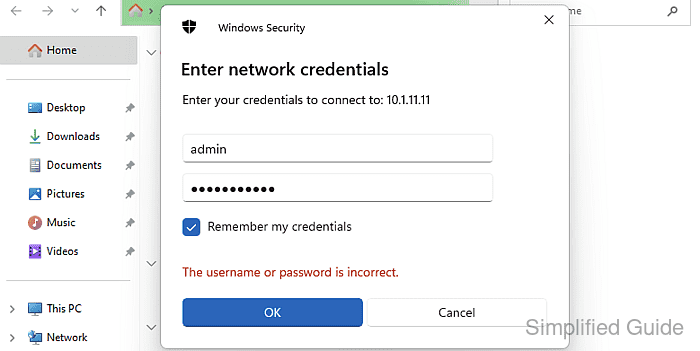
Windows stores saved usernames and passwords in Credential Manager under Windows Credentials, keyed by a Target name such as a server hostname, fully-qualified domain name, or IP address. When connecting to \\server\share, Windows can reuse an existing SMB session, fall back to a stored credential, or prompt via the Windows Security credential dialog depending on what is already cached. The same credential store can be queried and modified from the command line using cmdkey.
Only one set of SMB credentials per server can be active per logon session, so an existing connection may continue working even after a stored credential is removed until the session is disconnected. Removing the wrong entry can also impact other saved logins that share a similar Target name (for example, Remote Desktop targets), so confirm the target before deletion. Disconnecting a share can interrupt open files on the remote server.
Methods to delete saved username and password for network share in Windows:
Steps to clear Windows Credential for shared folders access in Windows 11 using Credential Manager:
- Open Credential Manager through the Windows search bar.
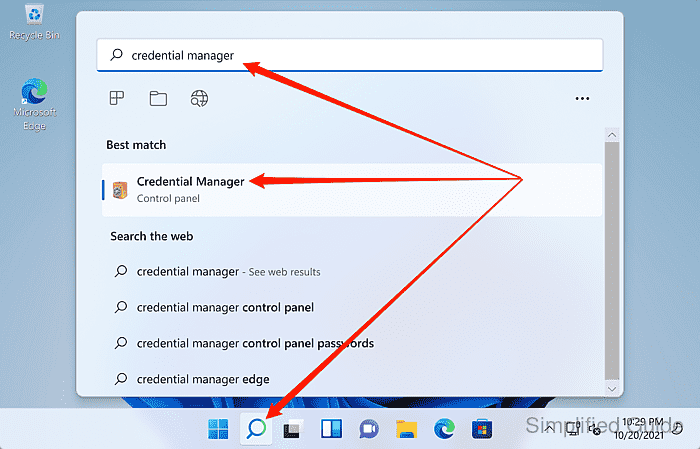
Press Win+R and run control /name Microsoft.CredentialManager to open Credential Manager directly.
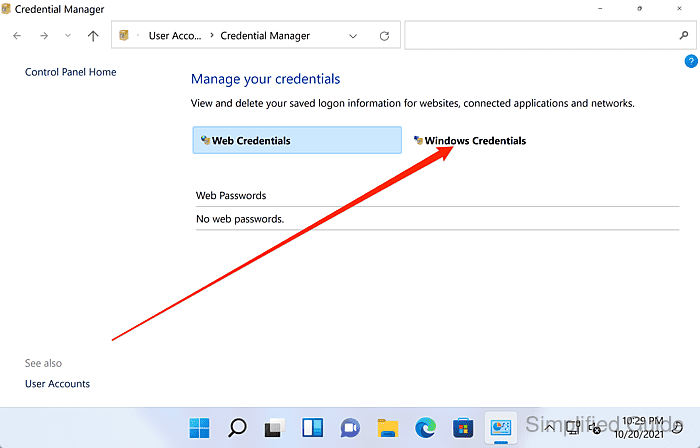
- Select the Windows Credentials tab.
- Expand the credential entry for the server or IP address used by the share.
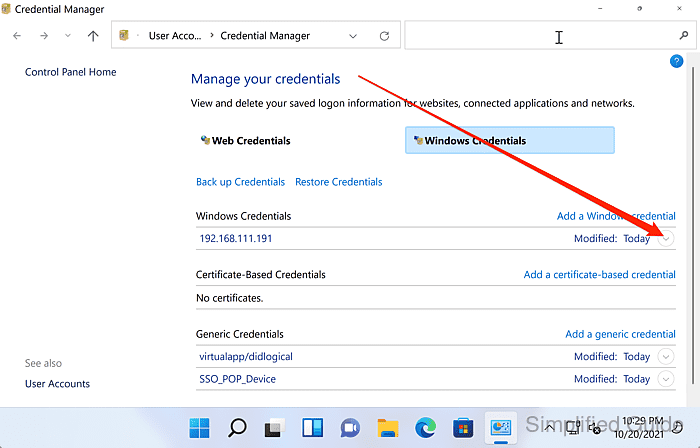
The same server can appear multiple times (hostname, FQDN, IP), so remove every matching entry to prevent fallback.
- Click Remove for the selected credential.
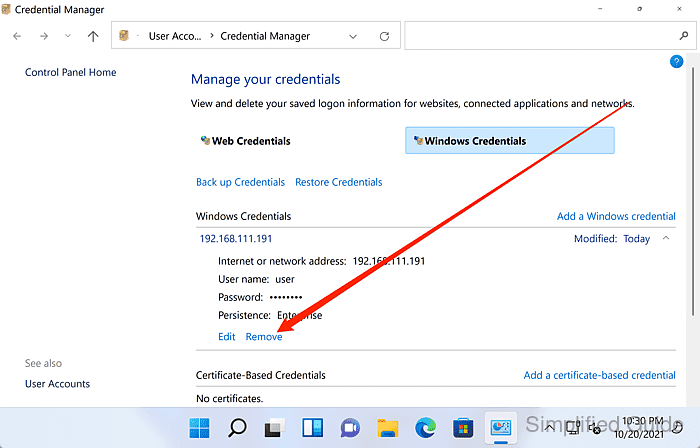
Removing the wrong credential can break saved logins for other services, so verify the Target name before deleting.
- Confirm the deletion when prompted.
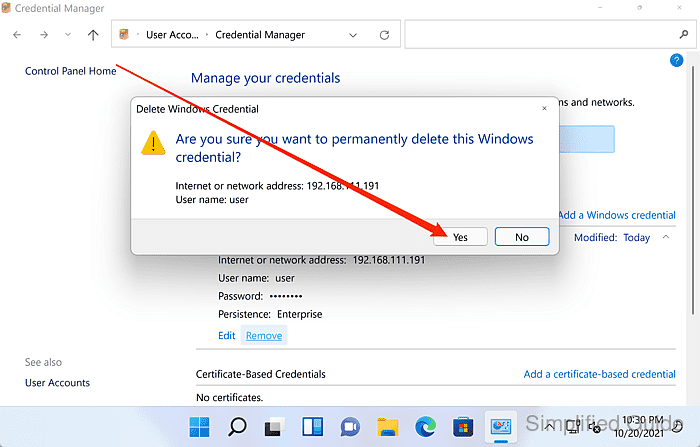
- Repeat the removal for other matching entries as needed.
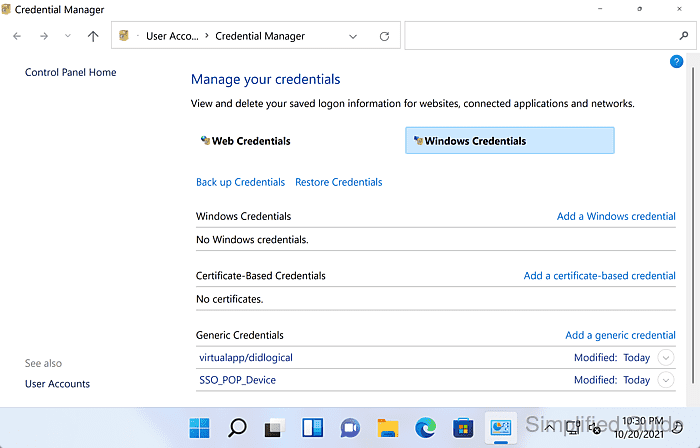
Cached SMB sessions can keep using the old login until the connection is disconnected or Windows is rebooted.
- Disconnect any existing connection to the share in File Explorer.
Disconnecting a mapped drive or open session can interrupt open files on the share.
- Open the share again to confirm a Windows Security credential prompt appears.
Use DOMAIN\username for domain accounts, and leave Remember my credentials unchecked for a one-time login.
Steps to clear Windows Credential for shared folders access in Windows 11 using cmdkey:
- Open an elevated Command Prompt session.
Windows PowerShell works with the same cmdkey and net use commands.
- List all the stored credentials.
$ cmdkey /list Currently stored credentials: Target: WindowsLive:target=virtualapp/didlogical Type: Generic User: 02erbobtpesylcou Local machine persistence Target: Domain:target=10.1.11.11 Type: Domain Password User: admin - Note the exact Target value for the share credential.
Target: Domain:target=10.1.11.11
- Delete the specific credential using cmdkey.
$ cmdkey /delete:"Domain:target=10.1.11.11"

CMDKEY: Credential deleted successfully.
- Verify that the credential has been removed.
$ cmdkey /list Currently stored credentials: Target: WindowsLive:target=virtualapp/didlogical Type: Generic User: 02erbobtpesylcou Local machine persistence - List active network share connections to confirm an SMB session is not still connected.
$ net use

New connections will be remembered.

Status       Local     Remote                    Network
-------------------------------------------------------------------------------
OK           Z:        \\10.1.11.11\shared        Microsoft Windows Network
The command completed successfully.
- Disconnect the active share connection to force Windows to request credentials again.
$ net use \\10.1.11.11\shared /delete

The command completed successfully.
Disconnecting a share can terminate open file operations on the remote server.
- Open the share again to confirm a Windows Security credential prompt appears.