How to create a heatmap in Matplotlib
A heatmap exposes patterns across two categorical dimensions that are difficult to spot in a table. Matplotlib can map a rectangular numeric array to color while retaining row and column labels, making the chart suitable for operational counts such as team queues across weekdays.
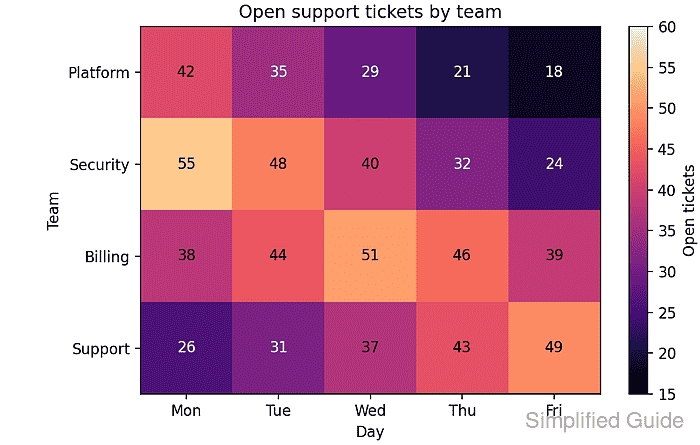
The Axes.imshow() method positions array rows vertically and columns horizontally, with the first matrix row at the top by default. Explicit tick locations keep every displayed label aligned with the intended row or column.
Cell annotations suit compact matrices where exact values matter alongside color. A colorbar explains the shared scale, while a contrast threshold keeps each annotation readable across the dark-to-light magma colormap.
Related: How to add a colorbar in Matplotlib
Related: How to set a colormap in Matplotlib
Related: How to fix overlapping labels in Matplotlib
Steps to create a Matplotlib heatmap:
- Create create_heatmap.py with the input data and output path.
- create_heatmap.py
from pathlib import Path

import matplotlib.pyplot as plt
import numpy as np


queue_counts = np.array(
    [
        [42, 35, 29, 21, 18],
        [55, 48, 40, 32, 24],
        [38, 44, 51, 46, 39],
        [26, 31, 37, 43, 49],
    ]
)

row_labels = ["Platform", "Security", "Billing", "Support"]
column_labels = ["Mon", "Tue", "Wed", "Thu", "Fri"]
output_path = Path("heatmap-create.png")
The queue_counts array must be rectangular. Its row count must match row_labels, and its column count must match column_labels.
- Append the figure and scalar image layer below the output path.
fig, ax = plt.subplots(figsize=(6.6, 4.2), layout="constrained")
image = ax.imshow(queue_counts, cmap="magma", vmin=15, vmax=60)
vmin and vmax keep the color scale fixed at 15 through 60 instead of deriving new limits whenever the matrix changes.
- Add the plot presentation block below the imshow() call.
ax.set_title("Open support tickets by team")
ax.set_xlabel("Day")
ax.set_ylabel("Team")
ax.set_xticks(range(len(column_labels)), labels=column_labels)
ax.set_yticks(range(len(row_labels)), labels=row_labels)
fig.colorbar(image, ax=ax, label="Open tickets")
Passing image to fig.colorbar() ties the colorbar to the same colormap and numeric limits as the heatmap cells.
- Append the cell annotation loop below the colorbar.
for row_index, row in enumerate(queue_counts):
    for column_index, value in enumerate(row):
        text_color = "black" if image.norm(value) > 0.62 else "white"
        ax.text(
            column_index,
            row_index,
            value,
            ha="center",
            va="center",
            color=text_color,
        )
image.norm(value) expresses each value on the heatmap's 0-to-1 color scale. The threshold switches annotations to black on the lighter end of magma.
- Complete create_heatmap.py with the PNG export and console report.
fig.savefig(output_path, dpi=160)
plt.close(fig)

print(f"matrix: {queue_counts.shape[0]} rows x {queue_counts.shape[1]} columns")
print(f"range: {queue_counts.min()} to {queue_counts.max()}")
print(f"saved: {output_path}")
- Compare the assembled create_heatmap.py file with the complete source.
- create_heatmap.py
from pathlib import Path

import matplotlib.pyplot as plt
import numpy as np


queue_counts = np.array(
    [
        [42, 35, 29, 21, 18],
        [55, 48, 40, 32, 24],
        [38, 44, 51, 46, 39],
        [26, 31, 37, 43, 49],
    ]
)

row_labels = ["Platform", "Security", "Billing", "Support"]
column_labels = ["Mon", "Tue", "Wed", "Thu", "Fri"]
output_path = Path("heatmap-create.png")

fig, ax = plt.subplots(figsize=(6.6, 4.2), layout="constrained")
image = ax.imshow(queue_counts, cmap="magma", vmin=15, vmax=60)

ax.set_title("Open support tickets by team")
ax.set_xlabel("Day")
ax.set_ylabel("Team")
ax.set_xticks(range(len(column_labels)), labels=column_labels)
ax.set_yticks(range(len(row_labels)), labels=row_labels)
fig.colorbar(image, ax=ax, label="Open tickets")

for row_index, row in enumerate(queue_counts):
    for column_index, value in enumerate(row):
        text_color = "black" if image.norm(value) > 0.62 else "white"
        ax.text(
            column_index,
            row_index,
            value,
            ha="center",
            va="center",
            color=text_color,
        )

fig.savefig(output_path, dpi=160)
plt.close(fig)

print(f"matrix: {queue_counts.shape[0]} rows x {queue_counts.shape[1]} columns")
print(f"range: {queue_counts.min()} to {queue_counts.max()}")
print(f"saved: {output_path}")
- Run create_heatmap.py from the Python environment that has Matplotlib installed.
$ python create_heatmap.py
matrix: 4 rows x 5 columns
range: 18 to 55
saved: heatmap-create.png
- Validate heatmap-create.png as a readable PNG file.
$ python -c "from PIL import Image; image = Image.open('heatmap-create.png'); image.verify(); print(f'{image.format} {image.size[0]}x{image.size[1]} {image.mode}')"
PNG 1056x672 RGBA
Pixel dimensions can change when figsize or dpi changes, but Image.verify() raises an exception when the file is not a valid image.
- Confirm that heatmap-create.png shows four labeled team rows, five weekday columns, readable values, and the Open tickets colorbar.