How to add a colorbar in Matplotlib
Color becomes quantitative in a Matplotlib plot only when readers can connect each shade to a number. A colorbar provides that translation, but it must share the same mapping object as the artist that paints the data.
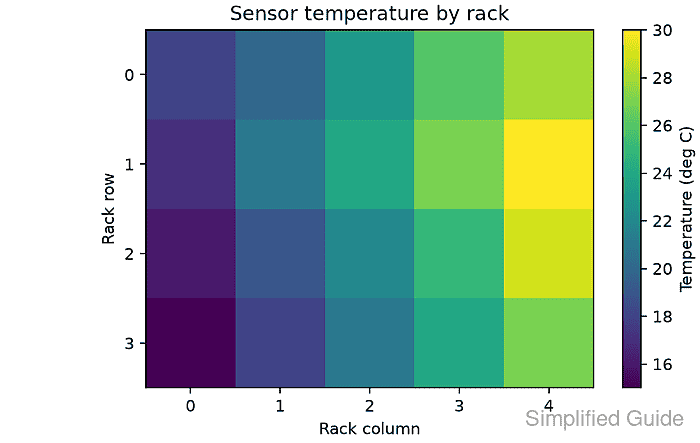
The AxesImage returned by imshow() retains both the colormap and its normalization. Passing that object to Figure.colorbar() keeps the plotted colors and the displayed scale tied to one scalar-mappable relationship.
The ax argument identifies which plot should yield room for the scale, while the returned Colorbar controls its label and tick positions. Comparing the mappable limits with the colorbar ticks exposes a detached or mismatched scale before the figure is shared.
Related: How to create a heatmap in Matplotlib
Related: How to set a colormap in Matplotlib
Related: How to fix overlapping labels in Matplotlib
Steps to connect a Matplotlib colorbar to its scalar mappable:
- Encode the temperature grid on a fixed 15-to-30 scale with NumPy and Normalize.
import matplotlib.pyplot as plt
import numpy as np
from matplotlib.colors import Normalize


measurements = np.array(
    [
        [18, 20, 23, 26, 28],
        [17, 21, 24, 27, 30],
        [16, 19, 22, 25, 29],
        [15, 18, 21, 24, 27],
    ]
)
norm = Normalize(vmin=15, vmax=30)
- Retain the AxesImage returned by imshow() when drawing the normalized grid on ax.
fig, ax = plt.subplots(figsize=(6, 3.8), layout="constrained")
image = ax.imshow(measurements, cmap="viridis", norm=norm)
The image object carries the same viridis colormap and Normalize instance that paint the grid.
- Attach the colorbar to ax with image as its scalar mappable.
colorbar = fig.colorbar(image, ax=ax)
Passing ax=ax identifies the axes that yields space for the new colorbar axes.
- Label the returned Colorbar with the temperature unit encoded by the grid.
colorbar.set_label("Temperature (deg C)")
- Set the colorbar ticks to values that span the 15-to-30 normalization.
colorbar.set_ticks([15, 20, 25, 30])
- Save the assembled example as colorbar-add.py with assertions for the mappable limits, colorbar ticks, and temperature unit.
- colorbar-add.py
from pathlib import Path

import matplotlib

matplotlib.use("Agg")

import matplotlib.pyplot as plt
import numpy as np
from matplotlib.colors import Normalize


measurements = np.array(
    [
        [18, 20, 23, 26, 28],
        [17, 21, 24, 27, 30],
        [16, 19, 22, 25, 29],
        [15, 18, 21, 24, 27],
    ]
)
norm = Normalize(vmin=15, vmax=30)

fig, ax = plt.subplots(figsize=(6, 3.8), layout="constrained")
image = ax.imshow(measurements, cmap="viridis", norm=norm)

ax.set_title("Sensor temperature by rack")
ax.set_xlabel("Rack column")
ax.set_ylabel("Rack row")
ax.set_xticks(range(measurements.shape[1]))
ax.set_yticks(range(measurements.shape[0]))

colorbar = fig.colorbar(image, ax=ax)
colorbar.set_label("Temperature (deg C)")
colorbar.set_ticks([15, 20, 25, 30])

lower, upper = image.get_clim()
ticks = colorbar.get_ticks()
label = colorbar.ax.get_ylabel()

assert (lower, upper) == (15.0, 30.0)
np.testing.assert_allclose(ticks, [15, 20, 25, 30])
assert label == "Temperature (deg C)"

output = Path("colorbar-add.png")
fig.savefig(output, dpi=160)
plt.close(fig)

rendered = plt.imread(output)

print(f"colorbar limits: {lower:.1f} to {upper:.1f}")
print("colorbar ticks:", ", ".join(f"{tick:g}" for tick in ticks))
print(f"colorbar label: {label}")
print(f"saved: {output}")
print(f"image shape: {rendered.shape[0]} x {rendered.shape[1]} x {rendered.shape[2]}")
- Run colorbar-add.py to verify the shared limits, ticks, and temperature unit.
$ python3 colorbar-add.py
colorbar limits: 15.0 to 30.0
colorbar ticks: 15, 20, 25, 30
colorbar label: Temperature (deg C)
saved: colorbar-add.png
image shape: 608 x 960 x 4
An assertion failure stops the export when the mappable limits, colorbar ticks, or scale label diverge. The saved figure should show ticks at 15, 20, 25, and 30 beside Temperature (deg C).