How to set a log axis scale in Matplotlib
Linear axes make equal numeric gaps look equal, which can bury patterns when a Matplotlib plot spans several powers of ten. A logarithmic axis spaces ticks by ratio, so growth from 100 to 1,000 uses the same visual interval as growth from 10,000 to 100,000.

The object-oriented Axes API keeps the scale change attached to one subplot. Use ax.set_yscale(“log”) for vertical values or ax.set_xscale(“log”) for horizontal values; the example changes only the y-axis so the year labels remain linear.
Use positive values when every point must remain visible on a standard logarithmic axis. Matplotlib places major ticks at powers of 10 and clips non-positive values by default, while symlog adds a linear region around zero when the plot must retain values on both sides of zero.
Related: How to create a line chart in Matplotlib
Related: How to set axis limits in Matplotlib
Related: How to format tick labels in Matplotlib
Steps to set a Matplotlib axis to log scale:
- Create log_axis_scale.py with the positive request values used by the logarithmic y-axis.
- log_axis_scale.py
import matplotlib.pyplot as plt

years = [2022, 2023, 2024, 2025, 2026]
requests = [250, 1800, 12600, 94000, 710000]
The default logarithmic transform clips values at zero or below; filter, mask, or use symlog when those values must remain visible.
- Append the Axes construction and line plot below the request values.
fig, ax = plt.subplots(layout="constrained")
ax.plot(years, requests, marker="o")
- Append the logarithmic y-axis setting immediately after the line plot.
ax.set_yscale("log")
- Append the plot presentation section below the scale setting.
ax.set_xticks(years)
ax.set_xlabel("Year")
ax.set_ylabel("Requests")
ax.set_title("Requests by year")
ax.grid(True, which="both", axis="y", color="0.9")
- Append the scale check and PNG export below the grid setting.
x_scale = ax.get_xscale()
y_scale = ax.get_yscale()

assert x_scale == "linear"
assert y_scale == "log"

fig.savefig("requests-log-axis.png", dpi=150)

print(f"x scale: {x_scale}")
print(f"y scale: {y_scale}")
print("saved: requests-log-axis.png")
- Compare the assembled log_axis_scale.py file with the complete script.
- log_axis_scale.py
import matplotlib.pyplot as plt

years = [2022, 2023, 2024, 2025, 2026]
requests = [250, 1800, 12600, 94000, 710000]

fig, ax = plt.subplots(layout="constrained")
ax.plot(years, requests, marker="o")

ax.set_yscale("log")

ax.set_xticks(years)
ax.set_xlabel("Year")
ax.set_ylabel("Requests")
ax.set_title("Requests by year")
ax.grid(True, which="both", axis="y", color="0.9")

x_scale = ax.get_xscale()
y_scale = ax.get_yscale()

assert x_scale == "linear"
assert y_scale == "log"

fig.savefig("requests-log-axis.png", dpi=150)

print(f"x scale: {x_scale}")
print(f"y scale: {y_scale}")
print("saved: requests-log-axis.png")
- Run log_axis_scale.py from the Python environment that has Matplotlib installed.
$ python log_axis_scale.py
x scale: linear
y scale: log
saved: requests-log-axis.png
- Confirm the saved plot uses powers-of-ten tick spacing on the y-axis.
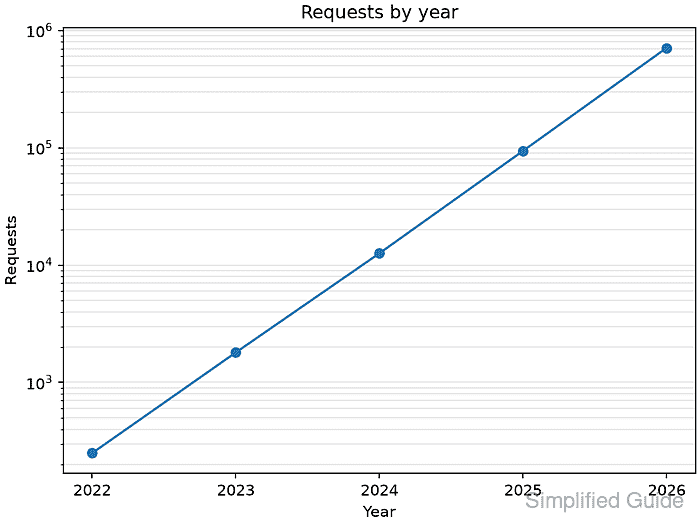
The printed y scale: log value identifies the active scale, and equal vertical intervals in the saved plot represent equal ratios.