How to set axis limits in Matplotlib
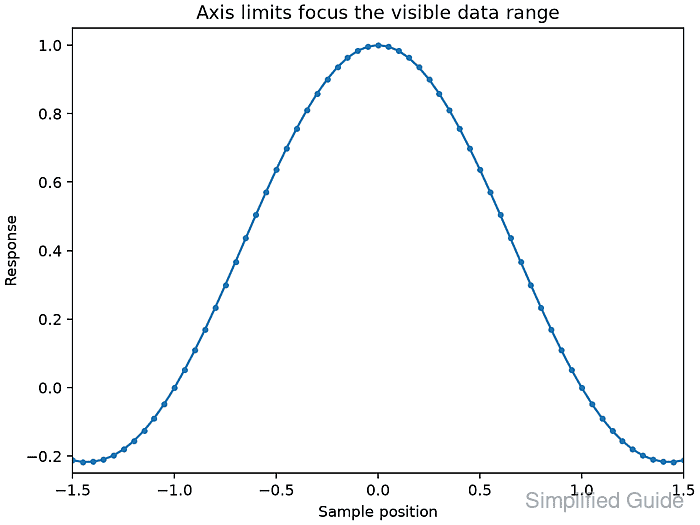
Automatic scaling keeps every plotted point in view, but the full extent can hide detail inside a smaller interval. Explicit axis limits create a focused viewport without removing or changing the underlying x and y values.

Choose bounds in data coordinates rather than from tick positions or screen distances. Measuring the data range first makes the tradeoff visible: narrower bounds crop plotted values, while wider bounds add empty space around them.
Each Matplotlib Axes stores the data extent separately from the displayed view. The Axes.set_xlim() and Axes.set_ylim() methods replace the automatically selected view bounds, and the matching getter methods report the interval that will be rendered or saved.
Steps to choose and set a Matplotlib axis viewport:
- Measure the full x and y data ranges in axis-limits.py.
- axis-limits.py
import numpy as np
import matplotlib.pyplot as plt

x = np.linspace(-3, 3, 121)
y = np.sinc(x)

data_xlim = (float(x.min()), float(x.max()))
data_ylim = (float(y.min()), float(y.max()))

print(f"data_xlim=({data_xlim[0]:.1f}, {data_xlim[1]:.1f})")
print(f"data_ylim=({data_ylim[0]:.4f}, {data_ylim[1]:.4f})")
- Run the range calculation to expose the coordinates available for cropping.
$ python3 axis-limits.py
data_xlim=(-3.0, 3.0)
data_ylim=(-0.2168, 1.0000)
- Choose explicit x and y view bounds below the range calculation.
view_xlim = (-1.5, 1.5)
view_ylim = (-0.25, 1.05)
Bounds inside the data range crop values; bounds outside it add surrounding space. Reversing either pair also reverses that axis direction.
- Plot the complete data series below the view-bound definitions.
fig, ax = plt.subplots(layout="constrained")
ax.plot(x, y, marker="o", markersize=3)
ax.set_xlabel("Sample position")
ax.set_ylabel("Response")
ax.set_title("Axis limits focus the visible data range")
- Apply the selected tuples to the Axes view.
ax.set_xlim(view_xlim)
ax.set_ylim(view_ylim)
- Reject an active viewport that differs from the selected bounds.
actual_xlim = ax.get_xlim()
actual_ylim = ax.get_ylim()

if actual_xlim != view_xlim or actual_ylim != view_ylim:
    raise RuntimeError(f"Unexpected viewport: {actual_xlim}, {actual_ylim}")

print(f"view_xlim=({actual_xlim[0]:.1f}, {actual_xlim[1]:.1f})")
print(f"view_ylim=({actual_ylim[0]:.2f}, {actual_ylim[1]:.2f})")
- Save the focused figure after the viewport check.
output = "axis-limits-focused-plot.png"
fig.savefig(output, dpi=160)
print(f"saved={output}")
- Execute the completed program to confirm the measured range and visible interval.
$ python3 axis-limits.py
data_xlim=(-3.0, 3.0)
data_ylim=(-0.2168, 1.0000)
view_xlim=(-1.5, 1.5)
view_ylim=(-0.25, 1.05)
saved=axis-limits-focused-plot.png