How to review Mastodon moderation reports
A Mastodon moderation queue collects reports about accounts, statuses, and server rules so staff can decide whether to dismiss a complaint or act against the reported account. The Admin API gives moderators a repeatable way to inspect a report and record the outcome from a controlled terminal session.
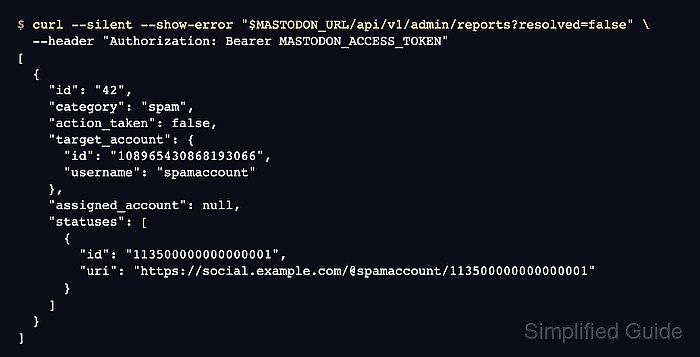
The report record includes the reporter, the target account, attached statuses, matched rules, assignment state, and whether action has already been taken. A moderator token needs the Manage Reports permission with admin:read:reports and admin:write:reports scopes for the report queue, while account-level actions also need Manage Users and admin:write:accounts.
The moderation decision remains separate from the report record. Resolving a report with no further action is different from limiting, disabling, or suspending the target account, and account actions should include the report ID so the moderation history points back to the complaint.
Related: How to create a Mastodon access token
Related: How to suspend a Mastodon user
Related: How to block a Mastodon instance
Steps to review Mastodon moderation reports with the Admin API:
- Set shell variables for the instance URL and moderator token.
$ export MASTODON_URL="https://social.example.com"
$ export MASTODON_ACCESS_TOKEN="MASTODON_ACCESS_TOKEN"
The token needs admin:read:reports to inspect reports and admin:write:reports to assign, update, resolve, or reopen them. Add admin:write:accounts only when the same token will apply account actions.
Related: How to create a Mastodon access token - List unresolved reports.
$ curl --fail-with-body --silent --show-error \
  "$MASTODON_URL/api/v1/admin/reports?resolved=false&limit=5" \
  --header "Authorization: Bearer $MASTODON_ACCESS_TOKEN"
[
  {
    "id": "42",
    "action_taken": false,
    "category": "other",
    "comment": "Bulk mention spam from this account.",
    "target_account": {
      "id": "108965430868193066",
      "username": "spamaccount",
      "domain": null
    },
    "assigned_account": null,
    "statuses": [
      {
        "id": "113500000000000001",
        "uri": "https://social.example.com/@spamaccount/113500000000000001"
      }
    ],
    "rules": []
  }
]
- Store the selected report ID and target account ID.
$ export MASTODON_REPORT_ID="42"
$ export MASTODON_TARGET_ACCOUNT_ID="108965430868193066"
- Open the selected report.
$ curl --fail-with-body --silent --show-error \
  "$MASTODON_URL/api/v1/admin/reports/$MASTODON_REPORT_ID" \
  --header "Authorization: Bearer $MASTODON_ACCESS_TOKEN"
{
  "id": "42",
  "action_taken": false,
  "category": "other",
  "comment": "Bulk mention spam from this account.",
  "account": {
    "username": "reporter"
  },
  "target_account": {
    "id": "108965430868193066",
    "username": "spamaccount",
    "domain": null
  },
  "statuses": [
    {
      "id": "113500000000000001",
      "uri": "https://social.example.com/@spamaccount/113500000000000001"
    }
  ],
  "rules": []
}
Review the comment, target_account, attached statuses, and rules before changing the report state.
- Assign the report to the moderator token owner.
$ curl --fail-with-body --silent --show-error --request POST \
  "$MASTODON_URL/api/v1/admin/reports/$MASTODON_REPORT_ID/assign_to_self" \
  --header "Authorization: Bearer $MASTODON_ACCESS_TOKEN"
{
  "id": "42",
  "action_taken": false,
  "assigned_account": {
    "username": "moderator"
  }
}
- Correct the report category when the initial classification is wrong.
$ curl --fail-with-body --silent --show-error --request PUT \
  "$MASTODON_URL/api/v1/admin/reports/$MASTODON_REPORT_ID" \
  --header "Authorization: Bearer $MASTODON_ACCESS_TOKEN" \
  --data-urlencode "category=spam"
{
  "id": "42",
  "action_taken": false,
  "category": "spam",
  "rules": []
}
Use category=violation with rule_ids[] values when the report should point to specific instance rules.
- Resolve the report with no account action when the complaint does not require a sanction.
$ curl --fail-with-body --silent --show-error --request POST \
  "$MASTODON_URL/api/v1/admin/reports/$MASTODON_REPORT_ID/resolve" \
  --header "Authorization: Bearer $MASTODON_ACCESS_TOKEN"
{
  "id": "42",
  "action_taken": true,
  "action_taken_at": "2026-06-27T08:45:13.000Z",
  "category": "spam"
}
- Apply an account action instead when the report requires moderation against the target account.
$ curl --fail-with-body --silent --show-error --request POST \
  "$MASTODON_URL/api/v1/admin/accounts/$MASTODON_TARGET_ACCOUNT_ID/action" \
  --header "Authorization: Bearer $MASTODON_ACCESS_TOKEN" \
  --data-urlencode "type=silence" \
  --data-urlencode "report_id=$MASTODON_REPORT_ID" \
  --data-urlencode "text=Limited after reviewing report 42 for repeated spam." \
  --data-urlencode "send_email_notification=true"
{}
This changes the target account and can resolve other open reports against the same account. Use type=suspend only when the moderation decision is to suspend the account.
Related: How to suspend a Mastodon user - Verify that the report is closed.
$ curl --fail-with-body --silent --show-error \
  "$MASTODON_URL/api/v1/admin/reports/$MASTODON_REPORT_ID" \
  --header "Authorization: Bearer $MASTODON_ACCESS_TOKEN"
{
  "id": "42",
  "action_taken": true,
  "action_taken_at": "2026-06-27T08:45:13.000Z",
  "category": "spam",
  "assigned_account": {
    "username": "moderator"
  },
  "action_taken_by_account": {
    "username": "moderator"
  }
}