How to troubleshoot Mastodon error pages
Mastodon shows a generic error page when the web application catches a server-side failure and hides the stack trace from visitors. Administrators need to connect that page load to the web process log before changing services, because the visible page usually says less than the request headers and Rails journal entry.
In a source install, nginx forwards browser traffic to mastodon-web, while mastodon-sidekiq handles background jobs and mastodon-streaming serves streaming API traffic. A public page error normally starts with mastodon-web, but missing assets, failed database migrations, Redis or PostgreSQL outages, and proxy upstream failures can all surface as similar browser failures.
The hostname social.example.com represents the failing server. Container deployments use the same triage order but read the web, Sidekiq, streaming, database, Redis, and reverse-proxy logs from their container runtime; keep any temporary debug logging short-lived because Mastodon logs to standard output.
Related: How to configure a Mastodon domain
Related: How to monitor Mastodon Sidekiq queues
Related: How to upgrade Mastodon
Steps to troubleshoot Mastodon error pages:
- Capture the response headers from the failing Mastodon page.
$ curl -I https://social.example.com/
HTTP/2 500
server: Mastodon
content-type: text/html; charset=utf-8
x-request-id: a24e0d2b-86a8-4d11-8a5f-d3bb05a41e19
The public error page hides internal exception details. The x-request-id value is the log correlation key for the failed request.
Tool: HTTP Header Checker - Check the reverse proxy when the response has 502, 504, or no x-request-id header.
$ sudo journalctl -u nginx --since "10 minutes ago" --no-pager
Jun 27 08:16:42 social.example.com nginx[942]: connect() failed (111: Connection refused) while connecting to upstream, client: 198.51.100.42, request: "GET / HTTP/2.0", upstream: "http://127.0.0.1:3000/"
A proxy-only failure usually means nginx could not reach mastodon-web, TLS or proxy configuration is wrong, or the request is stopping before Rails can assign a request ID.
Related: How to configure a Mastodon domain - Search the mastodon-web journal for the request ID.
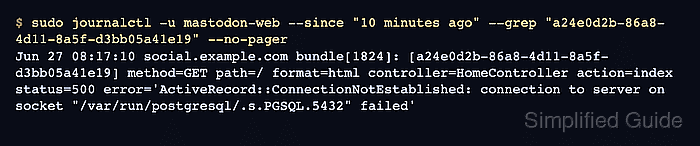
$ sudo journalctl -u mastodon-web --since "10 minutes ago" --grep "a24e0d2b-86a8-4d11-8a5f-d3bb05a41e19" --no-pager
Jun 27 08:17:10 social.example.com bundle[1824]: [a24e0d2b-86a8-4d11-8a5f-d3bb05a41e19] method=GET path=/ format=html controller=HomeController action=index status=500 error='ActiveRecord::ConnectionNotEstablished: connection to server on socket "/var/run/postgresql/.s.PGSQL.5432" failed'
Mastodon writes Rails errors to the service log, not to a normal /home/mastodon/live/log/production.log file.
- Check the application and dependency services.
$ sudo systemctl is-active mastodon-web mastodon-sidekiq mastodon-streaming postgresql redis-server
active
active
active
failed
active
The output follows the service order in the command. A failed postgresql or redis-server line can explain web errors even when mastodon-web itself is still running.
- Inspect the failed service before restarting it.
$ sudo systemctl status postgresql --no-pager
× postgresql.service - PostgreSQL RDBMS
     Loaded: loaded (/usr/lib/systemd/system/postgresql.service; enabled)
     Active: failed (Result: exit-code) since Sat 2026-06-27 08:16:49 UTC; 2min ago
##### snipped #####
Jun 27 08:16:49 social.example.com systemd[1]: postgresql.service: Failed with result 'exit-code'.
Restarting a failed database or Redis service without reading the first error can hide disk, memory, permission, or migration clues that explain the Mastodon page failure.
- Compare an API endpoint when the web UI fails after an upgrade.
$ curl -I https://social.example.com/api/v2/instance
HTTP/2 200
server: Mastodon
content-type: application/json; charset=utf-8
x-request-id: c2f68074-9924-4550-9a98-2f88f8a982ce
If the API answers but the browser UI still shows an error page after an upgrade, check the front-end asset build path before changing domain or database settings.
Related: How to upgrade Mastodon - Restart the affected Mastodon service after the logged cause is corrected.
$ sudo systemctl restart mastodon-web
Restart mastodon-sidekiq or mastodon-streaming only when the log signal points to those services; avoid restarting every Mastodon process as a substitute for identifying the failed component.
- Retest the original Mastodon page.
$ curl -I https://social.example.com/
HTTP/2 200
server: Mastodon
content-type: text/html; charset=utf-8
x-request-id: b17fd671-3ad5-4127-8122-9507e8c1f93a
A successful retest should remove the original error page, and the new request ID should not produce a fresh stack trace in mastodon-web.