How to use MCP tools with LlamaIndex agents
Agent tools are often managed outside the Python process that runs an application. Model Context Protocol, or MCP, gives a LlamaIndex agent a shared way to discover those external tools and call them through the normal agent tool list.
The llama-index-tools-mcp package provides BasicMCPClient for the MCP connection and McpToolSpec for converting server tools into LlamaIndex tool objects. The local process transport keeps the smoke test self-contained by starting a small stdio server from a Python file.
The smoke test uses MockFunctionCallingLLM so no hosted model key or production MCP server is required. After the agent lists lookup_ticket and returns the tool result, replace the local server command and deterministic LLM with the service endpoint and function-calling model used by the application.
Steps to use MCP tools with a LlamaIndex FunctionAgent:
- Install LlamaIndex core and the MCP tools package in the active Python environment.
$ python3 -m pip install --upgrade llama-index-core llama-index-tools-mcp
Successfully installed llama-index-core-0.14.23 llama-index-tools-mcp-0.4.8
Use a project virtual environment before installing packages when the system Python environment is shared.
Related: How to install LlamaIndex with pip - Create a local MCP server that exposes one deployment-ticket tool.
- release_tools_server.py
from mcp.server.fastmcp import FastMCP


mcp = FastMCP("release-tools")


@mcp.tool()
def lookup_ticket(ticket_id: str) -> str:
    """Return the deployment approval state for a ticket."""
    approvals = {
        "SR-431": "approved for production release",
    }
    return f"{ticket_id}: {approvals.get(ticket_id, 'not found')}"


if __name__ == "__main__":
    mcp.run(transport="stdio")
FastMCP publishes lookup_ticket to the stdio transport, which lets BasicMCPClient start the server as a local process without opening a network port.
- Create the FunctionAgent script that imports the MCP tool.
- mcp_agent_demo.py
import asyncio
from pathlib import Path

from llama_index.core.agent.workflow import FunctionAgent, ToolCallResult
from llama_index.core.base.llms.types import ChatMessage, MessageRole, ToolCallBlock
from llama_index.core.llms.mock import MockFunctionCallingLLM
from llama_index.tools.mcp import BasicMCPClient, McpToolSpec


SERVER_PATH = Path(__file__).with_name("release_tools_server.py")
QUESTION = "Check deployment ticket SR-431."


def mcp_result_text(tool_output) -> str:
    raw_output = getattr(tool_output, "raw_output", None)
    structured = getattr(raw_output, "structuredContent", None)
    if isinstance(structured, dict) and structured.get("result"):
        return str(structured["result"])

    content = getattr(raw_output, "content", None)
    if content:
        text = getattr(content[0], "text", None)
        if text:
            return str(text)

    return str(tool_output)


def response_generator(messages, **kwargs):
    tool_messages = [
        str(message.content or "")
        for message in messages
        if message.role == MessageRole.TOOL
    ]
    if tool_messages:
        return ChatMessage(
            role=MessageRole.ASSISTANT,
            content=(
                "The deployment ticket SR-431 is approved for production release."
            ),
        )

    return ChatMessage(
        role=MessageRole.ASSISTANT,
        blocks=[
            ToolCallBlock(
                tool_call_id="call_lookup_ticket_1",
                tool_name="lookup_ticket",
                tool_kwargs={"ticket_id": "SR-431"},
            )
        ],
    )


async def main() -> None:
    mcp_client = BasicMCPClient("python3", args=[str(SERVER_PATH)])
    tool_spec = McpToolSpec(client=mcp_client, allowed_tools=["lookup_ticket"])
    tools = await tool_spec.to_tool_list_async()

    agent = FunctionAgent(
        tools=tools,
        llm=MockFunctionCallingLLM(
            response_generator=response_generator,
            is_chat_model=True,
        ),
        system_prompt="Use MCP tools for deployment ticket questions.",
        streaming=False,
    )

    print("mcp_tools=" + ",".join(tool.metadata.name for tool in tools))
    handler = agent.run(QUESTION)

    async for event in handler.stream_events():
        if isinstance(event, ToolCallResult):
            print(f"tool_called={event.tool_name}")
            print(f"tool_input={event.tool_kwargs['ticket_id']}")
            print(f"tool_output={mcp_result_text(event.tool_output)}")

    response = await handler
    print(f"agent_answer={response}")


if __name__ == "__main__":
    asyncio.run(main())
BasicMCPClient(“python3”, args=[…]) uses the local process transport. Replace it with a remote MCP URL when the server runs over streamable HTTP or SSE. Replace MockFunctionCallingLLM with the application's function-calling LLM before using natural prompts in production.
Related: How to configure an OpenAI LLM in LlamaIndex - Run the agent script and confirm the MCP tool call result.
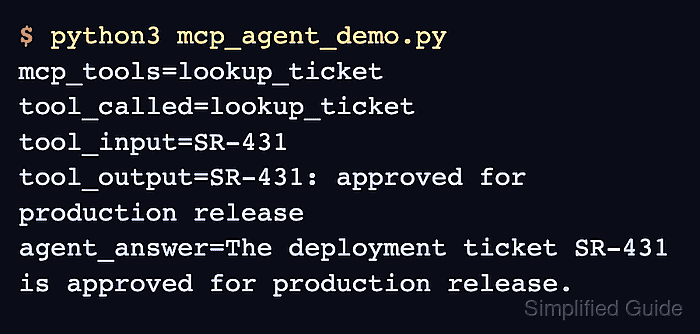
$ python3 mcp_agent_demo.py
mcp_tools=lookup_ticket
tool_called=lookup_ticket
tool_input=SR-431
tool_output=SR-431: approved for production release
agent_answer=The deployment ticket SR-431 is approved for production release.
The mcp_tools line confirms McpToolSpec imported the server tool. The tool_called, tool_input, and tool_output lines confirm the agent executed lookup_ticket through the MCP client before returning the final answer.
- Remove the smoke-test files after moving the MCP client and tool registration into application code.
$ rm release_tools_server.py mcp_agent_demo.py
Keep the server file when it is the actual local-process MCP server used by the application.