How to check file and folder permissions in Linux
Permission problems in Linux often appear as a user, service, or deployment step that can see a path but cannot read, write, or traverse it. Checking the target mode before changing anything separates a missing permission bit, wrong ownership, parent-directory block, or ACL exception from unrelated application errors.
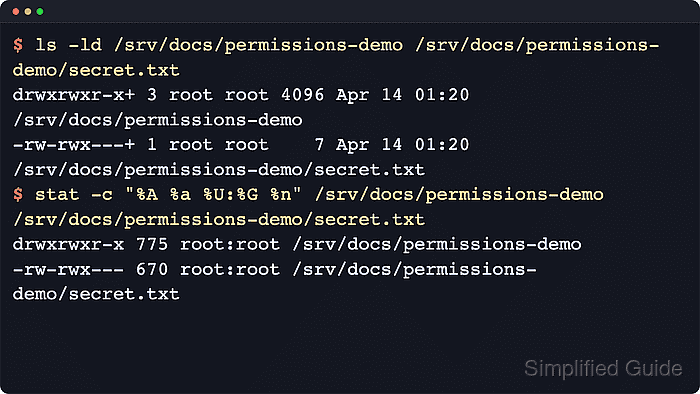
The mode shown by ls and stat is split into owner, group, and others permissions. A leading d means the path is a directory, a leading - means it is a regular file, and each r, w, and x position shows whether that class can read, write, or execute the object. Directory execute permission means path traversal, not program execution.
Permission checks are read-only, but a single listing can still miss the rule that blocks access. The target file may have the expected mode while a parent directory lacks execute permission, or the base mode may look narrow while a named-user ACL grants access. Check the target path, the directory contents when relevant, the parent chain, and the ACL entries before deciding which permission needs to change.
Steps to check file and folder permissions in Linux:
- Inspect the target file or directory entry.
$ ls -ld /srv/docs/demo /srv/docs/demo/secret.txt
drwxrwxr-x+  3 root root 4096 Jun 13 11:44 /srv/docs/demo
-rw-rwx---+  1 root root    7 Jun 13 11:44 /srv/docs/demo/secret.txt
The first character shows the object type. The trailing + after the mode means an ACL or another alternate access method exists.
- List directory contents when the child entries are the question.
$ ls -l /srv/docs/demo
total 12
-rw-r--r-- 1 root root    7 Jun 13 11:44 public.txt
-rw-rwx---+1 root root    7 Jun 13 11:44 secret.txt
drwxr-xr-x 2 root root 4096 Jun 13 11:44 subdir
ls -ld checks the directory node itself. ls -l without -d shows the permissions of entries inside that directory.
- Print the symbolic mode, octal mode, owner, group, and path in a stable line.
$ stat --format="%A %a %U:%G %n" /srv/docs/demo /srv/docs/demo/secret.txt
drwxrwxr-x 775 root:root /srv/docs/demo
-rw-rwx--- 670 root:root /srv/docs/demo/secret.txt
The octal value is the form used by chmod. stat reports the base mode bits and does not show the trailing ACL marker from ls.
- Check every parent directory in the path.
$ namei -om /srv/docs/demo/secret.txt
f: /srv/docs/demo/secret.txt
 drwxr-xr-x root root /
 drwxr-xr-x root root srv
 drwxr-xr-x root root docs
 drwxrwxr-x root root demo
 -rw-rwx--- root root secret.txt
Every directory in the path needs execute permission for traversal. Use this check when the file mode looks right but access is still denied.
- Query ACL entries when ls shows a trailing + marker.
$ getfacl --absolute-names /srv/docs/demo/secret.txt /srv/docs/demo
# file: /srv/docs/demo/secret.txt
# owner: root
# group: root
user::rw-
user:www-data:r--
group::rwx
mask::rwx
other::---

# file: /srv/docs/demo
# owner: root
# group: root
user::rwx
group::rwx
group:adm:r-x
mask::rwx
other::r-x
Named entries such as user:www-data or group:adm add rules beyond the base owner, group, and others bits. Install the distribution's acl package if getfacl is unavailable.
Related: How to set file ACL permissions in Linux - Check the shell creation mask when new files or directories appear with unexpected defaults.
$ umask -S
u=rwx,g=rx,o=rx
umask affects newly created objects only. It does not report or change the permissions of an existing file or directory.