How to create a Kubernetes NetworkPolicy
Kubernetes Pods can usually connect to each other until a NetworkPolicy selects them and narrows the allowed traffic. Creating a policy is useful when an application namespace needs a clear boundary, such as allowing one labelled client group to reach a backend while unrelated Pods are blocked.
NetworkPolicy objects are namespaced and use label selectors instead of fixed Pod IP addresses. The standard API controls layer 3 and layer 4 traffic for protocols such as TCP and UDP, and the final effect depends on the union of every policy that selects the same Pods.
The cluster network plugin must implement NetworkPolicy enforcement. A narrow ingress policy can isolate Pods labelled app=web and allow only Pods labelled role=frontend to connect to TCP port 80, but the API server alone cannot prove that blocked traffic is actually dropped.
Steps to create a Kubernetes NetworkPolicy:
- Confirm the cluster's NetworkPolicy plugin is ready.
$ kubectl wait -n kube-system --for=condition=Ready pod -l k8s-app=calico-node --timeout=300s
pod/calico-node-qxd82 condition met
pod/calico-node-tv8g7 condition met
Creating a NetworkPolicy object without an enforcing network plugin has no traffic effect. For Cilium, Antrea, or another plugin, use that provider's equivalent status check.
- Create the application namespace.
$ kubectl create namespace team-a
namespace/team-a created
Use the existing workload namespace when the application already exists. NetworkPolicy objects affect only Pods in their own namespace unless a rule selects peers from another namespace.
Related: How to create a Kubernetes namespace
- Create the sample web Deployment.
$ kubectl create deployment web -n team-a --image=nginx:1.27-alpine --port=80
deployment.apps/web created
- Expose the web Deployment inside the cluster.
$ kubectl expose deployment web -n team-a --port=80
service/web exposed
Related: How to create a Kubernetes Service
- Create a client Pod with the allowed label.
$ kubectl run frontend -n team-a --image=busybox:1.36 --labels=role=frontend --command -- sleep 1d
pod/frontend created
The role=frontend label is the source selector used by the policy.
- Create a client Pod without the allowed label.
$ kubectl run stranger -n team-a --image=busybox:1.36 --labels=role=stranger --command -- sleep 1d
pod/stranger created
- Wait for the web Deployment to become available.
$ kubectl wait -n team-a --for=condition=Available deployment/web --timeout=180s
deployment.apps/web condition met
- Wait for the allowed client Pod to become ready.
$ kubectl wait -n team-a --for=condition=Ready pod/frontend --timeout=180s
pod/frontend condition met
- Wait for the blocked client Pod to become ready.
$ kubectl wait -n team-a --for=condition=Ready pod/stranger --timeout=180s
pod/stranger condition met
- Save the ingress allowlist policy.
- web-ingress-allow.yaml
apiVersion: networking.k8s.io/v1
kind: NetworkPolicy
metadata:
  name: web-allow-frontend
  namespace: team-a
spec:
  podSelector:
    matchLabels:
      app: web
  policyTypes:
    - Ingress
  ingress:
    - from:
        - podSelector:
            matchLabels:
              role: frontend
      ports:
        - protocol: TCP
          port: 80
podSelector chooses the Pods being isolated, and the ingress rule allows only peers with role=frontend on TCP port 80.
Tool: Kubernetes NetworkPolicy Generator - Run a server-side dry run for the policy.
$ kubectl apply --dry-run=server -f web-ingress-allow.yaml
networkpolicy.networking.k8s.io/web-allow-frontend created (server dry run)
--dry-run=server sends the manifest through API validation without saving it.
- Apply the NetworkPolicy.
$ kubectl apply -f web-ingress-allow.yaml
networkpolicy.networking.k8s.io/web-allow-frontend created
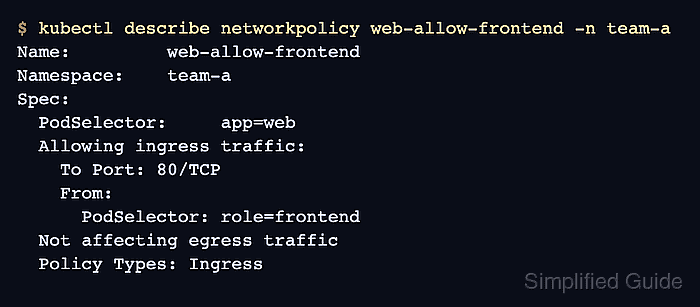
- Inspect the saved policy.
$ kubectl describe networkpolicy web-allow-frontend -n team-a Name: web-allow-frontend Namespace: team-a Spec: PodSelector: app=web Allowing ingress traffic: To Port: 80/TCP From: PodSelector: role=frontend Not affecting egress traffic Policy Types: Ingress - Test access from the allowed client Pod.
$ kubectl exec -n team-a frontend -- wget -qO- --timeout=3 http://web
<!DOCTYPE html>
<html>
<head>
<title>Welcome to nginx!</title>
##### snipped #####
<h1>Welcome to nginx!</h1>
##### snipped #####
</html>
A response from the web Service confirms that traffic from Pods labelled role=frontend still reaches Pods labelled app=web on TCP port 80.
- Test access from the blocked client Pod.
$ kubectl exec -n team-a stranger -- wget -qO- --timeout=3 http://web
wget: download timed out
command terminated with exit code 1
The timeout confirms that a Pod without role=frontend is not allowed by the ingress policy.
- Delete the sample namespace when it was created only for validation.
$ kubectl delete namespace team-a
namespace "team-a" deleted
Deleting the namespace removes the sample Deployment, Service, Pods, and NetworkPolicy. Do not run this command against a real application namespace that should keep the policy.