How to debug NaN loss in Keras
Keras training loss becomes NaN when a tensor feeding the loss or optimizer contains a non-finite value. The source is often invalid input data, an unsafe custom loss calculation, or an optimizer update that is too large for the model and dtype being trained.
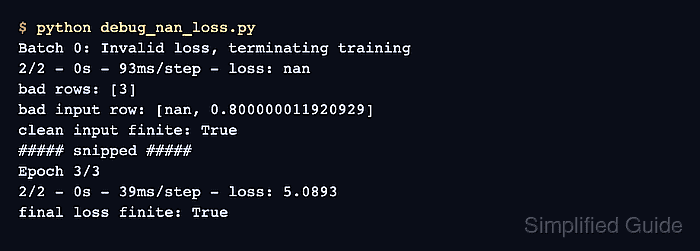
A short diagnostic model.fit() run should stop at the first invalid loss before the architecture or regularization changes. TerminateOnNaN catches the visible symptom, and run_eagerly=True keeps the training path easier to inspect while the source batch is being isolated.
TensorFlow-backed Keras can add op-level numerics checks with tf.debugging.enable_check_numerics() when the bad value appears inside a layer, model call, or custom loss. Finite data checks and optimizer clipping are backend-neutral; after the failing source is understood, normal training should return to compiled mode without temporary numerics probes.
Steps to debug NaN loss in Keras training:
- Compile the failing model with eager execution for a short debug run.
model.compile(
    optimizer=optimizer,
    loss="mse",
    run_eagerly=True,
)
run_eagerly=True slows training, but it lets Python-side checks and prints run in the training path while the bad batch is being isolated.
Related: How to compile a model in Keras
- Add TerminateOnNaN to the failing model.fit() call.
history = model.fit(
    x_train,
    y_train,
    batch_size=4,
    epochs=1,
    shuffle=False,
    callbacks=[keras.callbacks.TerminateOnNaN()],
)
Use raise_error=True only when the run should fail immediately with an exception instead of stopping through the normal callback cleanup path.
- Run the training script and confirm the first invalid loss signal.
$ python debug_nan_loss.py
Batch 0: Invalid loss, terminating training
2/2 - 0s - 93ms/step - loss: nan
- Check the training arrays for non-finite inputs or targets.
bad_rows = np.flatnonzero(
    (~np.isfinite(x_train).all(axis=1)) |
    (~np.isfinite(y_train).all(axis=1))
)

print("bad rows:", bad_rows.tolist())
print("bad input row:", x_train[bad_rows[0]].tolist())
print("bad target row:", y_train[bad_rows[0]].tolist())
bad rows: [3]
bad input row: [nan, 0.800000011920929]
bad target row: [nan]
For a tf.data.Dataset input, materialize one batch from the dataset and run the same finite check on the batch tensors before fit().
- Enable TensorFlow numerics checks when the data is finite but the model still creates NaN.
if keras.backend.backend() == "tensorflow":
    import tensorflow as tf
    tf.debugging.enable_check_numerics()
This check raises an error when a TensorFlow op outputs NaN or infinity, including the op type, dtype, shape, and stack information where available.
- Remove or repair the non-finite training rows before the next run.
keep_rows = (
    np.isfinite(x_train).all(axis=1) &
    np.isfinite(y_train).all(axis=1)
)
x_train = x_train[keep_rows]
y_train = y_train[keep_rows]

print("clean input finite:", bool(np.isfinite(x_train).all()))
print("clean target finite:", bool(np.isfinite(y_train).all()))
clean input finite: True
clean target finite: True
Do not continue training on rows that contain NaN or infinity; optimizer clipping and lower learning rates cannot repair non-finite source tensors.
- Recompile with a bounded optimizer update after the source data is finite.
optimizer = keras.optimizers.Adam(
    learning_rate=0.001,
    global_clipnorm=1.0,
)

model.compile(optimizer=optimizer, loss="mse")
global_clipnorm clips the combined gradient norm across all trainable weights. If finite data still produces NaN after several batches, reduce the learning rate before widening the model or changing the loss.
- Rerun training and confirm the loss remains finite.
$ python debug_nan_loss.py
clean input finite: True
clean target finite: True
Epoch 1/3
2/2 - 1s - 589ms/step - loss: 5.2014
Epoch 2/3
2/2 - 0s - 18ms/step - loss: 5.1452
Epoch 3/3
2/2 - 0s - 39ms/step - loss: 5.0893
final loss finite: True
- Remove temporary eager and backend numerics checks from the normal training run.
model.compile(
    optimizer=optimizer,
    loss="mse",
    run_eagerly=False,
)
Keep TerminateOnNaN in development or CI when failed training should stop before checkpoint or reporting callbacks save misleading results.