How to install JMeter Plugins Manager
JMeter Plugins Manager gives the JMeter GUI a catalog-backed way to install, update, and remove community plugins without manually tracking every extension jar. It is useful when a test plan needs extra thread groups, samplers, listeners, or timers that are not bundled with the base Apache JMeter distribution.
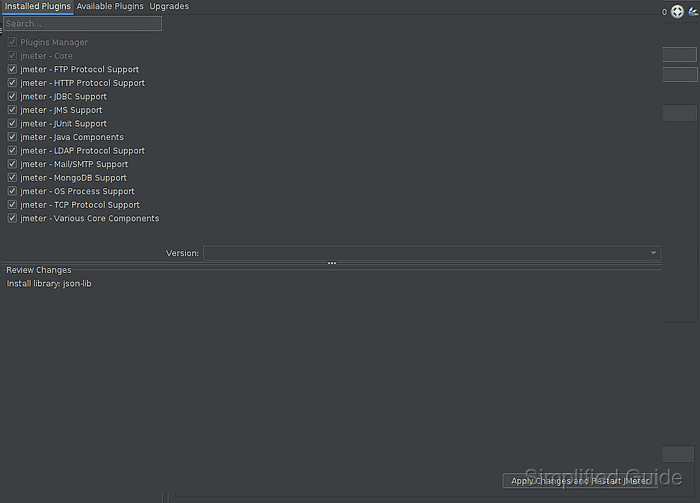
The manager is loaded as a JMeter component from JMETER_HOME/lib/ext. After JMeter restarts, the Options menu gains a Plugins Manager entry and the manager dialog can show installed plugins, available plugins, upgrades, and pending changes before anything is applied.
Start from an existing Apache JMeter installation and set JMETER_HOME to the directory that contains bin, lib, and lib/ext. Install the jar while the GUI is closed so the next startup reads the new classpath cleanly.
Related: How to install JMeter on Ubuntu
Related: How to start the JMeter GUI
Related: How to add a JDBC driver to JMeter
Steps to install JMeter Plugins Manager:
- Open a terminal on the host where JMeter is installed.
- Set JMETER_HOME to the JMeter installation directory.
$ export JMETER_HOME=/opt/apache-jmeter-5.6.3
Use the directory that contains the active bin/jmeter launcher. Package, archive, and symlink-based installs may use a different path.
- Confirm that the JMeter extension directory exists.
$ test -d "$JMETER_HOME/lib/ext"
- Download the Plugins Manager jar into lib/ext.
$ sudo curl --fail --location --output "$JMETER_HOME/lib/ext/jmeter-plugins-manager.jar" https://jmeter-plugins.org/get/
JMeter loads component and plugin jars from JMETER_HOME/lib/ext during startup. The upstream /get/ URL redirects to the current Plugins Manager jar.
- Verify that the jar is present.
$ ls -l "$JMETER_HOME/lib/ext/jmeter-plugins-manager.jar"
-rw-r--r-- 1 root root 909846 Jun 30 07:15 /opt/apache-jmeter-5.6.3/lib/ext/jmeter-plugins-manager.jar
- Close any running JMeter GUI window.
JMeter scans lib/ext at startup, so an already-open GUI will not show the new menu entry until it is restarted.
- Confirm that JMeter starts with the new jar on the classpath.
$ "$JMETER_HOME/bin/jmeter" --version _ ____ _ ____ _ _ _____ _ __ __ _____ _____ _____ ____ ##### snipped ##### /_/ \_\_| /_/ \_\____|_| |_|_____| \___/|_| |_|_____| |_| |_____|_| \_\ 5.6.3 Copyright (c) 1999-2024 The Apache Software Foundation - Start the JMeter GUI.
$ "$JMETER_HOME/bin/jmeter"
- Open Options → Plugins Manager.
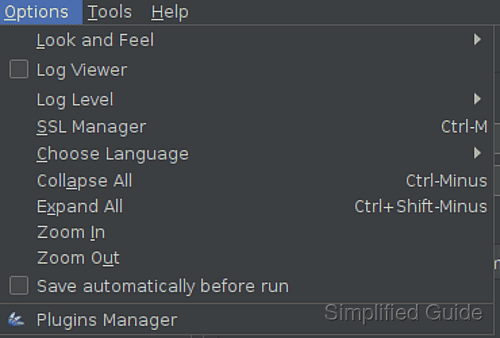
- Confirm that the manager opens with Installed Plugins, Available Plugins, and Upgrades tabs.
Use Apply Changes and Restart JMeter only after reviewing the Review Changes area for plugins or libraries that will be installed, upgraded, or removed.