How to add a JSR223 PostProcessor in JMeter
JMeter post-processors run after a sampler receives its response. A JSR223 PostProcessor is the Groovy-backed option for response-specific scripting, such as reading a response body, storing a derived variable, or writing a diagnostic line for one request in a test plan.
The element belongs under the sampler whose result it reads. Inside the script, prev refers to that sampler's SampleResult, vars stores per-thread variables, and log writes to jmeter.log during the run.
Use Groovy with script compilation caching for postprocessors that run repeatedly. Keep cached script text free of direct JMeter replacements such as ${token}; read changing values through vars.get('token') so each thread uses the current runtime value.
Steps to add a JMeter JSR223 PostProcessor:
- Open a validation copy of the .jmx test plan in the JMeter GUI.
- Select the sampler whose response should be inspected after it runs.
- Add the postprocessor from Add → Post Processors → JSR223 PostProcessor.
- Name the postprocessor for the value it stores.
Name: Store checkout status
- Set Language to groovy.
- Set Script compilation caching to a unique cache key.
Script compilation caching: store-checkout-status
The cache key should be unique within the test plan when the script text is inline. Use a script file instead for longer shared code.
- Paste the postprocessor script.
def responseBody = prev.getResponseDataAsString()
def status = responseBody.tokenize(';').find { it.startsWith('status=') }?.substring('status='.length()) ?: 'missing'
vars.put('checkout_status', status)
log.info('Store checkout status: checkout_status=' + status)
prev reads the completed sampler result, and vars.put() makes the derived value available to later elements in the same thread.
- Add a temporary downstream JSR223 Sampler for the smoke test.
def status = vars.get('checkout_status')
SampleResult.setResponseCode(status == 'ready' ? '200' : '500')
SampleResult.setResponseMessage(status == 'ready' ? 'OK' : 'missing checkout_status')
SampleResult.setResponseData('checkout_status=' + status, 'UTF-8')
SampleResult.setSuccessful(status == 'ready')
A Debug Sampler is enough for visual inspection. A temporary JSR223 Sampler can make a non-GUI smoke test fail when the variable was not set.
Related: How to add a Debug Sampler in JMeter - Save the validation copy of the test plan.
jsr223-postprocessor-add.jmx
- Run a one-user non-GUI smoke test.
$ jmeter -n -t jsr223-postprocessor-add.jmx -l jsr223-postprocessor-results.jtl -j jmeter.log
Creating summariser <summary>
Created the tree successfully using jsr223-postprocessor-add.jmx
Starting standalone test @ 2026 Jun 30 01:49:19 GMT
Waiting for possible Shutdown/StopTestNow/HeapDump/ThreadDump message on port 4445
summary =      2 in 00:00:01 =    2.4/s Avg:   358 Min:    17 Max:   699 Err:     0 (0.00%)
Tidying up ...
... end of run
- Check the result file for the original sampler and the downstream variable check.
$ cat jsr223-postprocessor-results.jtl
timeStamp,elapsed,label,responseCode,responseMessage,threadName,dataType,success,failureMessage,bytes,sentBytes,grpThreads,allThreads,URL,Latency,IdleTime,Connect
1782784160124,699,GET checkout session,200,OK,Checkout postprocessor user 1-1,text,true,,23,0,1,1,null,0,0,0
1782784160899,17,Use checkout status variable,200,OK,Checkout postprocessor user 1-1,text,true,,21,0,1,1,null,0,0,0
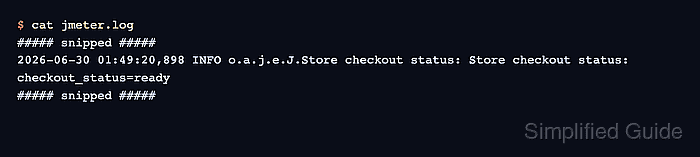
- Check the JMeter log for the postprocessor line.
$ cat jmeter.log
##### snipped #####
2026-06-30 01:49:20,898 INFO o.a.j.e.J.Store checkout status: Store checkout status: checkout_status=ready
##### snipped #####
- Remove the temporary downstream sampler before the real load run.
Keep the JSR223 PostProcessor under the real sampler that needs the derived value, but remove validation-only samplers or debug listeners after the smoke test passes.