How to run a distributed JMeter test
Large load tests can exhaust one JMeter client before the application under test is the real bottleneck. A distributed run keeps one controller in charge of the .jmx test plan while remote engines generate sampler traffic from worker hosts and send result samples back to the controller.
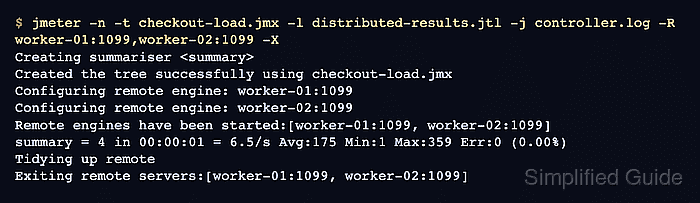
Remote execution uses Java RMI, so the controller and workers must agree on the JMeter release, Java release, plugins, property settings, and files referenced by the test plan. The controller sends the test plan tree to each worker, but external CSV files, plugin jars, certificates, and other local dependencies still need to exist on the worker hosts.
CLI mode with explicit worker hostnames keeps the run repeatable and avoids editing remote_hosts in jmeter.properties for a one-off test. Use a private load-test network or configure RMI SSL with a shared keystore before running across untrusted networks.
Steps to run a distributed JMeter test:
- Prepare the same test assets on the controller and every worker.
Controller: load-controller
Workers: worker-01, worker-02
Test plan: checkout-load.jmx
Result file: distributed-results.jtl
The controller distributes the in-memory test plan, but referenced files and plugins must already be present on the workers.
- Set the same RMI SSL mode on the controller and workers.
server.rmi.ssl.disable=true
Disable RMI SSL only on an isolated load-test network. Keep RMI SSL enabled and copy the shared rmi_keystore.jks to every host when the controller and workers cross an untrusted network.
Related: How to configure SSL for JMeter remote testing - Start a JMeter remote engine on each worker.
$ SERVER_PORT=1099 jmeter-server -Jserver.rmi.localport=4000
Using local port: 4000
Created remote object: UnicastServerRef2 [endpoint:[worker-01:4000]]
SERVER_PORT controls the RMI registry port. server.rmi.localport fixes the engine callback port so firewalls can allow a known port pair.
Related: How to set RMI ports for JMeter remote testing - Run the controller against the worker list.
$ jmeter -n \
  -t checkout-load.jmx \
  -l distributed-results.jtl \
  -j controller.log \
  -R worker-01:1099,worker-02:1099 \
  -X
Creating summariser <summary>
Created the tree successfully using checkout-load.jmx
Configuring remote engine: worker-01:1099
Configuring remote engine: worker-02:1099
Remote engines have been started:[worker-01:1099, worker-02:1099]
summary = 4 in 00:00:01 = 6.5/s Avg:175 Min:1 Max:359 Err:0 (0.00%)
Tidying up remote
Exiting remote servers:[worker-01:1099, worker-02:1099]
-R supplies the remote engines for this run. -X asks those engines to exit after the test finishes.
- Inspect the controller result file.
$ cat distributed-results.jtl
timeStamp,elapsed,label,responseCode,responseMessage,threadName,dataType,success
1782772914170,359,checkout-load,200,OK,worker-01:1099-Remote users 1-1,text,true
1782772914253,342,checkout-load,200,OK,worker-02:1099-Remote users 1-1,text,true
1782772914668,1,checkout-load,200,OK,worker-01:1099-Remote users 1-2,text,true
1782772914755,1,checkout-load,200,OK,worker-02:1099-Remote users 1-2,text,true
The threadName column should show samples from each worker. The controller owns the combined .jtl file.
- Check a worker server log when the controller output needs confirmation.
$ cat jmeter-server.log
Using local port: 4000
Starting the test on host worker-01:1099
Finished the test on host worker-01:1099