How to register a service worker with JavaScript
A service worker lets browser JavaScript place a separate worker between a web app and selected network requests. Registering that worker is the first step before offline caching, background updates, or request interception can work.
Registration starts from the page context with navigator.serviceWorker.register(). The browser downloads the service worker script separately, runs it without DOM access, and moves it through install and activate states before it can receive fetch events.
Browsers require a secure context for service workers. Use HTTPS in production; localhost works for local development. Keep the worker script under the URL path it should control, because the default scope is limited by the script location unless the server deliberately allows a wider scope.
Related: How to load JavaScript with defer
Related: How to fetch JSON with JavaScript
Steps to register a service worker with JavaScript:
- Create the page that loads the registration script.
- index.html
<!doctype html>
<html lang="en">
  <head>
    <meta charset="utf-8">
    <meta name="viewport" content="width=device-width, initial-scale=1">
    <title>Service worker registration demo</title>
    <script defer src="app.js"></script>
  </head>
  <body>
    <main>
      <h1>Service worker registration</h1>
      <p>The page registers sw.js, waits for activation, and checks one request handled by the worker.</p>
      <ol id="registration-log" aria-label="Service worker registration log"></ol>
      <div id="request-result">Waiting for service worker...</div>
    </main>
  </body>
</html>
defer lets app.js run after the page markup exists.
- Create the registration script.
- app.js
const logList = document.querySelector("#registration-log");
const requestResult = document.querySelector("#request-result");
const evidence = [];

window.serviceWorkerEvidence = evidence;

function writeStatus(message) {
  const item = document.createElement("li");
  item.textContent = message;
  logList.append(item);
  evidence.push(message);
  console.log(message);
}

async function waitForController() {
  if (navigator.serviceWorker.controller) {
    return navigator.serviceWorker.controller;
  }

  writeStatus("controller: waiting for claim");

  return new Promise((resolve) => {
    navigator.serviceWorker.addEventListener(
      "controllerchange",
      () => resolve(navigator.serviceWorker.controller),
      { once: true },
    );
  });
}

async function checkWorkerRequest() {
  const controller = await waitForController();
  writeStatus(`controller: ${controller.state}`);

  const response = await fetch("status.json", { cache: "no-store" });
  const data = await response.json();
  const message = `status.json handled by ${data.source}`;

  requestResult.textContent = message;
  writeStatus(message);
}

async function registerServiceWorker() {
  if (!("serviceWorker" in navigator)) {
    requestResult.textContent = "Service workers are not supported in this browser.";
    return;
  }

  try {
    const registration = await navigator.serviceWorker.register("./sw.js", {
      scope: "./",
    });

    writeStatus(`scope: ${registration.scope}`);

    const worker = registration.installing || registration.waiting || registration.active;

    if (worker) {
      writeStatus(`state: ${worker.state}`);
      worker.addEventListener("statechange", () => {
        writeStatus(`state: ${worker.state}`);
      });
    }

    await navigator.serviceWorker.ready;
    writeStatus("ready: active registration");
    await checkWorkerRequest();
  } catch (error) {
    requestResult.textContent = `registration failed: ${error.name}`;
    writeStatus(`registration failed: ${error.message}`);
  }
}

registerServiceWorker();
The scope value is relative to the registering page. With these files at the local server root, the worker controls http://localhost:8000/.
- Create the service worker script.
- sw.js
const VERSION = "service-worker-register-v1";

self.addEventListener("install", (event) => {
  event.waitUntil(self.skipWaiting());
});

self.addEventListener("activate", (event) => {
  event.waitUntil(self.clients.claim());
});

self.addEventListener("fetch", (event) => {
  const requestUrl = new URL(event.request.url);

  if (requestUrl.origin === self.location.origin && requestUrl.pathname.endsWith("/status.json")) {
    const body = JSON.stringify({ source: VERSION });

    event.respondWith(
      new Response(body, {
        headers: {
          "Content-Type": "application/json",
        },
      }),
    );
  }
});
skipWaiting() and clients.claim() make the demo page controlled without closing and reopening it. Use that pair in production only when open pages can safely move to the new worker immediately.
- Serve the files from a local HTTP origin.
$ python3 -m http.server 8000 --bind localhost
Serving HTTP on ::1 port 8000 (http://[::1]:8000/) ...
Do not test service worker registration from a file:// URL. The browser must load the page from HTTPS or a trusted local origin such as localhost.
- Open the page from the local server.
http://localhost:8000/
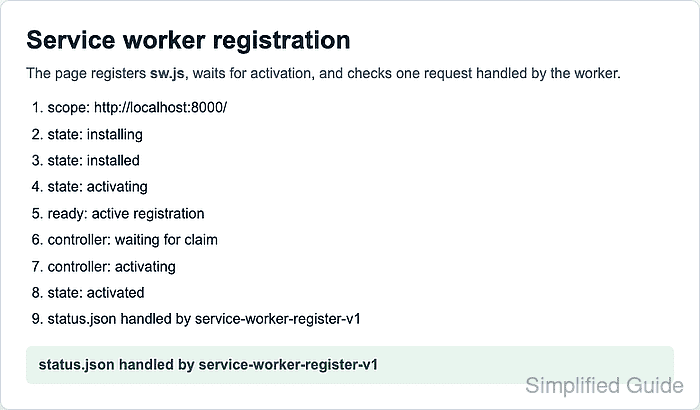
- Verify that the page reaches an active registration and receives the worker-handled response.
scope: http://localhost:8000/
state: installing
state: installed
state: activating
ready: active registration
controller: waiting for claim
controller: activating
state: activated
status.json handled by service-worker-register-v1
The state lines can move quickly or appear in a slightly different order. The important result is the scope line followed by ready: active registration and the status.json response from the worker.
- Unregister the local demo worker when testing is complete.
const registration = await navigator.serviceWorker.getRegistration("./");
await registration.unregister();
true
Run this in the browser developer tools console for http://localhost:8000/. Stop the local server with Ctrl+C in the terminal that is running python3 -m http.server.