How to add a noscript fallback for JavaScript-disabled browsers
Browser pages that mount a JavaScript widget can leave a blank panel when scripting is turned off. A <noscript> fallback gives the visitor a visible message and a non-script path for the page area that would otherwise depend on client-side code.
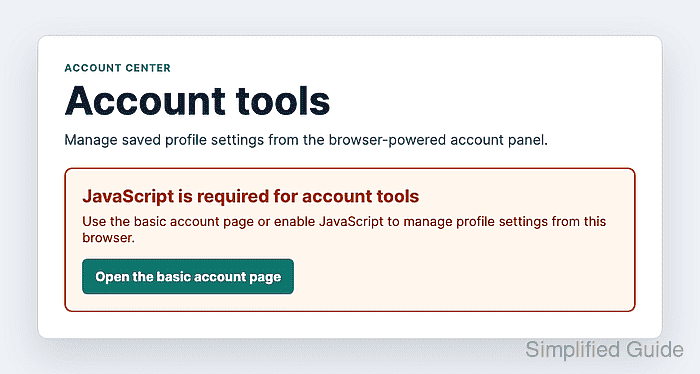
The <noscript> element is parsed based on whether scripting is enabled. In the document body, browsers render its child HTML only when scripts are disabled or unsupported, so the fallback belongs beside the JavaScript-owned panel rather than inside the script file.
Use the fallback for the disabled-scripting state, not as a catch-all error handler. If JavaScript loads and later throws an exception, the browser still treats scripting as enabled; handle that case with normal error UI or progressive enhancement logic.
Related: Add JavaScript to HTML
Related: Handle JavaScript errors with try-catch
Steps to add a noscript fallback for JavaScript-disabled browsers:
- Load the page script after the HTML has been parsed.
- index.html
<head>
  <meta charset="utf-8">
  <meta name="viewport" content="width=device-width, initial-scale=1">
  <title>Account tools fallback</title>
  <link rel="stylesheet" href="styles.css">
  <script src="app.js" defer></script>
</head>
Use defer on an external classic script when the script needs to select elements that appear later in the document.
Related: Load JavaScript with defer
- Add the JavaScript-owned panel and the fallback markup to the page body.
- index.html
<section class="account-panel" aria-labelledby="account-tools-title">
  <h1 id="account-tools-title">Account tools</h1>
  <p>
    Manage saved profile settings from the browser-powered account panel.
  </p>

  <div class="account-app" data-account-app hidden>
    <p class="app-status" data-app-status>
      Loading account tools...
    </p>
    <button type="button">Update notification settings</button>
  </div>

  <noscript>
    <div class="noscript-fallback" role="status">
      <h2>JavaScript is required for account tools</h2>
      <p>
        Use the basic account page or enable JavaScript to manage profile
        settings from this browser.
      </p>
      <a href="/account/basic">Open the basic account page</a>
    </div>
  </noscript>
</section>
Keep the <noscript> block near the content it replaces. A real link, server-rendered form, or support path is more useful than a message that only says JavaScript is disabled.
- Style the fallback as a clear page state.
- styles.css
.account-app,
.noscript-fallback {
  border-radius: 0.6rem;
  padding: 1.25rem;
}

.account-app {
  background: #e0f2fe;
  border: 1px solid #7dd3fc;
}

.noscript-fallback {
  background: #fff7ed;
  border: 2px solid #c2410c;
}

.noscript-fallback h2 {
  color: #9a3412;
  margin-block-start: 0;
}

.noscript-fallback a {
  background: #0f766e;
  border-radius: 0.4rem;
  color: #fff;
  display: inline-block;
  font-weight: 700;
  padding: 0.75rem 1rem;
  text-decoration: none;
}
- Unhide the JavaScript app after the script starts successfully.
- app.js
const app = document.querySelector("[data-account-app]");
const status = app.querySelector("[data-app-status]");

app.hidden = false;
status.textContent = "Account tools loaded.";
If the script can fail after loading, add a normal in-page error state as well. <noscript> will not appear for runtime exceptions because scripting is still enabled in the browser.
- Reload the page with JavaScript enabled.
JavaScript enabled
Visible app status: Account tools loaded.
Fallback visible: no
- Reload the page with JavaScript disabled in the browser profile used for testing.
JavaScript disabled
Visible fallback heading: JavaScript is required for account tools
Visible fallback link: Open the basic account page
Visible app status: no
Reload after changing the JavaScript setting because <noscript> behavior is decided while the browser parses the HTML.