How to fetch JSON with JavaScript
Web pages often need structured data from an API before rendering account details, product rows, dashboard cards, or other dynamic content. The browser Fetch API returns a Response object first, so JSON loading should treat the HTTP response and the body parse as separate outcomes.
A small async helper keeps that boundary visible. It requests JSON with fetch(), rejects non-2xx responses with response.ok, checks for a JSON media type, and lets response.json() turn the body into a JavaScript value.
A same-origin profile.json file keeps the first request local while the browser still loads it through HTTP. Use the same helper with a real api/profile route when that route returns JSON and the page is allowed by the site's same-origin or CORS policy.
Steps to fetch JSON with JavaScript:
- Create a strict JSON response file for the local request.
- profile.json
{
  "name": "Ada Lovelace",
  "role": "admin"
}
The payload must be strict JSON; comments, trailing commas, and malformed strings reach the catch branch when response.json() parses the body.
Tool: JSON Validator - Add a visible target and load the JavaScript module.
- Create the browser module that fetches and renders the JSON.
- app.js
async function readJsonResponse(response) {
  if (!response.ok) {
    throw new Error(`Request failed with ${response.status}`);
  }

  const contentType = response.headers.get("content-type") || "";
  const isJson =
    contentType.includes("application/json") || contentType.includes("+json");

  if (!isJson) {
    throw new TypeError("Expected a JSON response");
  }

  return response.json();
}

async function fetchJson(url) {
  const response = await fetch(url, {
    headers: { Accept: "application/json" },
  });

  return readJsonResponse(response);
}

const output = document.querySelector("#profile-output");

try {
  const profile = await fetchJson("profile.json");
  output.textContent = `${profile.name} (${profile.role})`;
} catch (error) {
  output.textContent = `Could not load profile: ${error.message}`;
}
response.json() reads the response body once. If the app needs the raw body for error logging, read response.text() in that error path instead of parsing the same body twice.
- Start a local HTTP server from the directory that holds the three files.
$ python3 -m http.server 8000
Serving HTTP on :: port 8000 (http://[::]:8000/) ...
Do not test the browser page from a file:// URL; local file loading and CORS checks do not match normal HTTP delivery.
- Open the page through the local server and confirm the parsed profile appears.
http://localhost:8000/
Ada Lovelace (admin)
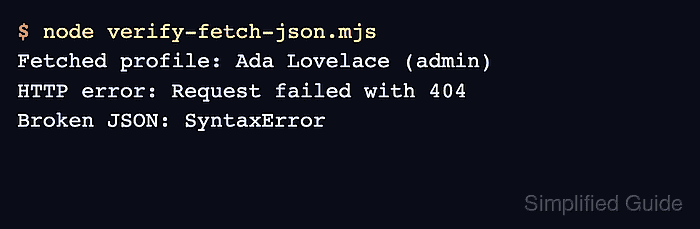
- Save a smoke-test script for the helper's success, HTTP error, and malformed JSON branches.
- verify-fetch-json.mjs
async function readJsonResponse(response) {
  if (!response.ok) {
    throw new Error(`Request failed with ${response.status}`);
  }

  const contentType = response.headers.get("content-type") || "";
  const isJson =
    contentType.includes("application/json") || contentType.includes("+json");

  if (!isJson) {
    throw new TypeError("Expected a JSON response");
  }

  return response.json();
}

async function fetchJson(url) {
  const response = await fetch(url, {
    headers: { Accept: "application/json" },
  });

  return readJsonResponse(response);
}

const profileUrl = `data:application/json,${encodeURIComponent(
  JSON.stringify({ name: "Ada Lovelace", role: "admin" }),
)}`;

const profile = await fetchJson(profileUrl);
console.log(`Fetched profile: ${profile.name} (${profile.role})`);

try {
  await readJsonResponse(
    new Response("Not found", {
      status: 404,
      headers: { "content-type": "application/json" },
    }),
  );
} catch (error) {
  console.log(`HTTP error: ${error.message}`);
}

try {
  await readJsonResponse(
    new Response("{", {
      headers: { "content-type": "application/json" },
    }),
  );
} catch (error) {
  console.log(`Broken JSON: ${error.name}`);
}
The data: URL keeps the success case local; the Response fixtures exercise the same response-checking function without depending on a third-party API.
- Run the smoke test.
$ node verify-fetch-json.mjs
Fetched profile: Ada Lovelace (admin)
HTTP error: Request failed with 404
Broken JSON: SyntaxError