How to delete an iptables rule
Deleting an iptables rule removes one active firewall match without changing the rest of the chain. The risky part is selecting the right rule after other firewall managers, package scripts, or administrators have changed order, because line numbers shift as soon as a rule is inserted or removed.
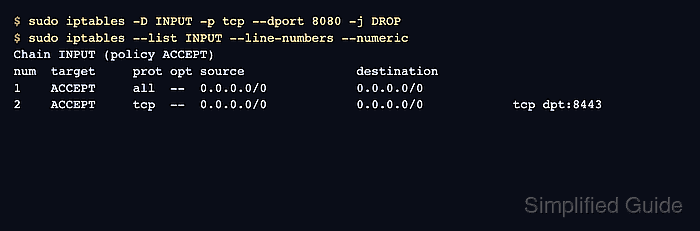
Exact-match deletion uses the same rule specification shown by iptables -S. The displayed command may include an inferred match such as -m tcp, while the delete command can still work with -p tcp and --dport when iptables can infer the TCP match from the protocol and port option.
Line-number deletion is useful when a rule is easier to identify in a numbered list than to copy exactly. Re-list the chain immediately before deleting by number, include -t when the rule is outside the default filter table, repeat the change with ip6tables for IPv6 rules, and save the ruleset only after the affected traffic behaves as intended.
Related: List iptables rules
Related: Insert an iptables rule at a specific position
Related: Save iptables rules permanently
Steps to delete an iptables rule:
- Print the active iptables backend.
$ iptables --version
iptables v1.8.11 (nf_tables)
(nf_tables) means the command uses the nftables compatibility backend. (legacy) means it uses the older xtables backend. Related: How to check the active iptables backend
- List the target chain with line numbers, numeric addresses, and exact counters.
$ sudo iptables --list INPUT --line-numbers --numeric --verbose --exact
Chain INPUT (policy ACCEPT 0 packets, 0 bytes)
num      pkts      bytes target     prot opt in     out     source               destination
1           0        0 DROP       tcp  --  *      *       0.0.0.0/0            0.0.0.0/0            tcp dpt:8080
2           0        0 ACCEPT     all  --  lo     *       0.0.0.0/0            0.0.0.0/0
3           0        0 ACCEPT     tcp  --  *      *       0.0.0.0/0            0.0.0.0/0            tcp dpt:8443
Do not delete by an old line number. A single inserted or removed rule changes the numbers that follow it.
Use FORWARD, OUTPUT, or -t nat with the correct chain when the rule is not in the default filter table. Related: How to list iptables rules with counters
- Print the same chain as reusable rule specifications when you can identify the exact rule.
$ sudo iptables -S INPUT
-P INPUT ACCEPT
-A INPUT -p tcp -m tcp --dport 8080 -j DROP
-A INPUT -i lo -j ACCEPT
-A INPUT -p tcp -m tcp --dport 8443 -j ACCEPT
The displayed -A append command becomes -D when deleting by exact match.
- Delete the target rule by exact match.
$ sudo iptables -D INPUT -p tcp --dport 8080 -j DROP
Exact-match deletion avoids line-number drift. Keep the same table, chain, protocol, match options, and target as the rule you identified. To delete by line number instead, re-list the chain immediately and run sudo iptables -D INPUT 1 for the current target line. Do not run both delete forms against the same rule.
Tool: iptables Rule Generator - Check that the exact rule no longer exists.
$ sudo iptables -C INPUT -p tcp --dport 8080 -j DROP
iptables: Bad rule (does a matching rule exist in that chain?).
The error is expected here because iptables -C checks for the rule without changing the chain. No output would mean the rule still exists.
- List the chain again and confirm neighboring rules remain.
$ sudo iptables --list INPUT --line-numbers --numeric --verbose --exact
Chain INPUT (policy ACCEPT 0 packets, 0 bytes)
num      pkts      bytes target     prot opt in     out     source               destination
1           0        0 ACCEPT     all  --  lo     *       0.0.0.0/0            0.0.0.0/0
2           0        0 ACCEPT     tcp  --  *      *       0.0.0.0/0            0.0.0.0/0            tcp dpt:8443
- Test the traffic that the deleted rule used to affect.
$ nc -vz -w 2 server.example.com 8080
Connection to server.example.com 8080 port [tcp/http-alt] succeeded!
If the traffic state does not change as expected, review the table, chain, IPv6 rules, upstream firewall, service listener, and any firewall manager that may rewrite iptables rules.
- Save the updated ruleset when the deletion should survive reboot.
$ sudo netfilter-persistent save
run-parts: executing /usr/share/netfilter-persistent/plugins.d/15-ip4tables save
run-parts: executing /usr/share/netfilter-persistent/plugins.d/25-ip6tables save
Debian and Ubuntu use netfilter-persistent when iptables-persistent is installed. Use the persistence mechanism that owns firewall rules on the host.