How to block outbound traffic with iptables
Blocking outbound traffic with iptables stops a local process from reaching a chosen destination while the rest of the host keeps using the existing firewall policy. The rule belongs in the OUTPUT chain because the packets are generated by the host itself, not arriving from another client.
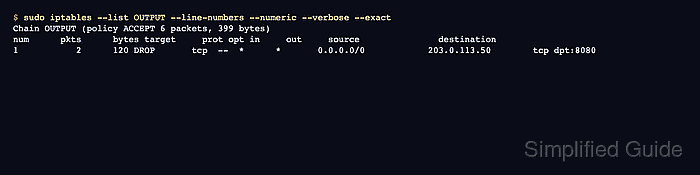
The default filter table uses OUTPUT for locally generated packets, so a narrow rule can match a destination address, protocol, and destination port before jumping to DROP. A DROP target makes the connection attempt time out, while the rule counter confirms packets are reaching that specific rule.
Runtime iptables changes are temporary unless the host restores them at boot. Keep management access that does not depend on the blocked path, test one allowed outbound destination before saving, and add a matching ip6tables rule when the process can reach the same service over IPv6.
Related: Check the active iptables backend
Related: List iptables rules with counters
Related: Save iptables rules permanently
Steps to block outbound traffic with iptables:
- Print the active iptables backend before changing rules.
$ iptables --version
iptables v1.8.11 (nf_tables)
(nf_tables) means the command uses the nftables compatibility backend. (legacy) means it uses the older xtables backend.
- List the current OUTPUT chain with line numbers and counters.
$ sudo iptables --list OUTPUT --line-numbers --numeric --verbose
Chain OUTPUT (policy ACCEPT 0 packets, 0 bytes)
num   pkts bytes target     prot opt in     out     source               destination
OUTPUT is the right chain for packets generated by local processes on the host. Use FORWARD instead when the system routes traffic from another machine.
- Confirm the target outbound service works before the firewall change.
$ curl -sS http://203.0.113.50:8080/
outbound test ok
Replace 203.0.113.50 and 8080 with the destination address and port that should be blocked. If the service does not answer before the rule is added, the later failure does not prove the firewall change.
- Insert the outbound block rule before broader allow rules.
$ sudo iptables -I OUTPUT 1 -p tcp -d 203.0.113.50 --dport 8080 -j DROP
Use the actual destination address and port. Blocking package repositories, DNS resolvers, backup endpoints, identity providers, or monitoring services can break host operations quickly.
Use a numeric destination address when possible. Hostnames are resolved when the rule is submitted, so later DNS changes do not automatically update the rule.
To block all IPv4 traffic to one destination, omit the protocol and port match: sudo iptables -I OUTPUT 1 -d 203.0.113.50 -j DROP.
- Check that the exact outbound rule exists.
$ sudo iptables -C OUTPUT -p tcp -d 203.0.113.50 --dport 8080 -j DROP
No output means the exact rule is present. A nonzero exit means the current OUTPUT chain does not contain that rule specification.
- Confirm the rule order and normalized rule syntax.
$ sudo iptables -S OUTPUT
-P OUTPUT ACCEPT
-A OUTPUT -d 203.0.113.50/32 -p tcp -m tcp --dport 8080 -j DROP
iptables may display the implicit TCP match as -m tcp after the rule is inserted.
- Test the blocked outbound connection from the host.
$ curl -sS --connect-timeout 2 http://203.0.113.50:8080/
curl: (28) Connection timed out after 2004 milliseconds
A timeout is expected with DROP. Use REJECT only when local applications should receive an immediate error instead of waiting for a timeout.
- Test an outbound path that should remain allowed.
$ curl -sS http://203.0.113.50:8081/
outbound test ok
If the unaffected test also fails, remove the new rule and review the chain for broader drops, destination mistakes, default policy changes, or another firewall manager replacing rules.
- List the OUTPUT counters after the blocked connection attempt.
$ sudo iptables --list OUTPUT --line-numbers --numeric --verbose --exact
Chain OUTPUT (policy ACCEPT 6 packets, 399 bytes)
num      pkts      bytes target     prot opt in     out     source               destination
1           2      120 DROP       tcp  --  *      *       0.0.0.0/0            203.0.113.50        tcp dpt:8080
The pkts and bytes counters on the DROP rule increase when locally generated packets match the outbound block.
- Add a separate IPv6 rule when the same destination is reachable over IPv6.
$ sudo ip6tables -I OUTPUT 1 -p tcp -d 2001:db8::50 --dport 8080 -j DROP
Test with an IPv6 client command such as curl -6. IPv4 iptables output does not prove the IPv6 firewall state.
- Keep the rollback commands ready until the block is confirmed.
$ sudo iptables -D OUTPUT -p tcp -d 203.0.113.50 --dport 8080 -j DROP
$ sudo ip6tables -D OUTPUT -p tcp -d 2001:db8::50 --dport 8080 -j DROP
Deleting by exact match is safer than deleting by line number after other rules have been inserted or removed.
Related: How to delete an iptables rule
- Save the tested runtime rules through the host firewall persistence method when the block should survive reboot.
$ sudo netfilter-persistent save
run-parts: executing /usr/share/netfilter-persistent/plugins.d/15-ip4tables save
run-parts: executing /usr/share/netfilter-persistent/plugins.d/25-ip6tables save
Debian and Ubuntu use netfilter-persistent when iptables-persistent is installed. Use the firewall manager that owns the host policy when ufw, firewalld, nftables, or another system manages rules.