How to configure NAT masquerading with iptables
A Linux gateway can give a private subnet outbound access by forwarding packets between an inside interface and an upstream interface, then rewriting the private source address as traffic leaves. iptables NAT masquerading fits VM networks, lab subnets, and small gateways where the upstream address comes from DHCP, PPP, a tunnel, or another changing link.
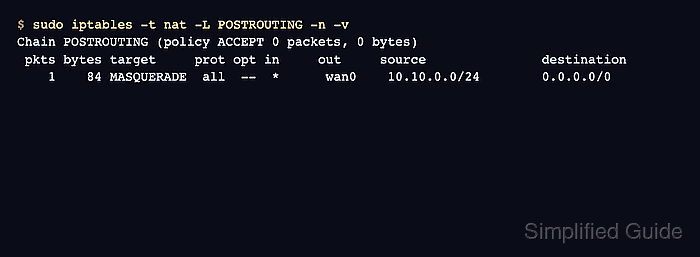
The MASQUERADE target belongs in the nat table's POSTROUTING chain. It uses the address on the outgoing interface for translated packets, while the FORWARD chain still decides whether routed packets may cross the host.
Examples below use lan0 for 10.10.0.0/24 and wan0 for the upstream network. Replace both interface names and the private CIDR before running commands, keep a console or second administrative path open on remote gateways, and save the rules only after a private client can reach the outside network and the masquerade counter increments.
Steps to configure NAT masquerading with iptables:
- Identify the inside and upstream interfaces on the gateway.
$ ip -br addr
lo               UNKNOWN        127.0.0.1/8 ::1/128
lan0             UP             10.10.0.1/24
wan0             UP             203.0.113.25/24
The inside interface receives traffic from private clients. The upstream interface is the interface that already has a route toward the outside network.
- Check the active iptables backend before adding rules.
$ iptables --version
iptables v1.8.11 (nf_tables)
Current Ubuntu and Debian systems commonly use the nftables compatibility backend for the plain iptables command. Keep all checks, saves, and restores on the same backend. Related: How to check the active iptables backend
- Enable IPv4 packet forwarding for the current runtime.
$ sudo sysctl -w net.ipv4.ip_forward=1
net.ipv4.ip_forward = 1
This immediately lets the host route IPv4 packets between interfaces when firewall rules and routes allow it. Do not enable forwarding on a host that should remain a single-interface endpoint.
- Make IPv4 forwarding survive reboot.
$ sudoedit /etc/sysctl.d/99-ip-forward.conf
Add the forwarding setting.
net.ipv4.ip_forward = 1
Apply that file without waiting for a reboot.
$ sudo sysctl -p /etc/sysctl.d/99-ip-forward.conf
net.ipv4.ip_forward = 1
Systemd-based distributions read /etc/sysctl.d/*.conf at boot through systemd-sysctl. Keep the setting in a small dedicated file so gateway-specific forwarding is easy to audit later.
- Allow private clients to forward out through the upstream interface.
$ sudo iptables -A FORWARD -i lan0 -o wan0 -s 10.10.0.0/24 -j ACCEPT
$ sudo iptables -A FORWARD -i wan0 -o lan0 -d 10.10.0.0/24 -m conntrack --ctstate ESTABLISHED,RELATED -j ACCEPT
The first rule permits new outbound flows from the private subnet. The second rule permits return traffic that connection tracking associates with those flows.
If the FORWARD chain already contains a broad DROP or REJECT rule, insert these allow rules above that rule instead of appending them after it. Related: How to insert an iptables rule at a specific position
- Add the NAT masquerade rule on the upstream interface.
$ sudo iptables -t nat -A POSTROUTING -s 10.10.0.0/24 -o wan0 -j MASQUERADE
MASQUERADE is intended for an upstream interface whose address can change. Use an explicit SNAT rule instead when the gateway has a static public source address and the policy should name that address directly.
- Confirm the forward and NAT rules are present.
$ sudo iptables -S FORWARD
-P FORWARD DROP
-A FORWARD -s 10.10.0.0/24 -i lan0 -o wan0 -j ACCEPT
-A FORWARD -d 10.10.0.0/24 -i wan0 -o lan0 -m conntrack --ctstate RELATED,ESTABLISHED -j ACCEPT
$ sudo iptables -t nat -S POSTROUTING
-P POSTROUTING ACCEPT
-A POSTROUTING -s 10.10.0.0/24 -o wan0 -j MASQUERADE
The FORWARD policy may be ACCEPT or DROP depending on the host's firewall design. The important checks are the two directional forward rules and the POSTROUTING masquerade rule for the private CIDR.
- Confirm a private client sends its default route to the gateway.
$ ip route
default via 10.10.0.1 dev eth0
10.10.0.0/24 dev eth0 proto kernel scope link src 10.10.0.20
Configure the private client's DHCP, static route, or default gateway before testing NAT. A client that routes directly somewhere else will not hit the gateway's masquerade rule.
- Test outbound reachability from the private client.
$ ping -c 3 1.1.1.1
PING 1.1.1.1 (1.1.1.1) 56(84) bytes of data.
64 bytes from 1.1.1.1: icmp_seq=1 ttl=56 time=12.8 ms
64 bytes from 1.1.1.1: icmp_seq=2 ttl=56 time=12.5 ms
64 bytes from 1.1.1.1: icmp_seq=3 ttl=56 time=12.7 ms

--- 1.1.1.1 ping statistics ---
3 packets transmitted, 3 received, 0% packet loss, time 2002ms
rtt min/avg/max/mdev = 12.500/12.666/12.800/0.124 ms
If ICMP is blocked upstream, test with an outbound TCP or HTTPS destination that the private subnet is expected to reach.
- Verify the masquerade rule counter increased on the gateway.
$ sudo iptables -t nat -L POSTROUTING -n -v
Chain POSTROUTING (policy ACCEPT 0 packets, 0 bytes)
 pkts bytes target     prot opt in     out     source               destination
    3   252 MASQUERADE  all  --  *      wan0    10.10.0.0/24        0.0.0.0/0
Packet and byte counters greater than zero show that traffic from the private CIDR matched the masquerade rule. A successful client test with a zero counter usually means the client did not use this gateway or the rule's source CIDR or output interface does not match the real path.
- Save the verified runtime rules through the host's existing persistence method.
$ sudo netfilter-persistent save
run-parts: executing /usr/share/netfilter-persistent/plugins.d/15-ip4tables save
Save only after the client test and counter check succeed. Persisting an incomplete forwarding or NAT policy can break outbound access again at the next reboot or firewall reload.