How to enable Prometheus metrics for Hyperledger Fabric
Enabling Prometheus metrics for Hyperledger Fabric gives monitoring systems a scrapeable view of peer or orderer process behavior. Operators use it when a Fabric node needs alerts, dashboards, or capacity signals from the same operations service that exposes health and version endpoints.
Fabric serves Prometheus metrics from /metrics on the operations listener. Peer nodes use the lower-case metrics.provider key in core.yaml, while orderer nodes use the capitalized Metrics.Provider key in orderer.yaml.
Use a dedicated operations TLS setup before exposing the metrics endpoint beyond loopback. When operations TLS is enabled, Prometheus needs a trusted operations CA file plus a valid client certificate and key to scrape /metrics.
Steps to enable Hyperledger Fabric metrics for Prometheus:
- Confirm the configuration directory used by the Fabric node.
$ echo "$FABRIC_CFG_PATH"
/etc/hyperledger/fabric
peer and orderer load core.yaml or orderer.yaml from FABRIC_CFG_PATH unless the service wrapper sets another path.
- Open the peer configuration file when the target node is a peer.
$ sudoedit /etc/hyperledger/fabric/core.yaml
- Set the peer operations listener and Prometheus metrics provider.
operations:
  listenAddress: 0.0.0.0:9443
  tls:
    enabled: true
    cert:
      file: operations/server.crt
    key:
      file: operations/server.key
    clientAuthRequired: true
    clientRootCAs:
      files:
        - operations/ops-ca.crt

metrics:
  provider: prometheus
Use 127.0.0.1:9443 when Prometheus runs on the same host. Use a management-network address instead of 0.0.0.0 when the server has interfaces that should not expose the operations service.
- Use the orderer key names when the target node is an orderer.
Operations:
  ListenAddress: 0.0.0.0:8443
  TLS:
    Enabled: true
    PrivateKey: operations/server.key
    Certificate: operations/server.crt
    ClientRootCAs:
      - operations/ops-ca.crt
    ClientAuthRequired: true

Metrics:
  Provider: prometheus
Skip this orderer block for peer nodes. The endpoint path remains /metrics, but the orderer configuration keys are capitalized.
- Restart the Fabric node with the updated configuration.
$ sudo systemctl restart fabric-peer
Replace fabric-peer with the actual peer or orderer service unit, container, or pod name used by the deployment.
- Check the startup log for the operations listener and Prometheus provider.
$ journalctl -u fabric-peer --no-pager
Jun 20 22:45:33 peer0 peer[1]: Starting peer:
##### snipped #####
Jun 20 22:45:33 peer0 peer[1]: metrics:
Jun 20 22:45:33 peer0 peer[1]:   provider: prometheus
Jun 20 22:45:33 peer0 peer[1]: operations:
Jun 20 22:45:33 peer0 peer[1]:   listenaddress: 0.0.0.0:9443
##### snipped #####
Jun 20 22:45:33 peer0 peer[1]: Started peer with ID=[peer0.org1.example.com]
- Request the Fabric metrics endpoint with the operations client certificate.
$ curl --silent --show-error \
  --cacert /etc/prometheus/fabric-ops/ops-ca.crt \
  --cert /etc/prometheus/fabric-ops/ops-client.crt \
  --key /etc/prometheus/fabric-ops/ops-client.key \
  https://peer0.example.com:9443/metrics
# HELP fabric_version The active version of Fabric.
# TYPE fabric_version gauge
fabric_version{version="v2.5.16"} 1
##### snipped #####
Use the orderer operations endpoint, such as https://orderer.example.com:8443/metrics, when scraping an orderer.
- Create the Prometheus directory for Fabric operations credentials.
$ sudo install -d -m 0750 /etc/prometheus/fabric-ops
- Install the operations CA and client certificate files on the Prometheus host.
$ sudo install -m 0640 -t /etc/prometheus/fabric-ops \
  ops-ca.crt ops-client.crt ops-client.key
Treat the operations client key as access to Fabric operational endpoints. Store it with the same controls used for other monitoring credentials.
- Add a Fabric scrape job to the Prometheus configuration.
- /etc/prometheus/prometheus.yml
scrape_configs:
  - job_name: fabric-peer
    scheme: https
    metrics_path: /metrics
    static_configs:
      - targets:
          - peer0.example.com:9443
    tls_config:
      ca_file: /etc/prometheus/fabric-ops/ops-ca.crt
      cert_file: /etc/prometheus/fabric-ops/ops-client.crt
      key_file: /etc/prometheus/fabric-ops/ops-client.key
      server_name: peer0.example.com
Add one target per peer or orderer operations endpoint. Use separate job names such as fabric-orderer when different alert rules or dashboard labels should separate peer and orderer metrics.
- Check the Prometheus configuration before reloading.
$ promtool check config /etc/prometheus/prometheus.yml
Checking /etc/prometheus/prometheus.yml
 SUCCESS: /etc/prometheus/prometheus.yml is valid prometheus config file syntax
- Reload Prometheus to apply the scrape job.
$ sudo systemctl reload prometheus
For container or Kubernetes deployments, reload or restart Prometheus through the deployment mechanism that manages the active configuration.
- Confirm that Prometheus marks the Fabric target as up.
$ curl --silent --show-error http://prometheus.example.com:9090/api/v1/targets
{"status":"success","data":{"activeTargets":[
{"scrapePool":"fabric-peer","scrapeUrl":"https://peer0.example.com:9443/metrics","health":"up","lastError":""}
##### snipped #####
]}}
If health is down, inspect lastError first. Certificate trust errors usually point to the ca_file or server_name setting, while HTTP 401 or TLS client-certificate errors point to the client certificate and key.
- Query a Fabric metric through Prometheus.
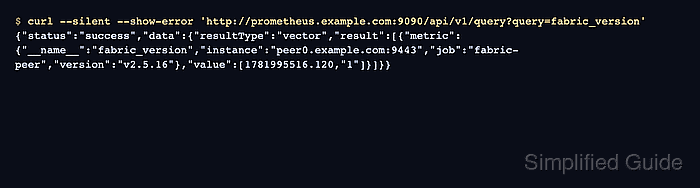
$ curl --silent --show-error 'http://prometheus.example.com:9090/api/v1/query?query=fabric_version'
{"status":"success","data":{"resultType":"vector","result":[{"metric":{"__name__":"fabric_version","instance":"peer0.example.com:9443","job":"fabric-peer","version":"v2.5.16"},"value":[1781995516.120,"1"]}]}}
fabric_version confirms that Prometheus scraped the Fabric node. Use the Fabric metrics reference to choose peer, orderer, ledger, gateway, or consensus metrics for dashboards and alert rules.