How to check the Haystack version
Haystack projects often run inside virtual environments, notebook kernels, or service containers where a global Python package is not the package the application imports. Checking the version from the same interpreter used by the project shows which haystack-ai distribution is active.
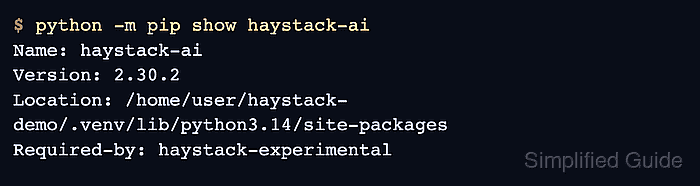
The current Haystack 2.x package is distributed as haystack-ai and imported in Python as haystack. Reading the distribution metadata through Python avoids mismatches between a shell-level pip command and the interpreter that runs the project.
Use python -m pip for follow-up package metadata so pip stays tied to that same interpreter. Older Haystack 1.x environments used farm-haystack, so a migration check should identify that package separately instead of treating it as a haystack-ai version.
Steps to check the Haystack version:
- Open the Python environment that runs the Haystack project.
Activate the project virtual environment, select the project notebook kernel, or open the service container before checking the package.
Related: How to create a virtualenv for Haystack - Print the active interpreter and the installed haystack-ai distribution version.
$ python -c 'import sys, importlib.metadata as md; print("python=" + sys.executable); print("haystack-ai=" + md.version("haystack-ai"))'
python=/home/user/haystack-demo/.venv/bin/python
haystack-ai=2.30.2
If this raises PackageNotFoundError, the active interpreter cannot see the haystack-ai distribution. Install it in this environment or switch to the interpreter that owns the package.
Related: How to install Haystack with pip - Confirm where the haystack import loads from.
$ python -c 'import haystack; print("haystack=" + haystack.__file__); print("haystack.__version__=" + haystack.__version__)'
haystack=/home/user/haystack-demo/.venv/lib/python3.14/site-packages/haystack/__init__.py
haystack.__version__=2.30.2
The import path should point inside the same environment as the interpreter path above, such as the project virtual environment or container path.
- Read package metadata through the same interpreter.
$ python -m pip show haystack-ai
Name: haystack-ai
Version: 2.30.2
##### snipped #####
Location: /home/user/haystack-demo/.venv/lib/python3.14/site-packages
Requires: docstring-parser, filetype, haystack-experimental, httpx, jinja2
##### snipped #####
Required-by: haystack-experimental
python -m pip keeps the metadata check bound to the interpreter that printed the version, which avoids shell pip aliases from another environment.
- Check for the legacy farm-haystack package when imports or migration history look suspicious.
$ python -m pip show farm-haystack
WARNING: Package(s) not found: farm-haystack
farm-haystack and haystack-ai are different distributions. If both appear in one environment, clean up the migrated environment before trusting version or import checks.
Related: How to migrate Haystack 1.x code to Haystack 2.x