How to configure a document splitter in Haystack
Long source files need controlled chunking before they are embedded or searched in a Haystack retrieval pipeline. DocumentSplitter turns one Document into smaller Document objects, so retrieval can return focused context instead of whole manuals, policy pages, or support handbooks.
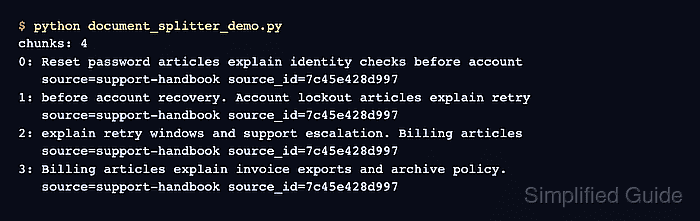
Haystack configures DocumentSplitter when the component is created. The split unit decides whether the component counts words, sentences, passages, pages, lines, or custom function results, while the length and overlap settings determine how much content each output document carries.
A support handbook sample makes word boundaries and repeated context easy to inspect. Each output keeps the original source label and gains Haystack's source_id and split_id metadata, so downstream components can trace a chunk back to its input document.
Steps to configure a Haystack DocumentSplitter:
- Create document_splitter_demo.py with the Haystack imports and support-handbook text.
- document_splitter_demo.py
from haystack import Document
from haystack.components.preprocessors import DocumentSplitter


text = (
    "Reset password articles explain identity checks before account recovery. "
    "Account lockout articles explain retry windows and support escalation. "
    "Billing articles explain invoice exports and archive policy."
)
- Append the input Document with its source metadata after text.
input_document = Document(
    content=text,
    meta={"source": "support-handbook"},
)
- Append the word-based splitter configuration after input_document.
splitter = DocumentSplitter(
    split_by="word",
    split_length=8,
    split_overlap=2,
    split_threshold=3,
)
split_length=8 limits each chunk to eight words, while split_overlap=2 carries two words into the next chunk. split_threshold=3 attaches a final fragment shorter than three words to the preceding chunk.
- Append the split operation below the splitter configuration.
documents = splitter.run(documents=[input_document])["documents"]
- Append the chunk and metadata assertions after documents.
assert len(documents) == 4

assert [document.meta["split_id"] for document in documents] == [0, 1, 2, 3]
assert all(document.meta["source_id"] == input_document.id for document in documents)
assert all(document.meta["source"] == "support-handbook" for document in documents)
split_id records each chunk's position, and source_id points to the original Document. The assertions stop the script if the splitter returns a different count, order, or source relationship.
- Append the chunk report after the assertions.
print(f"chunks: {len(documents)}")

for document in documents:
    source_id = document.meta["source_id"][:12]
    split_id = document.meta["split_id"]
    source = document.meta["source"]
    print(f"{split_id}: {document.content.strip()}")
    print(f"   source={source} source_id={source_id}")
- Verify the splitter configuration by running the completed script in the Python environment that has haystack-ai installed.
$ python document_splitter_demo.py
chunks: 4
0: Reset password articles explain identity checks before account
   source=support-handbook source_id=7c45e428d997
1: before account recovery. Account lockout articles explain retry
   source=support-handbook source_id=7c45e428d997
2: explain retry windows and support escalation. Billing articles
   source=support-handbook source_id=7c45e428d997
3: Billing articles explain invoice exports and archive policy.
   source=support-handbook source_id=7c45e428d997
The repeated phrases before account, explain retry, and Billing articles show the two-word overlap. The shared source_id prefix and source value show that Haystack retained the input metadata and linked every chunk to the original document.