How to configure HAProxy stick tables
An HAProxy stick table stores live counters or affinity data inside the running proxy. The useful proof is a request sequence that changes the table and a runtime query that shows the tracked key and counter value.
Stick tables can track source addresses, cookies, request rates, connection rates, error rates, or other HAProxy sample values. The example below tracks HTTP request rate per source IP and returns 429 when one address exceeds a small test limit.
Size, expiration, and key choice matter because stick tables live in memory. Keep the first table narrow, verify it with the Runtime API, and tune the threshold with production traffic patterns instead of copying a test limit directly into a busy public service.
Steps to configure HAProxy stick tables:
- Choose the key, counter, and expiration window.
The example uses source IP as the key and http_req_rate(10s) as the counter. NAT, proxies, and CDN edges can make many users appear as one source address unless real-client headers are handled separately.
- Open the active HAProxy configuration file.
$ sudoedit /etc/haproxy/haproxy.cfg
- Add the stick table and tracking rule to the frontend.
- /etc/haproxy/haproxy.cfg
frontend fe_http
    bind :80
    stick-table type ip size 100k expire 30s store http_req_rate(10s)
    http-request track-sc0 src
    http-request deny deny_status 429 if { sc_http_req_rate(0) gt 100 }
    default_backend be_apps

backend be_apps
    server app1 10.0.10.11:8080 check
track-sc0 src stores the client source address in sticky counter slot 0. sc_http_req_rate(0) reads the request-rate counter for that tracked key.
- Use a low threshold only in a temporary test environment when proving the rule.
- test-only
http-request deny deny_status 429 if { sc_http_req_rate(0) gt 3 }
Do not leave a tiny test threshold on a production listener. Choose the production value from real request volume, proxy topology, and service capacity.
- Validate the complete HAProxy configuration.
$ sudo haproxy -c -V -f /etc/haproxy/haproxy.cfg
Configuration file is valid
- Reload HAProxy after validation succeeds.
$ sudo systemctl reload haproxy
Related: How to reload HAProxy gracefully
- Send repeated test requests and confirm the limit triggers.
$ curl -sS -o /dev/null -w "%{http_code}\n" http://www.example.net/ 200 $ curl -sS -o /dev/null -w "%{http_code}\n" http://www.example.net/ 200 $ curl -sS -o /dev/null -w "%{http_code}\n" http://www.example.net/ 429 - Query the stick table through the runtime socket.
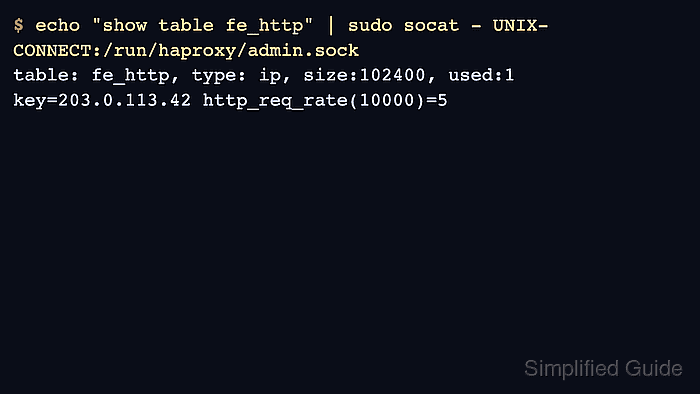
$ echo "show table fe_http" | sudo socat - UNIX-CONNECT:/run/haproxy/admin.sock
# table: fe_http, type: ip, size:102400, used:1
0xffff7c7302b0: key=203.0.113.42 use=0 exp=29991 shard=0 http_req_rate(10000)=5
The key and http_req_rate value prove HAProxy is tracking the source address in the table.
Related: How to enable the HAProxy runtime socket - Raise the threshold to the intended production value and validate again before the final reload.
Rate limits are usually safer when they are rolled out with monitoring first, then enforcement after the observed normal range is known.