How to route HTTP traffic by URL path with HAProxy
Path routing in HAProxy is useful when one public HTTP listener has to send paths such as /api/ and /app/ to different application services. A loose prefix match can send similar paths such as /apiary to the wrong pool, so the configuration needs clear path boundaries and a default backend for everything else.
In HTTP mode, HAProxy can inspect the request path before it chooses a backend. The path ACL fetch matches one exact URL path, path_beg matches a path prefix, and use_backend sends the request to the first matching backend rule. The default_backend line keeps unmatched traffic predictable instead of letting it fall through to an unintended target.
HAProxy should already be installed, the service should load /etc/haproxy/haproxy.cfg, and each backend service should be reachable from the HAProxy host. The example routes both root paths and subpaths for /api and /app, validates the full file before reload, and verifies that a lookalike path stays on the default backend.
Steps to route HTTP traffic by URL path with HAProxy:
- Confirm that each backend responds from the HAProxy host.
$ curl -sS http://10.0.20.11:8080/ http://10.0.20.12:8080/ http://10.0.20.13:8080/
api backend /
app backend /
default backend /
The response must identify the backend by body text, response header, log entry, or another visible signal. A backend that answers from a laptop may still be unreachable from the load balancer network path.
- Open the HAProxy configuration file.
$ sudoedit /etc/haproxy/haproxy.cfg
Debian and Ubuntu packages commonly load /etc/haproxy/haproxy.cfg through the haproxy service. Preserve existing package global settings such as user, group, logging, and runtime socket lines unless the deployment already manages them elsewhere.
- Add or update the HTTP frontend path rules and backend targets.
- /etc/haproxy/haproxy.cfg
defaults
    log global
    mode http
    option httplog
    timeout connect 5s
    timeout client 30s
    timeout server 30s

frontend fe_http
    bind :80
    acl is_api path -i /api
    acl is_api path_beg -i /api/
    acl is_app path -i /app
    acl is_app path_beg -i /app/
    use_backend be_api if is_api
    use_backend be_app if is_app
    default_backend be_default

backend be_api
    mode http
    server api1 10.0.20.11:8080 check

backend be_app
    mode http
    server app1 10.0.20.12:8080 check

backend be_default
    mode http
    server web1 10.0.20.13:8080 check
Line What it controls mode http Allows HAProxy to inspect HTTP request metadata such as the URL path. acl is_api path -i /api Matches the exact /api path without matching unrelated paths. acl is_api path_beg -i /api/ Matches subpaths such as /api/users while leaving /apiary unmatched. use_backend be_api if is_api Sends matching API requests to the API backend. default_backend be_default Handles every request that does not match a path ACL. Keep more specific path rules above broader rules. HAProxy evaluates matching use_backend rules in declaration order, and the first matching rule selects the backend.
Path routing does not remove or rewrite the path before forwarding. The API backend receives /api/users in this example; add a separate rewrite rule only when the application expects a different path.
- Validate the complete HAProxy file.
$ sudo haproxy -c -V -f /etc/haproxy/haproxy.cfg
Configuration file is valid
-c checks the configuration and exits without starting a proxy process. -V prints the success message; automation should still use the command exit status.
- Reload HAProxy after the configuration check passes.
$ sudo systemctl reload haproxy
A failed validation blocks the reload. Fix the reported file and line, then run the same haproxy -c -V -f command again before applying the change.
Related: How to reload HAProxy gracefully
- Request the routed paths through the HAProxy frontend.
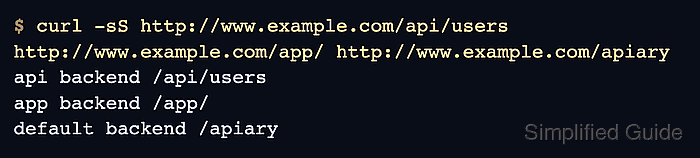
$ curl -sS http://www.example.com/api/users http://www.example.com/app/ http://www.example.com/apiary
api backend /api/users
app backend /app/
default backend /apiary
Use the real public hostname or a test hostname that reaches the HAProxy listener. The /apiary response should come from the default backend; if it reaches the API backend, replace a broad prefix such as path_beg /api with an exact /api match plus a /api/ prefix match.