How to configure backend health checks in HAProxy
Backend health checks let HAProxy remove a failed application server from rotation before clients keep landing on it. A backend pool without checks can still distribute requests, but HAProxy has no application-level signal that one target has stopped accepting traffic, is returning the wrong readiness response, or is still warming up after a restart.
A server line with check starts active health checking. Without an HTTP check rule, that usually proves only that HAProxy can open a TCP connection to the server port. For HTTP services, option httpchk sends a request to a readiness URI, and http-check expect controls which response HAProxy accepts before it keeps the server eligible.
Use a readiness endpoint that reflects whether the instance should receive real traffic, not only whether the process is alive. The configuration should keep the health-check cadence on default-server, require each server line to opt in with check, pass a full config validation, and show live state through the runtime socket or stats page after a controlled backend failure.
Steps to configure backend health checks in HAProxy:
- Confirm the backend readiness endpoint from the HAProxy host or a host on the same network path.
$ curl -sS http://10.0.10.11:8080/healthz
ok
$ curl -sS http://10.0.10.12:8080/healthz
ok
Use the same path, port, scheme, and Host header that the application team expects for readiness. A TCP connection check and an HTTP readiness check can answer different questions.
- Open the HAProxy configuration file.
$ sudoedit /etc/haproxy/haproxy.cfg
Package-managed Debian and Ubuntu hosts commonly use /etc/haproxy/haproxy.cfg. Use the actual file or file list loaded by the HAProxy service on other platforms.
- Confirm that the active defaults section has HTTP mode and timeouts for normal connections and checks.
defaults
    mode http
    timeout connect 5s
    timeout client 30s
    timeout server 30s
    timeout check 3s
timeout check limits how long HAProxy waits for a health-check response. Keep the value long enough for a healthy endpoint under normal load and short enough to avoid slow failure detection.
- Add or update the backend health-check rules and checked server lines.
backend app_pool
    mode http
    balance roundrobin
    option httpchk GET /healthz
    http-check expect status 200
    default-server inter 3s fall 3 rise 2
    server app1 10.0.10.11:8080 check
    server app2 10.0.10.12:8080 check
Directive or argument What it changes option httpchk GET /healthz Sends an HTTP health-check request to the readiness URI instead of stopping at a TCP connection check. http-check expect status 200 Marks the check successful only when the response status is 200. Without a custom expectation, HAProxy treats HTTP 2xx and 3xx responses as valid. default-server inter 3s fall 3 rise 2 Checks every three seconds, marks a server down after three consecutive failures, and brings it back after two successful checks. server ... check Enables active checks for that server line. Do not remove check from the server lines. The default-server line above sets shared timing values; it does not prove that every server has opted into active checks.
- Use http-check send when the readiness endpoint needs an HTTP version, Host header, or custom request details.
backend app_pool
    mode http
    balance roundrobin
    option httpchk
    http-check send meth GET uri /healthz ver HTTP/1.1 hdr Host app.internal.example
    http-check expect status 200
    default-server inter 3s fall 3 rise 2
    server app1 10.0.10.11:8080 check
    server app2 10.0.10.12:8080 check
Use this form for virtual-hosted applications, readiness paths that require HTTP/1.1, or checks that need request headers. Keep the request small and side-effect free.
- Validate the full HAProxy configuration before applying the change.
$ sudo haproxy -c -V -f /etc/haproxy/haproxy.cfg
Configuration file is valid
-c checks the configuration and exits before loading it as a running proxy. -V prints the visible success message; without -V a clean check can return no output and signal success only with exit status 0.
- Reload HAProxy after the configuration check passes.
$ sudo systemctl reload haproxy
A failed validation blocks the reload. Fix the reported line or included file and run the syntax check again before touching the running service.
- Send a few requests through the frontend and confirm that healthy servers can receive traffic.
$ curl -sS http://www.example.com/
app1
$ curl -sS http://www.example.com/
app2
Use a URL and Host header that reach the frontend tied to the checked backend.
- In staging or during an approved maintenance window, fail one backend readiness endpoint and wait for the configured fall threshold.
$ curl -sS http://www.example.com/
app2
$ curl -sS http://www.example.com/
app2
Do not intentionally stop a production backend just to test health checks unless the service owner has approved the maintenance impact. Use staging, a temporary backend, or a controlled readiness response whenever possible.
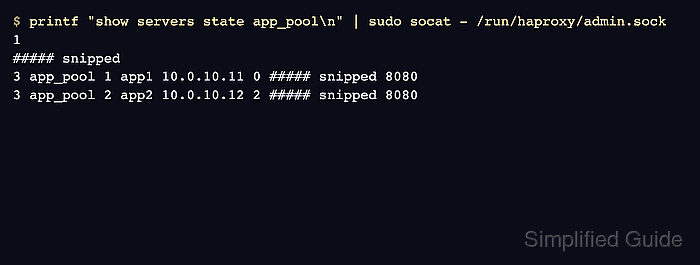
- Check the runtime state of the backend servers.
$ printf "show servers state app_pool\n" | sudo socat - /run/haproxy/admin.sock
1
# be_id be_name srv_id srv_name srv_addr srv_op_state ##### snipped srv_port
3 app_pool 1 app1 10.0.10.11 0 ##### snipped 8080
3 app_pool 2 app2 10.0.10.12 2 ##### snipped 8080
In the show servers state output, srv_op_state value 0 means the server is down and value 2 means the server is fully up. If the runtime socket is not enabled, use the HAProxy stats page and confirm that the failed server is shown as down while the healthy server stays up.
Related: How to enable the HAProxy runtime socket
Related: How to enable the HAProxy stats page